In “Overview: From Snippets to Code Generation” I discussed several tools used in my development process. On tool which helps me a lot to get things done is Processor Expert. In this post I’ll give an overview about this tool and reasoning for the pros and cons of using it.
Tag Archives: Embedded Component
McuOnEclipse Components: 17-Oct-2015 Release
On SourceForge I have published an update of the McuOnEclipse software components, with following major changes:
- FreeRTOS updated to version V8.2.2 which comes with TLS (Thread Local Storage) support and GDB debug helpers.
- Percepio Trace updated to V3.0.2 with the release of Segger Real Time Terminal (RTT) for continuous trace streaming.
- FSL_USB_Stack with alternate USB initialization to deal with an issue in combination with the Kinetis SDK v1.3.0
- GenericI2C and GenericSWI2C have added support for custom I2C bus handling.
FreeRTOS ARM Thread Debugging with Eclipse and GDB
FreeRTOS is probably the most popular RTOS used and I love it: it is efficient, has a lot of features, simple and easy to use. But despite its popularity, debugging it with open source tools as with Eclipse and GDB is really not that user-friendly: debugging threads/tasks is a pain compared to commercial solutions. For my university classes this semester I was looking for something easy to use by my students. Finally I managed to use a GDB helper which makes things easier now: I can switch task threads in Eclipse with GDB now 🙂
FRDM K64F Data Logger using FatFs with KSDK 1.2.0
Check out the article by Wesley Hunter about how to use the FRDM-K64F as a data logger. He describes all the steps how to use the Kinetis SDK v1.2.0 with FatFS.
Happy Logging 🙂
This blog is a guide on how to setup using the FatFs library included with the Kinetis SDK 1.2.0 using mostly the Processor expert within Eclipse Luna. FatFs is a generic FAT file system module for small embedded systems written by Chan. I prefer to use Processor Expert when possible as this will often generate code that is smaller in size than using the KSDK library files direct. I experienced many gotcha’s and complication setting this up and wanted to share how I finally managed to get it to work.
- Prerequisites
- Create New Project
- Open Processor Expert
- Add SD card component
- Add Init_Port component
- Add GPIO component
- Configure the clock
- Import FatFs
- Add Card detection code
- FAT file appender function
- Disable the MPU
Prerequisites
Before you begin please make sure your development environment is setup and you can already compile and debug code using KSDK 1.2.0 on Eclipse Luna…
View original post 2,197 more words
Unboxing the Freescale FRDM-KL43Z Board
I’m preparing for the next semester at the university starting in September this year. As part of that, I’m currently evaluating the Freescale Kinetis FRDM-KL43Z board:
Freescale Freedom Board Tutorials on Element14
I have found several excellent tutorials created by Bheema Rao on element14: He uses many of the McuOnEclipse components, features Kinetis Design Studio/Eclipse and shows how to use the Kinetis SDK, toggling/dimming LED’s on Freescale Freedom Boards.
How to use Kinetis Design Studio!!
Getting the hands on an embedded project has always been exciting for me. So, here I am again with my blog trying to provide you with an easy to use guide for the Kinetis Design Studio 3.0.0 (KDS_3.0.0). Well, as you all know I am an intern at Freescale working for the first time on KDS, I will tell you what all we can do to start working on it with a perspective of a novice. But personally I feel KDS is one of the most encouraging IDE you can work on. So how do I start with my code for our NeoMatrix board? I am currently working with one of the demo codes for the NeoMatrix:
https://mcuoneclipse.com/2015/07/10/lets-play-with-freescale-frdm-k64f/
So, my first task is to write the code in KDS for the NeoMatrix_Demo. How do I do that? After opening the KDS 3.0.0, I need to go to File and select New and then Kinetis Project. You can see that the New Kinetis Project wizard appears once you click the File>New> Kinetis Project. Type a name and click next.
FreeRTOS Continuous Trace Streaming
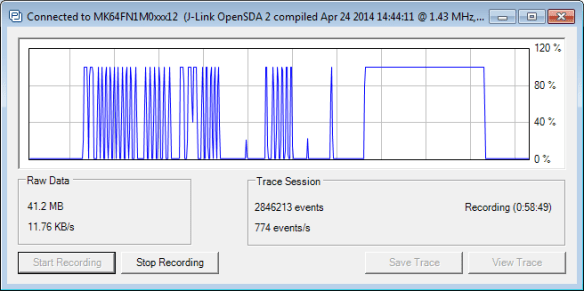
Key to successfully implementing embedded applications these days is to have detailed visibility into what is going on with the application on the board. For this, I’m using the FreeRTOS+Trace from Percepio to inspect the runtime behaviour. Stop-Mode debugging is very useful, but visibility into the runtime is even more important. FreeRTOS+Trace is a tool to accomplish this, but it requires to dump the data off the target to the host (see “Updated Percepio Tracealyzer and Trace Library to Version V2.7.0“). Usually, I’m using the GDB debugger for this, and that works for shorter trace sequences like a few seconds. Yes, I can combine them, but it painful to stop, dump and continue. So what if I could collect trace for several minutes or hours without the need to stop the application? Why not stream the data to the host directly?
So here is it: I’m now able to get almost unlimited trace streaming off the target, witout user intervention. I can trace my application for hours 🙂
Tutorial: Using Processor Expert and FreeRTOS with Kinetis SDK V1.2
Freescale has released the new Kinetis SDK v1.2 back in May. Because of the changes in v1.2, previous applications (or my tutorials) do not work any more :-(. So time to write a new tutorial: how I can use Processor Expert with FreeRTOS for the Kinetis SDK v1.2.
Processor Expert Component Repositories
Processor Expert for Kinetis v3.0.0 (which is part of Freescale Kinetis Design Studio v3.0.0, KDS) has now the concept of ‘repositories’ for the components.
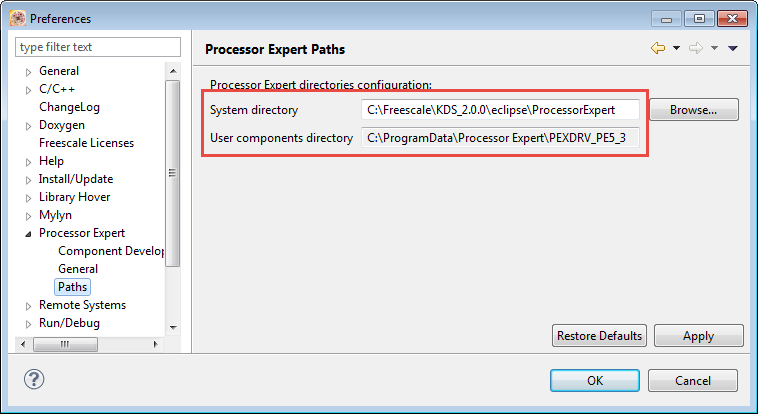
Previously, Processor Expert was able to use two paths for its components (e.g. in KDS v2.0.0):
- The ‘System‘ directory inside the Eclipse installation
- The ‘User‘ directory: a fixed path, global for all installations
These directories are listed in the workspace settings (menu Window > Preferences > Processor Expert > Paths):