The semester started last week. Ideally I wanted to have the boards for the new S robot (see “Zumo Robot with WiFi and GPS“) ready in the first week. But our manufacturer was not able to get the four-layer boards with parts populated and delivered in that time frame. Until the new boards arrive, we have anyway plenty of things to cover. One thing is to build a prototype shield to host several distance sensors, nRF24L01+ and Bluetooth transceiver:
Executing Multiple Commands as Post-Build Steps in Eclipse
The GNU ARM Eclipse plugins from Liviu already offer several built-in actions which can be performed at the end of a build: creating flash image, create listing file and printing the code and data size:
But what if I need different things, or even more things?
Vapour Trail above Wing
During take-off last week on my Sunday Morning Flight, I noticed a fascinating thin vapour trail above the wing, coming from the jet engine of that Boeing 767-200ER:
How to Add Existing Files to Eclipse Projects
This Tip sounds very basic, but still: I get asked about this about once a week. So it must be something non-obvious in Eclipse then ;-): how to add existing files to an Eclipse project. As with many things in Eclipse, there is not a single way to do something. There are two basic ways to do this:
- Import
- Drag & Drop
- Copy & Paste
The first is the ‘official’ way in Eclipse, the other two are much faster and easier :-).
1. Import
To import one or multiple files, select the folder/project where I want to add the files, then use the menu File > Import:
Building Projects with Eclipse from the Command Line
Eclipse has a great user interface (UI). But what if I want to do things from the command line, without the GUI? For example to build one or more projects in the workspace without using the Eclipse UI? With this, I can do automated check-outs and do automated builds.
Semihosting with GNU ARM Embedded (LaunchPad) and GNU ARM Eclipse Debug Plugins
In “Semihosting with Kinetis Design Studio” I used printf() to exchange text and data between the target board and the host using the debug connection. Kinetis Design Studio (KDS) has that semihosting baked into its libraries. What about if using the GNU ARM Embedded (launchpad) tools and libraries (see “Switching ARM GNU Tool Chain and Libraries in Kinetis Design Studio“)? Actually it requires two more steps, but is very easy too.
P&E Eclipse Update Site for GNU ARM Eclipse Plugins
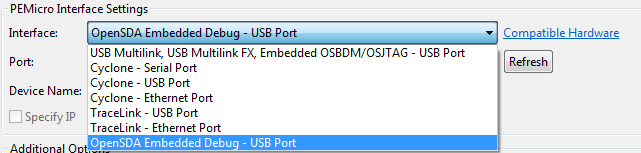
P&E has just released a new version of their Eclipse plugins for the set of GNU ARM Eclipse debug plugins. The GNU ARM Eclipse plugins from Liviu support OpenOCD and Segger J-link, so with this update or extension it adds P&E support to it. With this, I can use the P&E debug devices (P&E Multilink, Tracelink) or as well the Freescale OpenSDA with it.
Sunday Morning Flight
Image
On my way to the airport to catch an early morning flight. Leaving home and waiting for my train to arrive, and maybe I’m already spotting my plane there?
Automatic Documentation Generation: Doxygen with Processor Expert
One really cool thing with Processor Expert is: it does not only generate the source code for me, it generates as well documentation :-). I’m a believer of the ‘single source’ approach: if I have to document a software project, then the software itself shall be the source of the documentation. And for this I love Doxygen: see “5 Best Eclipse Plugins: #1 (Eclox with Doxygen, Graphviz and Mscgen)“. Doxygen is a compiler which compiles my source files, and instead of object files it creates documentation files for me :-).
Wildflowers, by Altitude
Image
A very nice and relaxing vacation week in Austria comes to its end. It was fascinating to see how nature changes by altitude: the lower areas had big and ‘expensive’ flowers, while in the higher areas they were much smaller and had to survive a much harsher environment.