Processor Expert Component *.PEupd Files on GitHub

The MCUonEclipse GitHub repository is great for everyone which is familiar with Git or GitHub. Previously I was hosting my Processor Expert components on steinerberg.com. Exporting and maintaining the Processor Expert Update Files (*.PEupd) one by one is a lot of effort. GitHub makes things a lot easier, but again: you need to be familiar with it. And not everyone is ‘gitting’ yet. To help the rest of the world (the non-Gitter), I have now published Processor Expert update files for all the components in the repository, so it is easier to install them.

IMPORTANT NOTE: After October 17th 2014, the releases of the McuOnEclipse Processor Expert has been moved to SourceForge, see McuOnEclipse Releases on SourceForge

Continue reading

Added Write Protection Pin to FatFsMemSDHC

What was missing in the FatFsMemSDHC component presented here is support for a ‘write protection’ pin. Well, that write protection is not present on micro-SD cards, and on normal SD cards it is a simple plastic thing with no real hardware meaning: it is all up to the software to respect it. While my other SD card components have support for such a write protection detection, it was lacking for the FatFsMemSDHC (for Kinetis) component. Time to fix this!

SD Card Lock

SD Card Lock: an SD-Card, a micro-SD Card and a micro-SD card adapter, both with write-enabled

Continue reading

Extended Driver for the MMA8451Q Accelerometer

In “Tutorial: Accelerating the KL25Z Freedom Board” I used the MMA8451Q accelerometer on the FRDM-KL25Z board in a very primitive way: I’m reading directly some low-level registers from the device through an I2C low-level component. No calibrating, no special device feature setting, only raw values. Since then, things have been evolved: In “Tutorial: Creating a Processor Expert Component for an Accelerometer” I started to create a driver for this accelerometer, and since then a lot more functionality has been added.

Tracing Accelerometer Values to the Shell

Traced Accelerometer Values to the Shell

Continue reading

Tutorial: Creating a Processor Expert Component for an Accelerometer

If you are a frequent reader of this blog, then you know: I’m a big fan of Processor Expert components. While there are many Processor Expert components delivered with CodeWarrior, it lacks many components and device drivers beside of the normal on-chip peripherals. But value gets added to an embedded project with all the external devices, sensors and actuators. That’s why I have created many more components which are available on my GitHub site. Readers of this blog have asked several times to create a tutorial on how to create a Processor Expert component. So why not working on that on a long Easter weekend full of cold rain and snow?

So here we go: a tutorial how to create a Processor Expert component for the MMA8451Q accelerometer found on the FRDM-KL25Z board:

MMA8451Q Accelerometer on the FRDM-KL25Z Board

MMA8451Q Accelerometer on the FRDM-KL25Z Board

Continue reading

McuOnEclipse goes Git

When I have asked by a student last year if I’m uing Git, I said “Git what?”. Yep, a shame I did not know what Git was a this time. But it is never to late to learn new things.

I was coming from CVS, moved to the successor of it (SVN) and was happy with it. Especially with having a local SVN server and repository, that was (and still is) a great thing. But to truely collaborate with a worldwide community, it is time to use something different: Git.

GitHub Bootcamp: 4 simple steps to git

GitHub Bootcamp: 4 simple steps to git

Continue reading

A Processor Expert Component to Help with Hard Faults

Ahrg! Again my ARM application crashed somewhere and I ended up in a HardFault exception :-(. In my earlier post I used a handler to get information from the processor what happened. But it is painful to add this handler again and again. So I decided to make things easier for me: with a special HardFault Processor Expert component :-).

After adding this HardFault component to my project, it automatically adds an entry to the vector table. So no manual steps are needed: having the component in the project and enabled will do the needed steps.

Continue reading

Processor Expert Maxim I2C RTC for the Arduino Data Logger Shield

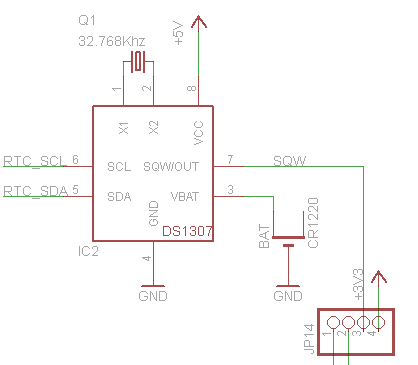
There was one part missing to complete the software support for my Arduino DataLogger Shield on top of my FRDM-KL25Z Freedom board: support for the Maxim DS1307 RTC (Real Time Clock).

DS1307 on the Adafruit Data Logger Shield

DS1307 on the Adafruit Data Logger Shield (Source: http://www.ladyada.net/make/logshield/design.html)

Things got delayed a bit, as I first needed to get the I2C infrastructure up and running (see this post). But finally, I have things working :-). I proudly present: RTC_Maxim!

Continue reading

A Generic I2C High Level Driver

I’m working with the I2C bus recently a lot. I’m using it in a project to reverse-engineering skimming (credit card fraud) devices. I needed to improve one of my applications for the lecture classes where a MCF52259 is communicating with a TWR-LCD display over I2C. And I want to add RTC (Real-Time-Clock) capabilities to my Arduino Data Logger Shield which requires I2C.

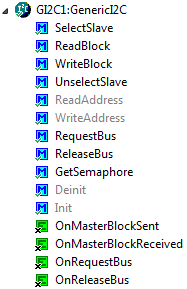
The same time I want to have things working with ARM Cortex-M4 and M0+ devices. And here the challenge started: using the I2C_LDD (Logical Device Driver) Processor Expert components for the ARM Kinetis devices is definitely not simple and easy. I want to use my software compatible for both the ARM cores and say for S08 and ColdFire cores. So what I ended up is to write a ‘generic’ I2C driver on top of the low level Processor Expert components: named GenericI2C.

Generic I2C Component

Generic I2C Component

Continue reading

FatFs with Kinetis

An SD (Secure Digital) Card interface is kind of standard for many applications today: it provides a lot of memory at a reasonable cost. Still, I need a software stack for it, up to the level of a file system. So far I was really happy with using FatFs: an open source FAT file system provided by Elm-Chan. I’m using the FatFs Processor Expert component already in multiple designs. What was missing: a port to the Freescale Kinetis ARM Cortex-M4 family of processors.

Continue reading

There is a Time and Date for both Worlds

The Kinetis ARM Cortex-M4(F) is a wonderful machine: a 32bit architecture, plenty of FLASH and RAM, an ideal play field. I love the Kinetis Tower boards, and even more the Freedom board which has an ARM Cortex-M0+ on it. I have a lot of projects on S08, S12 and ColdFire at the university, and they are all using a lot of Processor Expert components. Processor Expert is such a great productivity tool: having software in components allows easy software re-use. With Processor Expert abstracting from the hardware, I can easily port my applications to new boards and processors. Well, until Processor Expert changed for Kinetis :-(.

Continue reading