One key element of a CI/CD pipeline is the automatic testing phase: whenever I check in new source code or manually trigger it, I can run a test suite to make sure that the changes do not break anything. For this, I have to run automated tests. For an an embedded target, it means that I have to run some tests on the board itself too.
It is interesting to see that modern tools and agile development workflows are getting more and more into the embedded world. CI/CD is a strategy where code changes to an application get automatically integrated, tested and released automatically into a production environment.
In my previous article I showed how to import, build and debug MCUXpresso SDK projects in VS Code. In my lectures and labs we are using a robot based on the NXP Kinetis K22FX512 ARM Cortex-M4F microcontroller, and there is only the v2.13.0 SDK available.
Sumo Robot with K22FX512
The software on the robot uses the latest NXP MCUXpresso SDK v2.3.1. The he Eclipse based MCUXpresso IDE 11.8.0 works fine with all the 2.x SDKs, up to the latest 2.13.0 one.
In a previous article I have imported an example project. Now I want to compile and build it.
Traditionally, the build action inside VS Code is somewhat hidden. There is a keyboard shortcut, but recent additions to VS Code making the build action more accessible.
I’m using the RS-485 field bus in many of my projects: it is very reliable and robust, and easy to implement. And with ModBus there is standardized protocol used in building automation or industrial control applications. For example I’m using the protocol to communicate between battery systems and an EV Charger.
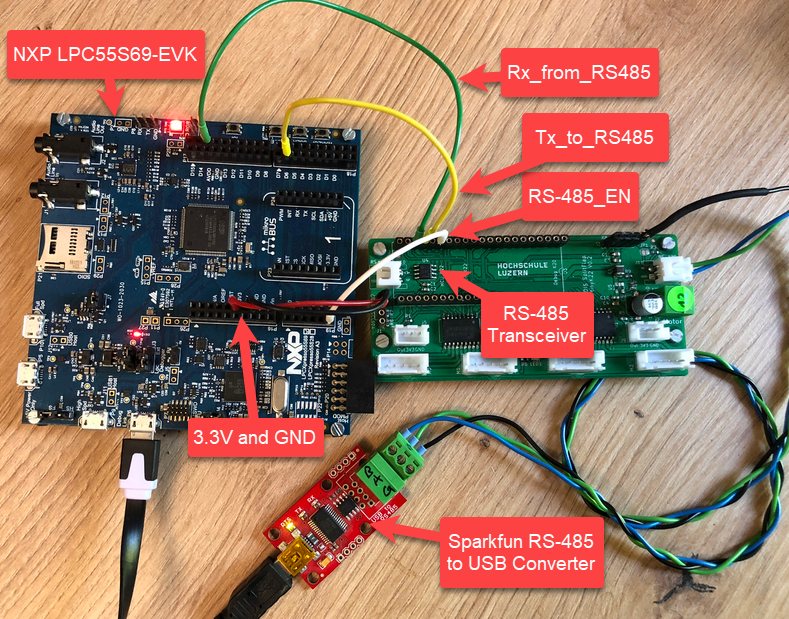
NXP LPC55S69-EVK with RS-485
In this article I show you with an example, how the NXP LPC55S69 can be used with RS-485.
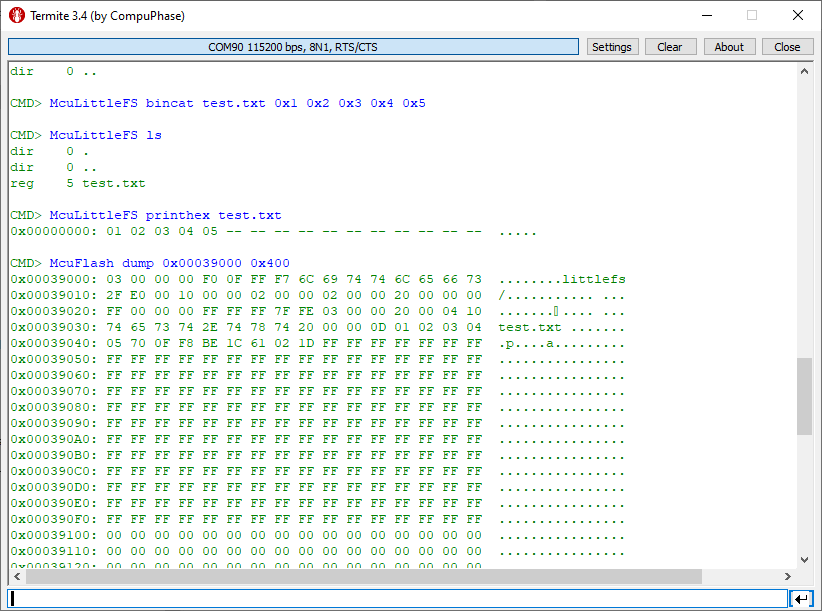
In many of my embedded projects I need persistent data or storage for settings. If using an SD card, then FatFS is usually my choice for the file system. But if using an external FLASH memory device, then my preferred choice is usually LittleFS: it is a little fail-safe filesystem, designed for micro-controllers, which I’m using with external flash memory devices.
In the case where there is enough MCU flash, or if there is no external FLASH device available in a design, it can use the MCU internal FLASH as storage storage too. This is the topic of this article:
A Triumvirate is or Triarchy is built by three individuals which lead or rule something. In this article I want to rule a project with Eclipse CDT, Visual Studio Code and with building it from the command line for automated builds.
So what if I have an Eclipse project (say MCUXpresso IDE and SDK), and want to build it on a build server, and and I want to use the same time the project with Eclipse IDE and Visual Studio code?
Key to this is CMake: I’m keeping the Eclipse CDT features, adding CMake with Make and Ninja to the fix, and have it ‘ruled’ by three different ’emperor’: Eclipse, Visual Studio Code and from a shell console:
MCUXpresso SDK CDT project with CMake for Eclipse, Visual Studio Code and Command Line BuildingContinue reading →




 MCU on Eclipse