Freescale has released this week an updated version of CodeWarrior: version 10.4. I’m usually not switching a tools version in the middle of a university semester. Unless I see a real benefit, and the risk is low. Well, I have used it now for a few days, and I have decided to move my projects from 10.3 to 10.4. Why? Read on…
Tag Archives: software
Serial Bootloader for the Freedom Board with Processor Expert
Bootloaders are a very useful thing: it allows programming an application file without a debugger. This makes it ideal for upgrading a system in the field.
Usually, there are application notes and examples from silicon vendors available. But typically they are for a certain microcontroller, and hard to change it to another system without a lot knowledge about its implementation. What I need for a project based on the FRDM-KL25Z is a bootloader which shall be small and portable. As I’m using Processor Expert to keep my applications portable across different microcontroller families: why not create a bootloader with Processor Expert components? With the Processor Expert drivers available, things can get a lot simpler compared to the ‘traditional’ approach. With less than 10 KByte footprint?
USB CDC with the FRDM-K20D50M
Good news for everyone owning the FRDM-K20D50M board: I have extended the FSL_USB_Stack with USB CDC device class support for the K20D50M :-).
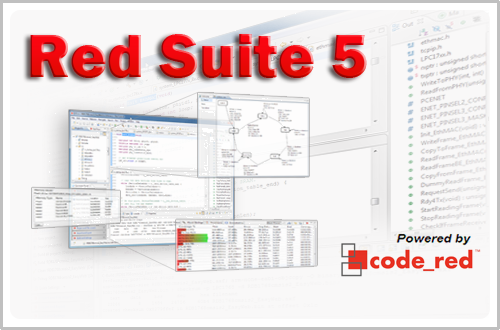
Red Suite 5: Eclipse Juno, Processor Expert and unlimited FRDM-KL25Z
❗ UPDATE: Code Red Technologies have been acquired May 1st 2013 by NXP, see this press release. According to this, they will not continue to support non-NXP architectures after May 2014. 😦
You probably know this already: I’m a fan of Eclipse, Processor Expert and the Freedom board. As for tool chains I use CodeWarrior for MCU10.x (Eclipse based, 64 KByte free limit) and IAR (32 KByte limit) with the Processor Expert Driver Suite.
And I have added a new Eclipse based solution: Red Suite 5 from Code Red Technologies. They released a new Red Suite 5 (v5.2.2 build 2108) which caught my attention when reading the release notes:
- Eclipse Juno SR2: New Eclipse Look & Feel 🙂
- Added integration for Processor Expert 🙂 🙂
- Non-expiring 128k (!!!) limit when used with the Freescale FRDM boards 🙂 🙂 🙂
Why I don’t like printf()
How many times have I seen this:
printf("Hello world!");
I have a strong opinion, and a rule for using printf():
“Do *not* use printf()!”
printf() with the FRDM-KL25Z Board and without Processor Expert
In this tutorial I explored how to use printf(), and this tutorial is so generic that it works for any processor/microcontroller. That flexibility is because I’m using Processor Expert. In case Processor Expert shall not be used, then some tweaks are needed. Here I show what is needed to have printf() working with the FRDM-KL25Z board. I use the UART0 connected to OpenSDA USB CDC for this.
A new Freedom Board: FRDM-K20D50M with ARM Cortex M4
Freescale/Farnell/Element14 announced last week a new Freedom Board: the FRDM-K20D50M :-). As you can expect, I was not able to resist, and ordered one from my local Farnell store right away. So I did my first steps with it on this sunny and wonderful weekend (yes! we skipped Spring Time and entered Summer Time right away!).
I do not need to compare the board with the previous Freedom boards, as I have found an article here. I a nutshell: I get pretty much the same as with the FRDM-KL25Z, but instead of an ARM Cortex-M0+, it has an ARM Cortex-M4!
text, data and bss: Code and Data Size Explained
In “Code Size Information with gcc for ARM/Kinetis” I use an option in the ARM gcc tool chain for Eclipse to show me the code size:
text data bss dec hex filename 0x1408 0x18 0x81c 7228 1c3c size.elf
I have been asked by a reader of this blog what these item numbers really mean. Especially: what the heck is ‘bss’???? 🙂
Show it again! (How to re-enable hidden Dialogs in Eclipse)
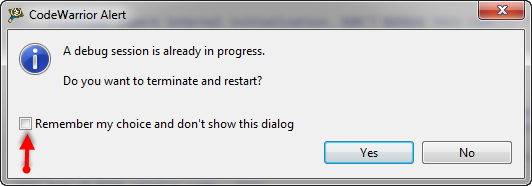
Eclipse has a nice feature to ‘shut up’ dialogs: In many dialogs I can select an option so that dialog does not show up again:
But what if I change my mind later on and what to have this dialog to show up again?
Extended Driver for the MMA8451Q Accelerometer
In “Tutorial: Accelerating the KL25Z Freedom Board” I used the MMA8451Q accelerometer on the FRDM-KL25Z board in a very primitive way: I’m reading directly some low-level registers from the device through an I2C low-level component. No calibrating, no special device feature setting, only raw values. Since then, things have been evolved: In “Tutorial: Creating a Processor Expert Component for an Accelerometer” I started to create a driver for this accelerometer, and since then a lot more functionality has been added.