This post starts a small (or larger?) series of tutorials using the Arduino Motor/Stepper/Servo Shield with the FRDM-KL25Z board. That motor shield is probably one of the most versatile on the market, and features 2 servo and 4 motor connectors for DC or stepper motors. That makes it a great shield for any robotic project :-).
Tag Archives: Embedded Component
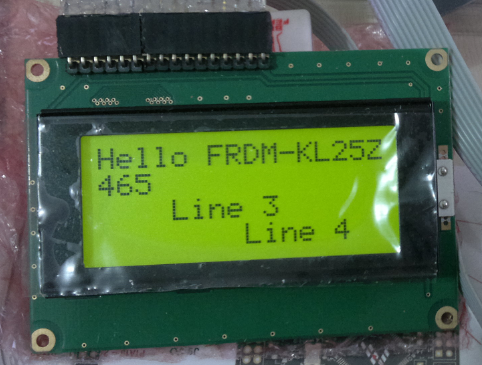
Character LCD with 4 Lines
Character LCD’s (like 2 lines with 16 characters each) as in this post are easy to use. Much easier to use compared to full graphical LCDs.
The ones I’m using have either 1 or 2 lines, but I saw that there are 4 line displays too. So far my LCD component only supports one or two lines.
How to use MCUonEclipse GitHub without Git
Not everyone is familiar with Git, and not everyone wants to use it. Although I think using Git or SVN is something every software engineer today needs to master 😉 To make it easier for the ‘non-Gitter’ to use the Processor Expert components, they are available now as *.PEupd files as described here. However, the *.PEupd files are just a snapshot, and not the latest and greatest. So how to use the latest component sources and example projects without Git?
Freedom Track Robot with IEEE802.15.4/SMAC
My other robots based on the FRDM-KL25Z use Bluetooth as connectivity. This one is using a Freescale IEEE802.15.4/ZigBee/SMAC module:
Low-Level Coding with PDD (Physical Device Driver)
As with any software drivers: they are never perfect. The same applies to the Processor Expert components delivered in CodeWarrior for MCU10 or the DriverSuite too. That’s why I have created many more components which are available on GitHub here. All these components are using other components to reach the hardware. But what if a functionality is not exposed through the low-level component? Or what if I want direct access to the hardware? Up to now I had to choose either the Processor Expert way, or to do it in the ‘traditional’ way using an SDK like CMSIS or vendor supplied header files.
With MCU10.4, I noticed that there is another way: PDD (Physical Device Driver).
Processor Expert Component *.PEupd Files on GitHub
The MCUonEclipse GitHub repository is great for everyone which is familiar with Git or GitHub. Previously I was hosting my Processor Expert components on steinerberg.com. Exporting and maintaining the Processor Expert Update Files (*.PEupd) one by one is a lot of effort. GitHub makes things a lot easier, but again: you need to be familiar with it. And not everyone is ‘gitting’ yet. To help the rest of the world (the non-Gitter), I have now published Processor Expert update files for all the components in the repository, so it is easier to install them.
IMPORTANT NOTE: After October 17th 2014, the releases of the McuOnEclipse Processor Expert has been moved to SourceForge, see McuOnEclipse Releases on SourceForge
Added Write Protection Pin to FatFsMemSDHC
What was missing in the FatFsMemSDHC component presented here is support for a ‘write protection’ pin. Well, that write protection is not present on micro-SD cards, and on normal SD cards it is a simple plastic thing with no real hardware meaning: it is all up to the software to respect it. While my other SD card components have support for such a write protection detection, it was lacking for the FatFsMemSDHC (for Kinetis) component. Time to fix this!
Serial Bootloader for the Freedom Board with Processor Expert
Bootloaders are a very useful thing: it allows programming an application file without a debugger. This makes it ideal for upgrading a system in the field.
Usually, there are application notes and examples from silicon vendors available. But typically they are for a certain microcontroller, and hard to change it to another system without a lot knowledge about its implementation. What I need for a project based on the FRDM-KL25Z is a bootloader which shall be small and portable. As I’m using Processor Expert to keep my applications portable across different microcontroller families: why not create a bootloader with Processor Expert components? With the Processor Expert drivers available, things can get a lot simpler compared to the ‘traditional’ approach. With less than 10 KByte footprint?
USB CDC with the FRDM-K20D50M
Good news for everyone owning the FRDM-K20D50M board: I have extended the FSL_USB_Stack with USB CDC device class support for the K20D50M :-).
A new Freedom Board: FRDM-K20D50M with ARM Cortex M4
Freescale/Farnell/Element14 announced last week a new Freedom Board: the FRDM-K20D50M :-). As you can expect, I was not able to resist, and ordered one from my local Farnell store right away. So I did my first steps with it on this sunny and wonderful weekend (yes! we skipped Spring Time and entered Summer Time right away!).
I do not need to compare the board with the previous Freedom boards, as I have found an article here. I a nutshell: I get pretty much the same as with the FRDM-KL25Z, but instead of an ARM Cortex-M0+, it has an ARM Cortex-M4!