Freedom Board with Segger OpenSDA Debug Firmware

Looks like there is some movement on the ‘OpenSDA Front’: After CodeRed has released their RedProbe OpenSDA firmware, now Segger has released an OpenSDA firmware.

With this, I get a low-cost debugging solution similar to the well-known J-Link run control devices. The OpenSDA Segger Firmware is something like a J-Link-lite.

FRDM-KL25Z with Segger OpenSDA Debug Firmware

FRDM-KL25Z with Segger OpenSDA Debug Firmware

Continue reading

Adding USBDM to CodeWarrior for MCU10.4

If you are following my recent posts, then you know I started using USBDM on OpenSDA as an alternative run control solution. Now with the advent of MCU10.4, the question is: how to use USBDM with it, because the USBDM installer obviously only knows the version up to MCU10.3?

USBDM 4.10.4a Installer

USBDM 4.10.4a Installer

Continue reading

Switching Processor Package – Simplified in MCU10.4

I continue to uncover new things in CodeWarrior in MCU10.4 :-). Remember my post “Switching Processor Package in Processor Expert” about the steps needed to switch from one microcontroller package to another? Although that’s not something I need to do on a daily base, this process is simplified in the new version 10.4 🙂

Select Package

Select Package

Continue reading

Review of CodeWarrior for MCU10.4

Freescale has released this week an updated version of CodeWarrior: version 10.4. I’m usually not switching a tools version in the middle of a university semester. Unless I see a real benefit, and the risk is low. Well, I have used it now for a few days, and I have decided to move my projects from 10.3 to 10.4. Why? Read on…

CW for MCU10.4

CW for MCU10.4

Continue reading

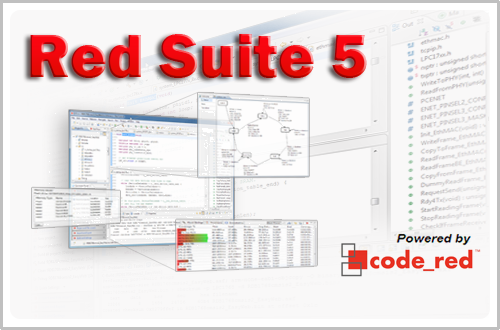
Red Suite 5: Eclipse Juno, Processor Expert and unlimited FRDM-KL25Z

❗ UPDATE: Code Red Technologies have been acquired May 1st 2013 by NXP, see this press release. According to this, they will not continue to support non-NXP architectures after May 2014. 😦

You probably know this already: I’m a fan of Eclipse, Processor Expert and the Freedom board. As for tool chains I use CodeWarrior for MCU10.x (Eclipse based, 64 KByte free limit) and IAR (32 KByte limit) with the Processor Expert Driver Suite.

And I have added a new Eclipse based solution: Red Suite 5 from Code Red Technologies. They released a new Red Suite 5 (v5.2.2 build 2108) which caught my attention when reading the release notes:

  1. Eclipse Juno SR2: New Eclipse Look & Feel 🙂
  2. Added integration for Processor Expert 🙂 🙂
  3. Non-expiring 128k (!!!) limit when used with the Freescale FRDM boards 🙂 🙂 🙂
Red Suite 5 Eclipse Startup

Red Suite 5 Eclipse Startup

Continue reading

A new Freedom Board: FRDM-K20D50M with ARM Cortex M4

Freescale/Farnell/Element14 announced last week a new Freedom Board: the FRDM-K20D50M :-). As you can expect, I was not able to resist, and ordered one from my local Farnell store right away. So I did my first steps with it on this sunny and wonderful weekend (yes! we skipped Spring Time and entered Summer Time right away!).

I do not need to compare the board with the previous Freedom boards, as I have found an article here. I a nutshell: I get pretty much the same as with the FRDM-KL25Z, but instead of an ARM Cortex-M0+, it has an ARM Cortex-M4!

The new FRDM-K20D50M Board

The new FRDM-K20D50M Board

Continue reading

Show it again! (How to re-enable hidden Dialogs in Eclipse)

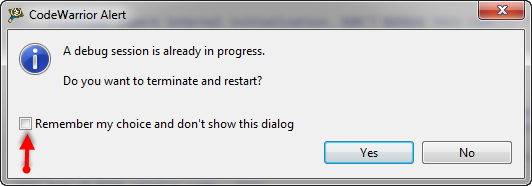
Eclipse has a nice feature to ‘shut up’ dialogs: In many dialogs I can select an option so that dialog does not show up again:

'Dont' show Again' in Dialog

‘Dont’ show Again’ in Dialog

But what if I change my mind later on and what to have this dialog to show up again?

Continue reading

Stepping Backwards while Debugging: Move To Line

It happens to me many times: I’m stepping with the debugger through my code, and ups! I made one step too far!

Debugging, and made one step over too far

Debugging, and made one step over too far

What now? Restart the whole debugging session?

Actually, there is a way to go ‘backwards’ 🙂
Continue reading

First Steps with the P&E Tracelink

“As an engineer, you should ask for the best tools available. Spending money for better tools can make the difference between finding a problem quickly, or wasting days or weeks, and ultimately failing a project.” (unknown)

I had to learn it the hard way: some ‘hard-to-find-problems’ sometimes only can be found with some amount of luck, or with using a good trace solution. CodeWarrior already supports trace, such as using the MTB on the Cortex-M0+. But with this I’m limited to the on-chip trace buffer or on-chip RAM, which is better than nothing. But to solve the real hard problems, a bit of more power and memory is needed. And here where the P&E Tracelink comes into play: with 128 MByte trace buffer it would allow me to record a lot more trace data :-).

Continue reading

Restore Deleted Files in Eclipse with Local History

I’m using Version Control Systems like Git and SVN on a daily base. Because this gives me the opportunity to revert my changes and go back in time in my project. A VCS is incredible useful as well if I have deleted files or settings: restoring it is just a matter of a few mouse clicks.

But even without using a VCS, Eclipse has a built-in simple version control system: the Local History.

Eclipse History View

Eclipse History View

Continue reading