Attaching to a Running Target with Segger J-Link, GDB and Eclipse

This happens several times for me: I have a board running for a while (even for days), and then it crashes or is stuck somewhere. Yes, I usually use a watchdog do recover from that situation. But it would be good to know and debug the problem. With CodeWarrior I had the functionality in the debugger to ‘attach’ or ‘connect’ to a running (stuck/crashed) board. However, with Eclipse/Kinetis Design Studio/GDB this is a different debugger, and not possible. At connection time with the debugger the target does a reset, so I don’t know any more where the application crashed. But now I have a solution, at least with the Segger GDB :-).
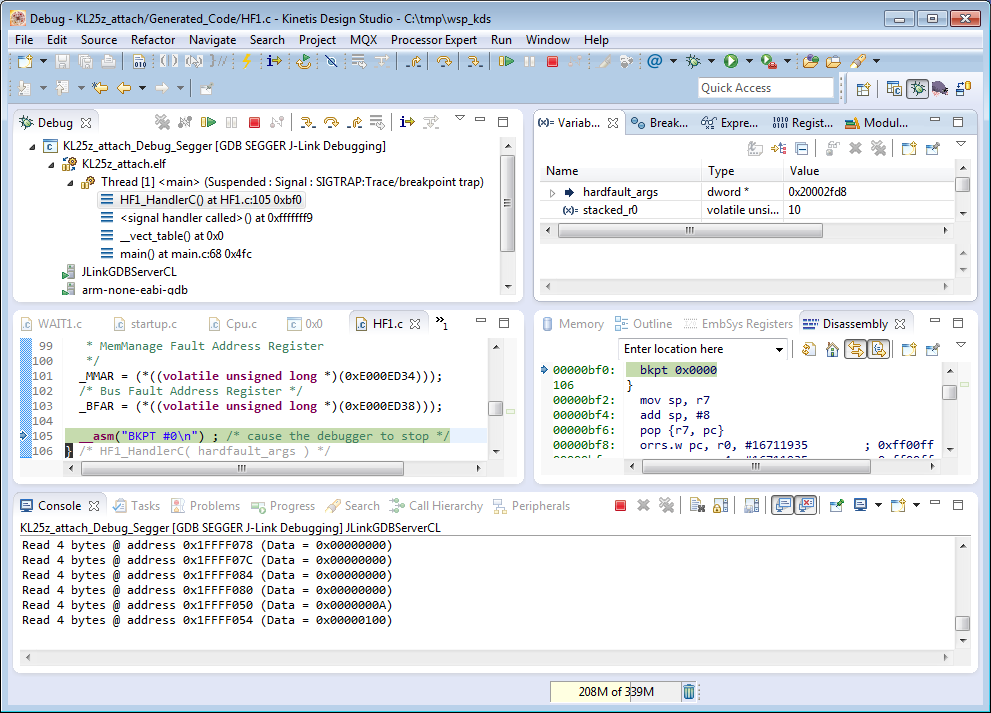
Debug Hard Fault Attached Target

Debug Hard Fault Attached Target
Continue reading

Quick Way to Open Closed Project in Eclipse

Sometimes it is all about knowing the simple tricks, even if they might be obvious ;-). In my post “Eclipse Performance Improvement Tip: Close Unused Projects” I explained why it is important to close the ‘not used’ projects in the workspace to improve Eclipse performance:

Closing Project in Eclipse Workspace

Closing Project in Eclipse Workspace

Continue reading

Using Kinetis Design Studio with IAR Embedded Workbench IDE

For everyone who wants to combine the power of Eclipse and Processor Expert with the IAR Embedded Workbench IDE, here is how to get them working side by side:KDS with IAR Continue reading

McuOnEclipse Components: 03-Feb-2015 Release

It has been a while since the last version, but finally there is a new release available on SourceForge, with the following highlights:

  • FreeRTOS V8.2.0 with task notification
  • New VS1053 component to play MP3 and MIDI data/files
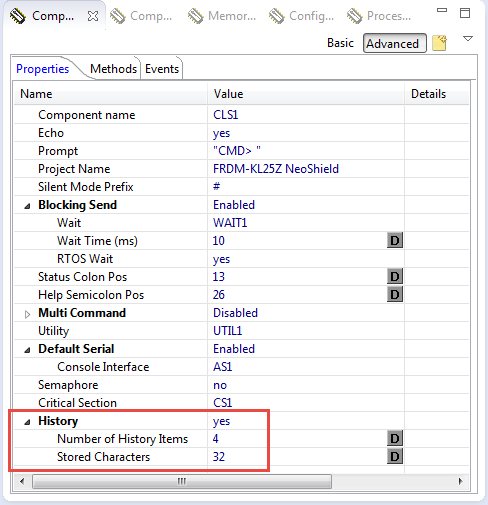
  • Shell with command history support
  • Percepio Trace V2.7.0 for FreeRTOS
Components Release

Components Release

Continue reading

Updated Percepio Tracealyzer and Trace Library to Version V2.7.0

Percepio has recently released the v2.7 version of Tracealyzer. This is a major upgrade from the v2.6 version which I have used so far: time to upgrade my Trace component for FreeRTOS to the latest and greatest v2.7!

FreeRTOS Plus Trace View

FreeRTOS+Trace View (V2.7)

Continue reading

McuOnEclipse Components: 27-Dec-2014 Release

This post is overdue, as it is about the McuOnEclipse components which have been released already a few days ago. The highlights are (beside smaller updates and bug fixes):

  • Nordic Semiconductor nRF24L01+ component extended for shared SPI bus usage
  • SD_Card component can use AsynchroSerial component for Kinetis
  • FatFS has added v0.10c patches
  • FSL_USB_Stack: Host support for Kinetis K20D72 and support for FRDM-K22F (K22FN512)
  • FreeRTOS has added Timer API support

    SourceForge 2014-12-27 Release

    SourceForge 2014-12-27 Release

Continue reading

Code Coverage for Embedded Target with Eclipse, gcc and gcov

The great thing with open source tools like Eclipse and GNU (gcc, gdb) is that there is a wealth of excellent tools: one thing I had in mind to explore for a while is how to generate code coverage of my embedded application. Yes, GNU and Eclipse comes with code profiling and code coverage tools, all for free! The only downside seems to be that these tools seems to be rarely used for embedded targets. Maybe that knowledge is not widely available? So here is my attempt to change this :-).

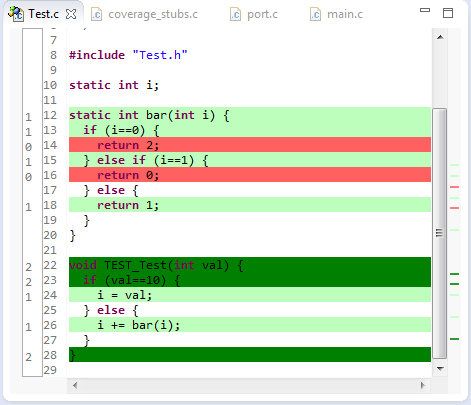
Or: How cool is it to see in Eclipse how many times a line in my sources has been executed?

Line Coverage in Eclipse

Line Coverage in Eclipse

And best of all, it does not stop here….

Continue reading

Adding Multiple Include Paths to Build Settings in Eclipse

In Eclipse and CDT, I need to tell the compiler where it has to search for the header files. The normal way is to go to the compiler settings (menu Project > Properties > C/C++ Build > Settings) and then add the include paths, one by one, using the ‘+’ icon:

Adding Include Path

Adding Include Path (shown using the GNU ARM Eclipse plugin)

But for many include paths, this is a time-consuming process. But there is another way.

Continue reading