Traps and Pitfalls: No Hex/Bin/S19 File Created with GNU?

I stumbled now twice over a problem, and only after a lot of head scratching (you should see my head now 😉 ) I have found the cause (and solution) for it. In the hope that I can save the readers of this blog some time, here is what happened.

I described in earlier posts how to enable GNU build tools to generate hex/bin/S19 files, or to write the code size to the console view. That works fine for me. But then I received a project were obviously this does not work: even with the project settings configured properly, there is no S19 file, and no code size printed. What’s wrong?
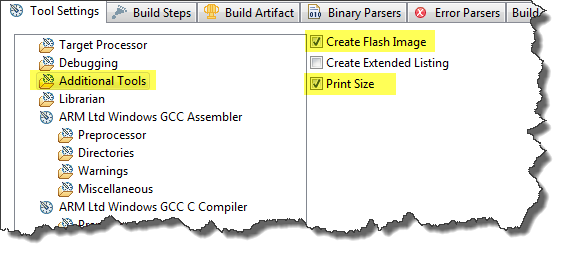
Additional Tools in ARM GNU Eclipse Panel

Additional Tools in ARM GNU Eclipse Panel

Continue reading

Software Engineering for Embedded Systems

Yesterday was a great day: The book “Software Engineering for Embedded Systems” finally arrived 🙂 :

Software Engineering for Embedded Systems

Software Engineering for Embedded Systems

Why I’m excited about this? Because I had the honor to contribute a chapter to that book 🙂

Continue reading

Adding/Removing Floating Point Format for S08 Projects

Usually I do *not* use floating point numbers in my projects. For this, I select ‘None’ during the project creation in CodeWarrior for MCU:

No Floating Point Selected

No Floating Point Selected

But what if I need to change my mind later? How to change such a ‘no-floating-point-needed’ project to one with floating point format support?

Continue reading

Review of CodeWarrior for MCU10.4

Freescale has released this week an updated version of CodeWarrior: version 10.4. I’m usually not switching a tools version in the middle of a university semester. Unless I see a real benefit, and the risk is low. Well, I have used it now for a few days, and I have decided to move my projects from 10.3 to 10.4. Why? Read on…

CW for MCU10.4

CW for MCU10.4

Continue reading

printf() with the FRDM-KL25Z Board and without Processor Expert

In this tutorial I explored how to use printf(), and this tutorial is so generic that it works for any processor/microcontroller. That flexibility is because I’m using Processor Expert. In case Processor Expert shall not be used, then some tweaks are needed. Here I show what is needed to have printf() working with the FRDM-KL25Z board. I use the UART0 connected to OpenSDA USB CDC for this.

Continue reading

text, data and bss: Code and Data Size Explained

In “Code Size Information with gcc for ARM/Kinetis” I use an option in the ARM gcc tool chain for Eclipse to show me the code size:

   text       data        bss        dec        hex    filename
 0x1408       0x18      0x81c       7228       1c3c    size.elf

I have been asked by a reader of this blog what these item numbers really mean. Especially: what the heck is ‘bss’???? 🙂

Continue reading

Show it again! (How to re-enable hidden Dialogs in Eclipse)

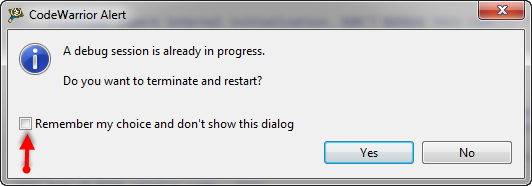
Eclipse has a nice feature to ‘shut up’ dialogs: In many dialogs I can select an option so that dialog does not show up again:

'Dont' show Again' in Dialog

‘Dont’ show Again’ in Dialog

But what if I change my mind later on and what to have this dialog to show up again?

Continue reading

Decoding S19 Files

I’m recently dealing again with S19 (S-Record) files. I can easily generate S19 files from my ARM .elf files, but what I need is a simple decoder of the file format.

The good thing is: such a decoder is provided with CodeWarrior for MCU10.x 🙂

That capability is built into the Decoder.exe which is delivered with the Freescale S08 (or S12) tool chain, and is located inside the MCU\prog folder:

Decoder.exe inside MCU prog Folder

Decoder.exe inside MCU prog Folder

Continue reading

Compiling C Files with GNU ARM G++

If I want a C++ project for my KL25Z Freedom board, I select C++ during the project creation:

C++ Project Creation for GCC

C++ Project Creation for GCC

This creates a gcc C++ project with all the needed settings.

This worked fine until I added a *.c file to my project which had code in it which was not accepted by the C++ compiler. Wait! Should the *.c not be compiled in C mode, as I was used to with other compilers? It turned out that things are different with gcc (or g++) :-(: the *.c files in my project are compiled in C++ mode. So the question is: how to compile in C mode with the ARM g++ compiler?

Continue reading