CodeWarrior for MCU10.3 comes with the ARM GNU 4.6.2 installed:

gcc 4_6_2 in MCU10.3 layout
What about switching to a different (newer) gcc?

CodeWarrior for MCU10.3 comes with the ARM GNU 4.6.2 installed:
gcc 4_6_2 in MCU10.3 layout
What about switching to a different (newer) gcc?
Processor Expert in Eclipse and CodeWarrior is cool thing, and acts as the ‘expert’ for anything around the microcontroller used. But by default, it is acting in the ‘Basic’ level only.
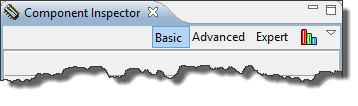
Component Inspector Levels
But there are ways to get it to the Expert level :-).
Debugging is usually a ‘stop-inspect-continue’ process. That does not work very well for watching a system which continuously changes its state. For this usually I toggle an LED, or write things to the console to watch with a human eye what is going on. But there is something very powerful in the CodeWarrior debugger too: to display variables and memory content while the target is running.

Variable Live View
In my view: the world needs more engineers to solve all the problems.
Question: How to recruit future engineers?
Answer: Show young people that engineering is a lot of fun!
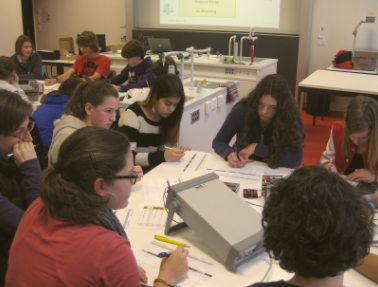
Polygraph in Action
If you think that my LED tutorial is too complicated to program a simple LED, then this article might be of interest for you. Because there is an easy and basic way: And I mean it: really basic. And the name is the program(ming language) ;-).
One of my very first contact with computers was the Commodore C64: this was a very successful home computer system back in the 1980’s: a 8bit machine with 64 KByte of RAM and a built-in Basic Interpreter in ROM:

Commodore C64 Startup Screen
It is already two weeks into 2013, and not to late to mention Christmas: I have received another gift :-). It did not make it for Christmas itself: Because of the overloaded postal service and because the Swiss customs wanted to deeply inspect the board (they probably wanted to try the board too 😉 ). So it had it finally in my hands last week: The Avnet Wi-Go Board:
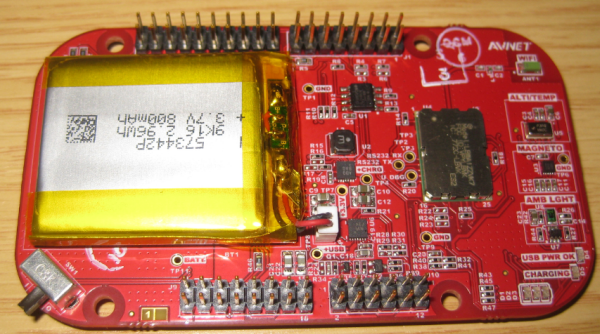
Avnet Wi-Go Board
And here it is again: a Hard Fault exception raised by the ARM Cortex-M0+ on my Freedom board:

Hard Fault in Debug View
A reason for hard faults are for example dereferencing a NULL pointer. The issue with the ARM Cortex hard fault exception stack is: it is not easy to find out where in the code the problem is.I have created a Processor Expert component to help me to find the location of such an exception. With the Eclipse based CodeWarrior for MCU10.3 there is another way: Trace with the MTB (Micro Trace Buffer)!
Eclipse based CodeWarrior for MCU10.3 comes with gcc build tools for Kinetis/ARM cores. While it features the parallel build make, I noticed that especially for larger projects build times are not as fast as it should be. The good news is: I was able to cut down my build time to less than half with a simple change :-).
When I looked at the output folder where all the object and make files are stored by Eclipse, I noticed that it has as well the listing files generated:

Listing Files in output folder
Some times, especially after making some clock/timing changes in Processor Expert, I have an error showing up in the Processor Expert components:

Processor Expert Components with Errors
Many times Processor Expert is right. But not always: It is possible that Processor Expert is stuck on the error, and there seems no way out. But there is a trick to resolve it….
When I have asked by a student last year if I’m uing Git, I said “Git what?”. Yep, a shame I did not know what Git was a this time. But it is never to late to learn new things.
I was coming from CVS, moved to the successor of it (SVN) and was happy with it. Especially with having a local SVN server and repository, that was (and still is) a great thing. But to truely collaborate with a worldwide community, it is time to use something different: Git.

GitHub Bootcamp: 4 simple steps to git
 MCU on Eclipse