
Code Size Information with gcc for ARM/Kinetis

Working with the Freescale S08 and S12 build tools, there is something I really appreciated: that the linker reports on the console the code size of the application:

S08 Linker reporting the code size

S08 Linker in Eclipse reporting the code size

This is especially handy as it allows you to see the impact on code size immediately e.g. if I change a compiler option or do a source code change. Simple and easy. Yes, I could get that kind of information from the linker map file too. But this means I need to open that file, scroll down/etc: many steps just to find out the code size.
Continue reading

Spaces vs. Tabs in Eclipse

I admit: I’m a ‘space’ person. What I mean is that I prefer ‘spaces’ over ‘tabs’ in my source code. Why? Because I don’t want to relay on the tab width, and I prefer to use ‘two spaces for an intention level’.

I would assume that maybe half of the world is for spaces, and half of the world is for tabs. I don’t want to cause a religious war here. I’m for freedom of choice, and this is what Eclipse and CodeWarrior for MCU (which is Eclipse based) offers. Now as I have outed myself as a ‘spacer’, and given the fact that CodeWarrior comes as ‘tabser’ by default, this is something I have to change as a setting for my workspace. Here is what I do….

Continue reading

S-Record Generation with gcc for ARM/Kinetis

With my Freedom KL25Z board I’m using the GNU/gcc build tools and Eclipse/CodeWarrior. When I wanted to create an S19 file of my application using the GNU tools, this was not that easy to find out. So here are the steps to do this:

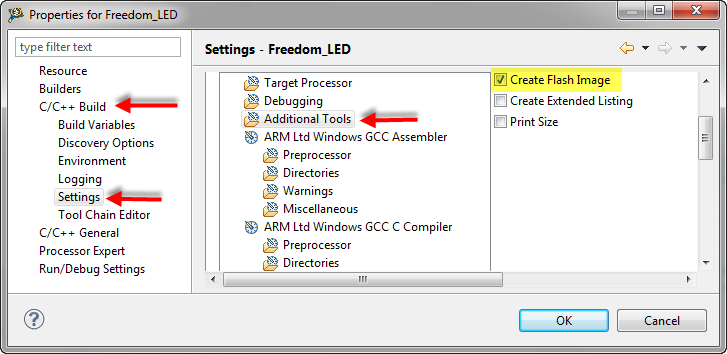
I open the project setting using the menu Project > Properties and go to C/C++ Build > Settings > Additional Tools and enable’Create Flash Image‘:

Additional Tools gcc Settings

Additional Tools gcc Settings

Continue reading

Tutorial: Enlightning the Freedom KL25Z Board

The schematics for the Freedom board is now available on the element14 Freedom Board site (you need to log into the element14 community first) as FRDM-KL25Z Schematics (SPF-27556_D).pdf (314.7 K)). So time to write a tutorial how to use the LED on that board.

❗ Note: since this tutorial, the LED component has been simplified. So some of the steps below are much simpler and easer. Please see LED’s for Kinetis, simplified | MCU on Eclipse. I have updated this post with the new instructions and images.

In “FreeRTOS with GCC, Cortex-M0+ and Kinetis KL25Z Freedom Board” and “A Shell for the KL25Z Freedom Board” I have used that board with an RTOS: FreeRTOS. But it is really easy to use that board without an RTOS (‘bare metal’) too. In this tutorial I’m providing step by step instructions to use the RGB LED on the Freedom KL25Z board with Processor Expert and the open source LED component.

Continue reading

Changing the CPU with Processor Expert

I have an example project with Processor Expert and CodeWarrior. The problem I have is that I want to use it for another CPU derivative. So how can I migrate the project?

There are three different approaches:

  1. Change Wizard: In MCU10.2 there is the menu Project > Change Device/Connection. While this sounds promising, it only works for the very simple projects. And it does not change the project in-place: it simply creates a copy of the project and applies some (many times wrong) settings. So I do not recommend to use that option.
  2. New Project Wizard: For me in most cases this is the best way: this creates a new project for the new device, with everything set up correctly. In a second step I copy my source files and compiler settings (if I have changed them). The Processor Expert component I can transfer with using drag&drop.
  3. Changing the CPU: With Processor Expert, I can change the CPU. For this I add a new CPU to the project and change other settings (debugger, build tools settings) as needed.

Continue reading

Tutorial: Timer (LED) with Processor Expert for Kinetis

In the ‘Pre-LDD age’, setting up a periodic timer event with Processor was really easy. With the concept of LED’s (see “There is a Time and Date for both Worlds”) things are a bit different. But once things are clear, it is not that hard. So here I’m doing a very exciting thing: blinking an LED using a timer! 😎

So I’m going to have an LED blinking every second. I’m using the TWR-K60N512 with an ARM Cortex-M4 and the Eclipse based CodeWarrior for MCU10.2. But it is easy to adopt it to any other Kinetis board.

Continue reading

Eclipse Debugging with Strings – Part 2

Maybe a better title for this post would be “Eclipse Debugging with Strings Attached’? Digging a bit more into the domain of string debugging, things are not always the way I wish they are.

I’m using here CodeWarrior for MCU10.2, which is based on Eclipse 3.6. Let’s use the following piece of code with the ARM Cortex-M4 Kinetis K60 core and the Freescale ARM compiler:

char buf[] = "abcd";
char *p = &buf[0];

unsigned char ubuf[]="ABCD";
unsigned char *up = &ubuf[0];

signed char sbuf[]="1234";
signed char *sp = &sbuf[0];

Continue reading

Eclipse Debugging with Strings

Here I am: past midnight, and debugging why my Kinetis ARM Cortex-M4 K60N512 application. So now you know what keeps me up at night :-). Stepping through some code which is using all kind of strings:

Debugging the K60 with Eclipse and CodeWarrior

Debugging the K60 with Eclipse and CodeWarrior

The challenge is: how to debug my strings?

Continue reading