Blinky LED with openHAB on Raspberry Pi

In my earlier post I showed how I have installed the open source openHAB home automation system (see “Installing openHAB Home Automation on Raspberry Pi“). In this post I show how to control a local LED on the Raspberry Pi with openHAB home automation system: how to control any GPIO pin on the Raspberry Pi from remote:

Controlling the LED with openHAB

Controlling the LED with openHAB

Continue reading

Installing openHAB Home Automation on Raspberry Pi

I’m currently building a home automation project around Raspberry Pi: I want to be able to monitor and control things like the lights, garage doors and the heating system both at home and from remote. I already have added a touch screen to one of my Raspberry Pi 2 computers (see “Adding a Touch LCD to the Raspberry Pi 2“). This article is about how to install the openHAB on that Raspberry so it can be the brain of the automation system.

openHAB Demo House on Pi

openHAB Demo House on Pi

Continue reading

Linting with Eclipse and the GNU ARM Embedded Launchpad Compiler

For a space project we have to make sure that things are not failing while our hardware orbits around the Mother Earth. Therefore we are using different static and dynamic analysis tools, and one of it is using PC-lint from Gimpel to catch as many errors and bugs as possible. For that project, we are using Eclipse with the GNU ARM Embedded (launchpad) ARM compiler and Eclipse as IDE with the GNU ARM Eclipse plugins. There are commercial plugins available for linting with Eclipse (e.g. Linticator), but with a few tweaks it is possible to lint with Eclipse free-of-charge. So this article is about how to lint an Eclipse (Freescale/NXP Kinetis Design Studio) project with PC-Lint.

Lint messages in Eclipse

Lint messages in Eclipse

Continue reading

Using the KwikStik K40 Board to Debug an external Board

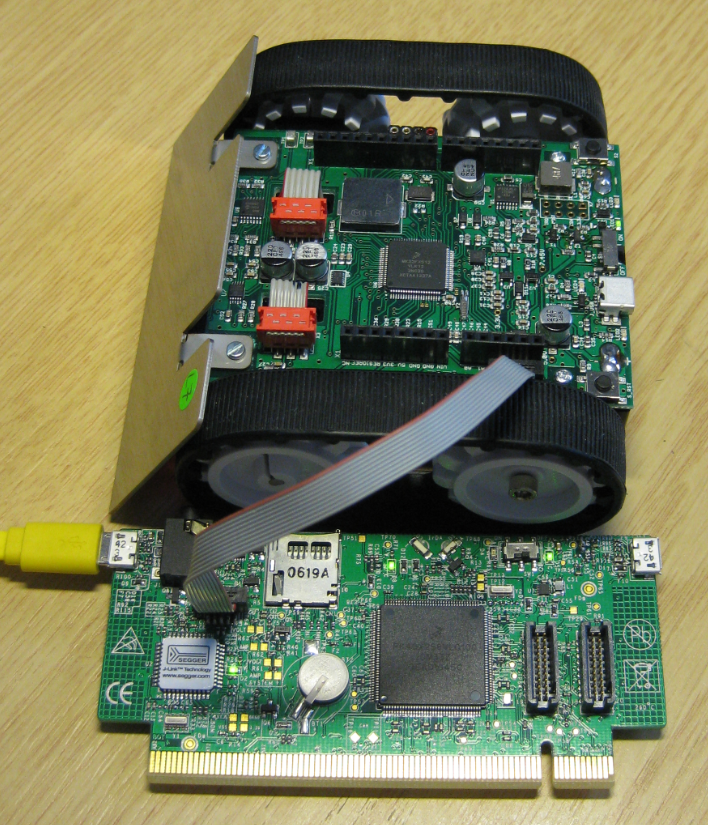
When I left for the week-end, I missed to take with me my Segger J-Link debug box. I have one P&E Universal Multilink at home, but I needed a Segger J-Link to use the SystemViewer with my robot. I need that for a FreeRTOS trainig I will deliver in Poing/Germany on Monday at Avnet/Silica.

But I had a Freescale KwikStk board at home, and I did remember that I can use that board as a Segger J-Link to debug my custom hardware (see “Freescale Kinetis KwikStik (part 1)“).

Debugging Custom Board with KwikStik

Debugging Custom Board with KwikStik

Continue reading

Preprocessor Listing for GNU gcc with GNU ARM Eclipse Plugins

In case there are problems with the C/C++ preprocessor, it is useful to generate the compiler preprocessor listing. Here is how to create a preprocessor listing with GNU gcc compiler and the GNU ARM Eclipse plugins in Eclipse:

Preprocessor Listing in Eclipse

Preprocessor Listing in Eclipse

Continue reading

GNU gcc printf() and BuiltIn Optimizations

Readers of my blog know: I’m not a fan of printf(), and I think for many good reasons. Still printf() is widely used, and the GNU gcc tries to optimize things. This is observed with a simple example: If I’m writing

printf("a");

Then the code produced (ARM Cortex-M0+ with GNU ARM Embedded 4.9 2015q2 gives:

movs r0, #97    ; 0x61
bl 0xa98

Instead of calling printf(), it is calling putchar()! Why is that?

PutChar instead of Printf

PutChar instead of Printf

Continue reading

Segger SystemView: Realtime Analysis and Visualization for FreeRTOS

One of the most important aspects for developing complex realtime applications is get insights into what is going on the target. Segger just has released a free tool which gives an incredible useful insight view and visualization:

Segger System View for FreeRTOS

Segger System View for FreeRTOS

Continue reading