After having imported the repository with the SDK, it is now time to create a first project.


After having imported the repository with the SDK, it is now time to create a first project.
In a previous article I have installed the MCUXpresso extension and used the MCUXpresso Installer to install the necessary development tools.
In this article I’m going to import the SDK.

I’m using the RS-485 field bus in many of my projects: it is very reliable and robust, and easy to implement. And with ModBus there is standardized protocol used in building automation or industrial control applications. For example I’m using the protocol to communicate between battery systems and an EV Charger.
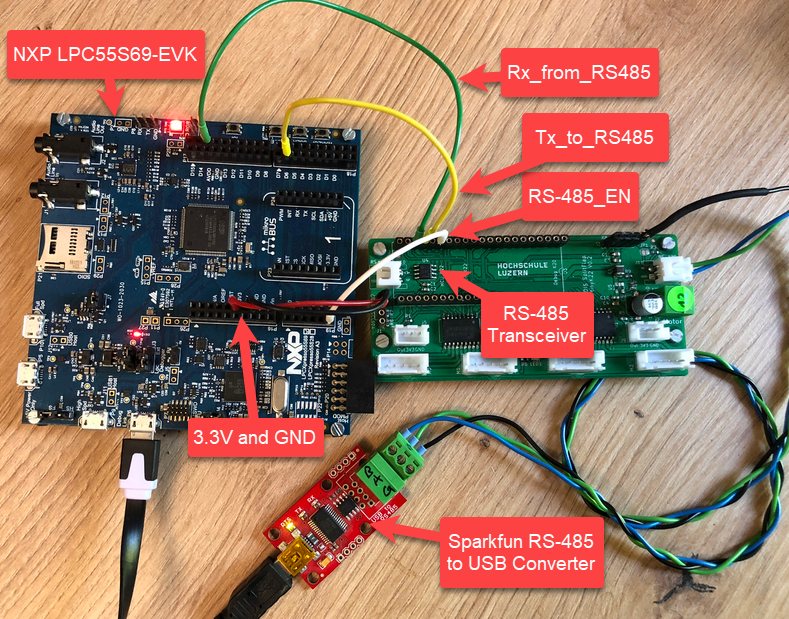
In this article I show you with an example, how the NXP LPC55S69 can be used with RS-485.
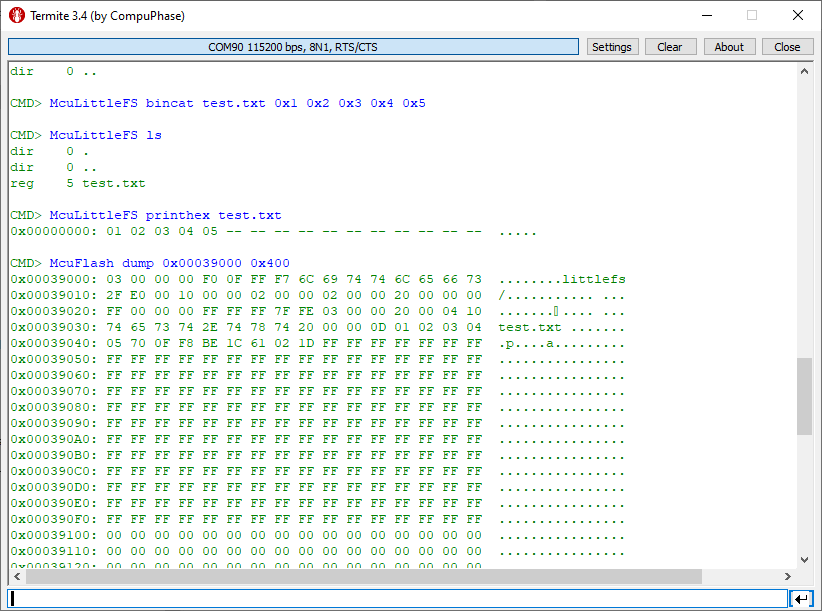
Continue readingIn many of my embedded projects I need persistent data or storage for settings. If using an SD card, then FatFS is usually my choice for the file system. But if using an external FLASH memory device, then my preferred choice is usually LittleFS: it is a little fail-safe filesystem, designed for micro-controllers, which I’m using with external flash memory devices.
In the case where there is enough MCU flash, or if there is no external FLASH device available in a design, it can use the MCU internal FLASH as storage storage too. This is the topic of this article:
A Triumvirate is or Triarchy is built by three individuals which lead or rule something. In this article I want to rule a project with Eclipse CDT, Visual Studio Code and with building it from the command line for automated builds.
So what if I have an Eclipse project (say MCUXpresso IDE and SDK), and want to build it on a build server, and and I want to use the same time the project with Eclipse IDE and Visual Studio code?
Key to this is CMake: I’m keeping the Eclipse CDT features, adding CMake with Make and Ninja to the fix, and have it ‘ruled’ by three different ’emperor’: Eclipse, Visual Studio Code and from a shell console:

When developing with C or C++ an application, then you mostly focus on your own code. You don’t want to bother with the details how input/output functions like printf() or scanf(), and you might just use these functions and helpers and that’s it.
The implementation is part of the ‘C Standard Library’ (or C++ Standard Library). In the world of Linux, this is usually the ‘glibc’ or ‘GNU C Library, and one usually link with ‘libc’. That provides the implementation of printf(), or use ‘libm’ if using math functions like sin() or cos().
In the embedded world, things are much more complex, with plethora of choices, for example in the MCUXpresso IDE:

It is the exam and grading time at the university, and the same time I’m preparing the lectures and labs for the new semester starting mid of February. I’m always heading for using the latest and greatest tools in my labs. A few days ago, NXP released the new version of the MCUXpresso IDE, version 11.7.0. Time to check it out…

In many embedded applications, it is mandatory that memory allocation is static and not dynamic. Means that no calls to things like malloc() or free() shall be used in the application, because they might fail at runtime (out of memory, heap fragmentation).
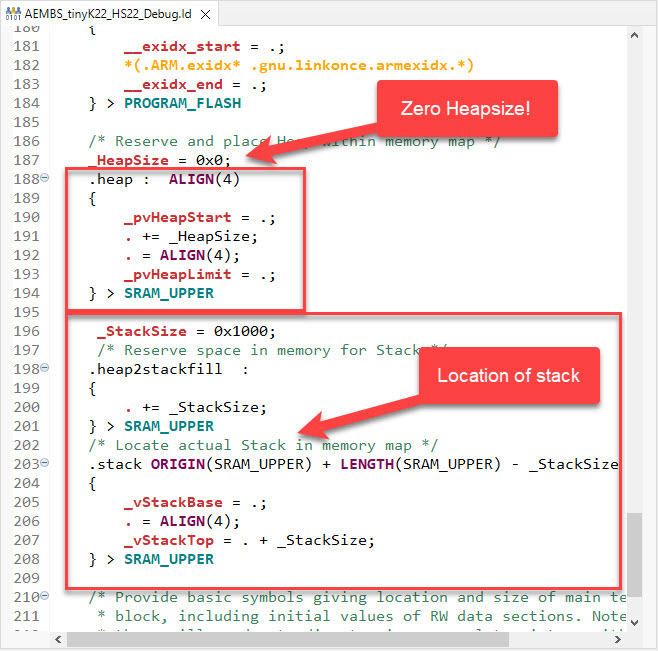
But when linking with 3rd party libraries or even with the C/C++ standard libraries, how to ensure no dynamic memory is used? The problem can occur as well for C++ objects, or a simple call to printf() which internally requires some dynamic memory allocated.
Continue readingIf using C++ on an embedded target, you depend on the constructors for global objects being called by the startup code. While in many cases an embedded system won’t stop, so you don’t need to call the global C++ destructors, this is still something to consider for a proper shutdown.

You might never heard about ROM Libraries, and you are probably not alone. Some might thing that this refers to the boot ROM modern MCUs have built in, which is kinda close. But the thing here is about to build your own (possibly constant) ROM library, program it to your device of choice, and then use it from the application running on the device.
So the concept is to have a (fixed, stable) part with code and data on your device, which can be used by a (possibly changing) application: Think about a stable LoRaWAN network stack in the ROM, with a changing application using it: Would that not be cool?

This not only adds flexibility, but as well allows smaller updates, as only a part of the program has to be changed or updated.
The question is: how to create and use such a ROM Library with the normal GNU build tools?
Continue reading MCU on Eclipse