Eclipse has a nice feature to ‘shut up’ dialogs: In many dialogs I can select an option so that dialog does not show up again:
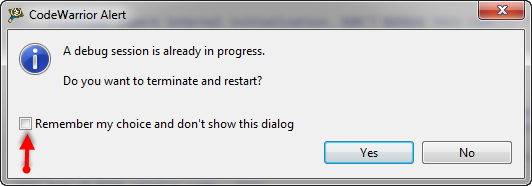
‘Dont’ show Again’ in Dialog
But what if I change my mind later on and what to have this dialog to show up again?
Eclipse has a nice feature to ‘shut up’ dialogs: In many dialogs I can select an option so that dialog does not show up again:
‘Dont’ show Again’ in Dialog
But what if I change my mind later on and what to have this dialog to show up again?
I’m recently dealing again with S19 (S-Record) files. I can easily generate S19 files from my ARM .elf files, but what I need is a simple decoder of the file format.
The good thing is: such a decoder is provided with CodeWarrior for MCU10.x 🙂
That capability is built into the Decoder.exe which is delivered with the Freescale S08 (or S12) tool chain, and is located inside the MCU\prog folder:

Decoder.exe inside MCU prog Folder
If I want a C++ project for my KL25Z Freedom board, I select C++ during the project creation:

C++ Project Creation for GCC
This creates a gcc C++ project with all the needed settings.
This worked fine until I added a *.c file to my project which had code in it which was not accepted by the C++ compiler. Wait! Should the *.c not be compiled in C mode, as I was used to with other compilers? It turned out that things are different with gcc (or g++) :-(: the *.c files in my project are compiled in C++ mode. So the question is: how to compile in C mode with the ARM g++ compiler?
I knew about mbed already for some time: watching students using it for an NXP enabled board. Pretty cool stuff: mbed is an online IDE and compiler with tons of software libraries for the supported platform. So I was dreaming to have something like this for my own boards like the Freedom board. But because mbed only supported two dedicated NXP boards, that was a road block.
But then mbed announced recently that the mbed SDK is open source. Wow, that is interesting! And finally the announcement last week: mbed supports the KL25Z Freedom Board. Now they have my attention :-).
Maybe this article gets the attention of a local optometrist or eye shop: I have a business opportunity for you! ;-).
I ran into a weird problem: I received an ARM GNU gcc project which failed during the generation of the S19 file in strange way:
'Executing target #80 Freedom_Zumo.siz'
'Invoking: ARM Ltd Windows GNU Create Flash Image'
“C:/Freescale/CW MCU v10.3\eclipse\../Cross_Tools/arm-none-eabi-gcc-4_7_3/bin/arm-none-eabi-objcopy”  -O srec Freedom_Zumo.elf "Freedom_Zumo.hex"
' '
Der Befehl "“C:" ist entweder falsch geschrieben oder
konnte nicht gefunden werden.
mingw32-make: *** [Freedom_Zumo.hex] Error 1
Sometimes things take longer than anticipated. And this is definitely the case for my USB MSD Host project where I wanted to use a USB memory stick with the Freedom FRDM-KL25Z board.

Memory Stick attached to the Freedom Board
But finally, I have things working. At least most of the time ….
When I create a new project for the KL05Z with Processor Expert, then it shows up as 48 pin LQFP package in the project:

48pin LQFP Package in Components View
However, when I look at my board, it has a KL05Z32 in a LQFP package with 32 pins:

FRDM-KL05Z Board
One of the great advantage of using an ARM core as on my FRDM-KL25Z board is that I can leverage a lot of things from the community. And one big thing around ARM is CMSIS (Cortex Microcontroller Software Interface Standard). It is an industry wide software library for the ARM Cortex microcontroller. Using the CMSIS libraries and interfaces will make it easier to port applications within the ARM Cortex family.

CMSIS Version 3 Block Diagram (Source: Arm.com)
In ‘A Library with ARM gcc and Eclipse’ I was using the CodeWarrior MCU10.3 beta version to create a library project. At that time I had to do things manually. Now with the final MCU10.3 there is an option in the New Project Wizard which makes things easier:

Library Creation
This will create a library (or better: an archive) with gcc for me. But how to use it from another project?
In this post I tapped into how to print messages to a console using the Kinetis/Freedom board. I’m not a fan of printf() for multiple reasons: It is simply a bad thing for embedded systems programming. But as many have asked for it, here is how to say “hello” from the Freedom Board using printf():
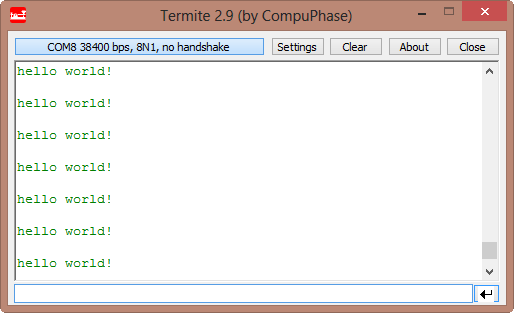
Hello World on the Terminal
 MCU on Eclipse