What could be wrong with this code:
volatile uint16_t myDelay; void wait(uint16_t time) { myDelay = 0; while (myDelay<time) { /* wait .... */ } } void TimerInterrupt(void) { myDelay++; }?

What could be wrong with this code:
volatile uint16_t myDelay; void wait(uint16_t time) { myDelay = 0; while (myDelay<time) { /* wait .... */ } } void TimerInterrupt(void) { myDelay++; }?
Git is now my favorite version control system. Git and GitHub are very powerful, it has (nearly) all features I can think about, and best of all: As a distributed version control system, I can work with it, even if disconnected from the network :-).
There are many standalone and IDE integration available for Git. Beside of using TortoiseGit, I’m using the eGit Eclipse integration. This post is about how to install eGit in Eclipse, particularly in CodeWarrior for MCU10.4.
For everyone who wants to build a Do-It-Yourself toolchain for Kinetis on Linux, I recommend to read the following excellent post by Karibe:
Setting up Linux opensource build and debug tools for freescale freedom board FRDM-KL25Z
He describes how to get OpenOCD with CMSIS-DAP working with Eclipse on Ubuntu to debug the FRDM-KL25Z board.
Happy Linuxing 🙂
So far I have covered in this tutorial series how to install ARM GNU gcc, adding Eclipse, followed by adding GNU GDB debugger, and then adding Processor Expert. I’m using FreeRTOS a lot in my projects, and luckily there is a Kernel Awareness Plugin available for FreeRTOS for GDB in Eclipse. This tutorial is about how to install and use it.

Queues and Tasks
I covered in a previous tutorial how add ARM gcc to Kepler Eclipse to build a DYI toolchain. I’m using Processor Expert a *lot* in my project, because it simplifies and speeds up the development of my embedded applications. What is missing so far is how Processor Expert can be added to Eclipse. As Kepler is as of this writing the latest Eclipse version, this tutorial is using that version.
❗ Eclipse Luna is *NOT* supported in Processor Expert 10.4! Eclipse Luna is expected to be supported in Processor Expert 10.5 coming out in 2015! So if you are using Processor Expert 10.4, then make sure you are using Eclipse Kepler.

Processor Expert Project in Kepler Eclipse
I love to have my sources ‘warning free’, so I spend an extra effort to have things clean and the way the compilers like it. In a similar way, I want to have my source comments spell-error free :-). For this, I love the Eclipse spell checker (see this post) which offers to add unknown words to the dictionary:
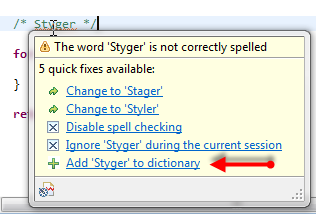
Add word to dictionary
But what if that ‘Add’ action is missing? How to re-enable it?
This is the third part of a tutorial series how to ‘do-it-yourself’ a tool chain for the Freescale Kinetis microcontroller, with the FRDM-KL25Z as example. The tool chain is using GNU ARM gcc plus Eclipse Kepler release. So far I have the following parts:
So far things are very generic. But with debugging it means different hardware, and different hardware connections. And for this connection we need a GDB Server.
Eclipse CDT features a GNU Debugger (GDB), and this is what I want to use here: debugging my microcontroller with GDB inside Eclipse. In order to debug the microcontroller, I need two other things: a GDB Server and a Debug Probe.

GDB with GDB Server
This is the second part of a multi-part tutorial about how to set up an open source tool chain with GNU ARM gcc + Eclipse to build and debug an application for Kinetis ARM devices.

Eclipse Kepler
This is the first part of a multi-part tutorial on setting up a free and functional GNU gcc + Eclipse + debugger environment for use with the Freescale FRDM-KL25Z board.
In this first part, I’m showing how to install the GNU ARM tool chain to build a ‘blinking LED’ application for the FRDM-KL25Z. With 100% free tools 😉

Blinking Red RGB LED made with free tools
Ok, I still do not own an Android phone, but I know many readers of this blog do, and there were several questions how to use the FRDM-KL25Z with Android. And here is something exciting I just saw today: Kai Liu posted information how to connect the FRDM-KL25Z with USB OTG (On-The-Go) to Android: FRDM-KL25Z now talks to Android Phone
He published the S19 file so you can try things out. He still needs to organize the sources and decide on how to publish it (I hope it will be available soon).
If you do not own a FRDM-KL25Z RevE, then you need to consider this post about a hardware change: USB host HID demo times out on FRDM-KL25Z with reproduced USB host
Happy Droiding 🙂
 MCU on Eclipse