Eclipse Build Variables

This post is not about variables in my application code (which I debug). It is about using Variables in Eclipse for building projects. Eclipse variables allow me to make my projects ‘position independent’ whenever I cannot use a path relative to my projects or workspace.

Eclipse Variables

Which variables are used where in Eclipse might be sometimes not very clear. Depending in which context variables are used, not everything might be available. This link for example gives a list of variables which can be used to invoke an external tool.

Build Variables

Eclipse comes with many built-in variables, especially for the build system. If I want to see what variables are already defined, I can show them in the project properties, under C/C++ Build > Build Variables with enabled option ‘Show system variables’:

System Build Variables

System Build Variables

Continue reading

Sumo Robot Portraits

If you are familiar with battle games, then typically there is portrait of the machinery you can use. Or if you have every watched ‘competitive’ sports, then every player can have an opportunity to present himself to the audience. So here we go…

Fredy the Commander

Fredy the Commander

Continue reading

Zumo Robot Last Tuning Tips

Tomorrow will the STD (Sumo Tournament Day)! Here are a few last tips and tricks to be prepared for that Sumo Tournament using the Pololu Zumo Robot chassis:

Battery Inertia

If two robots crash into each other, there can be quite some force. What I have observed is that it can be strong enough to temporarily disconnects the batteries from their spring contacts. I use pieces of plastic parts to keep the batteries tight and in place.

Battery Enforcement

Battery Enforcement

Continue reading

Processor Expert CDE: Debug Verbose Mode

I have one rule I try to follow every day: my code shall be warning free. Writing software for multiple compilers gets challenging with this rule, but it avoids the ‘not seeing the forest because of the trees’ problem. This rule extends to writing Processor Expert components with CDE (Component Development Environment). What I have missed (and not used) is a useful option to enable debug output:

Enable Processor Expert Components Debug Verbose Mode

Enable Processor Expert Components Debug Verbose Mode

Continue reading

Kinetis Unique Identification Register

For my RNet stack I need a way to identify nodes in the network using a unique address. What I need is Media-Access (MAC) address. Base on such a unique address I can assign short addresses (e.g. with a DHCP or similar protocol to automatically assign shorter network addresses). So how to uniquely identify my network nodes?

The Freescale Kinetis microcontroller have nice feature: they have a Unique Identification Register (UID) which would be a perfect fit for a MAC address :-).

UID Output

UID Output

Continue reading

Sumo Robot Battle Tips

The INTRO course is progressing fast, with a lot of information passed on how to build a successful mini Sumo robot based on the Freescale FRDM-KL25Z and a modified Pololu Zumo chassis. The PID control loop implementation for speed and position finally starts to work properly with the help of FreeMaster. Things are not perfect yet, but the robots get better from day-to-day.

Zumo Test Battle

Zumo Test Battle

Continue reading

Processor Expert Component not Showing Up?

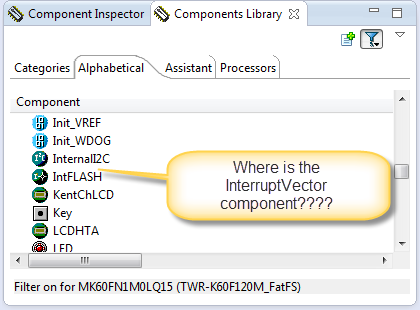
In case you are desperately looking a component in the components library view, but somehow it does not show up? For example I know there is component ‘InterruptVector’, but it is not present in the Components library view?

Where is the InterruptVector Component

Where is the InterruptVector Component

Continue reading

Tutorial: Using a Terminal Input and Output; *without* printf() and scanf()

So this tutorial is about using a terminal connection between my board and my host (e.g. a notebook) to read and write text:

Color Text in PuTTY

Color Text in PuTTY

Continue reading