This article is part of a ‘mini series’ about hidden gems, tips and tricks around Eclipse.
The topic of this one is how to organize projects in the workspace with ‘Working Sets’.

Working Set Selection

This article is part of a ‘mini series’ about hidden gems, tips and tricks around Eclipse.
The topic of this one is how to organize projects in the workspace with ‘Working Sets’.
Working Set Selection
This article is part of a ‘mini series’ about hidden gems, tips and tricks around Eclipse.
The topic of this one is how to comment and un-comment a block of source code.

Block Comment
This article is part of a ‘mini series’ about hidden gems, tips and tricks around Eclipse.
The topic of this one is how to quickly mark and show where a variable is used and defined in the code.
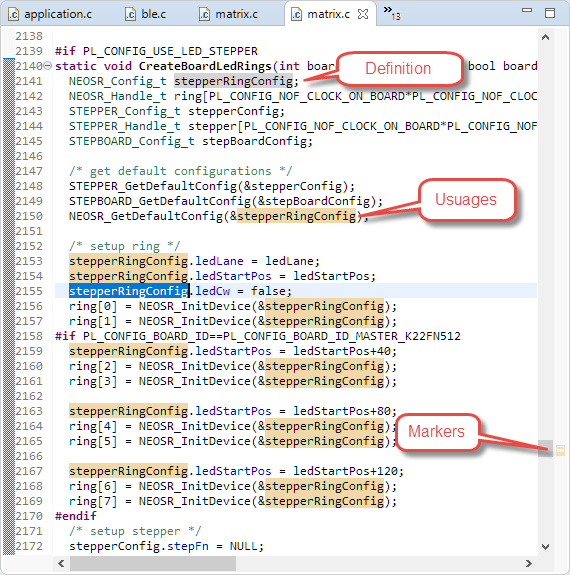
Highlighted Usages
This article is part of a ‘mini series’ about hidden gems, tips and tricks around Eclipse.
The topic of this one is how use Code Completion in the editor.

Library Code Completion
This article is part of a ‘mini series’ about hidden gems, tips and tricks around Eclipse.
The topic of this one is how to show where a variable, function, … is declared or defined.

Navigate Open Declaration
This article is part of a ‘mini series’ about hidden gems, tips and tricks around Eclipse.
The topic of this one is how to show where a project is located on the host system.

Show in System Explorer
This article is part of a ‘mini series’ about hidden gems, tips and tricks around Eclipse.
The topic of this one is how access more hints and tips in the manual.

User Manual
This article is part of a ‘mini series’ about hidden gems, tips and tricks around Eclipse.
The topic of this one is how to accelerate the start of the debugger.

Nothing to be done
This article is part of a ‘mini series’ about hidden gems, tips and tricks around Eclipse.
The topic of this one is how to use a ‘black theme’.

Eclipse Black Theme
This article is part of a ‘mini series’ about hidden gems, tips and tricks around Eclipse.
The topic of this one is how to use filters in the Project Explorer view.

Filter Icon

