Today I attended the regional ‘Design with Freescale’ seminar. It had a part with a hands-on training using PEG for the Tower K60 + TWR-LCD board. It was the first time I had my hands on PEG which is a good learning experience. I learned that it is possible to fill more than 200 KByte of Flash with a simple LCD Touchscreen application which only has two screens, two buttons, a static text and two small bitmaps ;-).
CodeWarrior for MCU10.3 beta is now available
Today is the ‘L Day’ for Freescale: After the announcement of the Cortex-M0+ family (Kinetis-L) earlier this year, it has been launched on the Freescale web site. Given the positive echo on my post around the KL25Z Freedom board (which has a Kinetis Cortex-M0+ KL25 on it) and the fact that production board is shipping these days, a lot of engineers were waiting for the CodeWarrior for MCU10.3 as it is in my view the development tool of choice as well for ARM Kinetis-L. And right on time, the MCU10.3 beta is available for download on http://www.freescale.com/cwmcu10. Time to show what I have noticed as new and noteworthy…
Code Size Information with gcc for ARM/Kinetis
Working with the Freescale S08 and S12 build tools, there is something I really appreciated: that the linker reports on the console the code size of the application:
This is especially handy as it allows you to see the impact on code size immediately e.g. if I change a compiler option or do a source code change. Simple and easy. Yes, I could get that kind of information from the linker map file too. But this means I need to open that file, scroll down/etc: many steps just to find out the code size.
Tutorial: Accelerating the KL25Z Freedom Board
In “Tutorial: Enlightning the Freedom KL25Z Board” I used the RGB LED on the FRDM-KL25Z board. This tutorial extends it to use the MMA8451Q inertial sensor on the board which is connected through I2C to the KL25Z processor:
The goal is show the accelerometer x, y and z-axis on the RGB LED.
OpenSDA on the Freedom KL25Z Board
P&E has released information and firmware instructions for using the OpenSDA, see pemicro.com/opensda. Future has posted a very useful article about using OpenSDA here. So time to upgrade OpenSDA bootloader and firmware v10.1. My FRDM-KL25Z board is a pre-production board, and I assume the production boards expected next week will have the new firmware on it. But it is always useful to know how to change/upgrade the firmware, as I expect there will be new versions of it in the future.
Spaces vs. Tabs in Eclipse
I admit: I’m a ‘space’ person. What I mean is that I prefer ‘spaces’ over ‘tabs’ in my source code. Why? Because I don’t want to relay on the tab width, and I prefer to use ‘two spaces for an intention level’.
I would assume that maybe half of the world is for spaces, and half of the world is for tabs. I don’t want to cause a religious war here. I’m for freedom of choice, and this is what Eclipse and CodeWarrior for MCU (which is Eclipse based) offers. Now as I have outed myself as a ‘spacer’, and given the fact that CodeWarrior comes as ‘tabser’ by default, this is something I have to change as a setting for my workspace. Here is what I do….
S-Record Generation with gcc for ARM/Kinetis
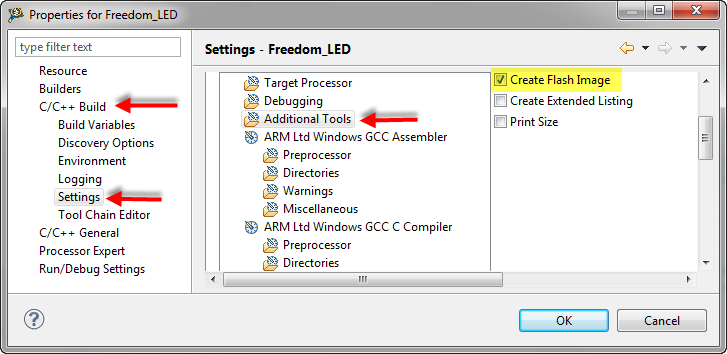
With my Freedom KL25Z board I’m using the GNU/gcc build tools and Eclipse/CodeWarrior. When I wanted to create an S19 file of my application using the GNU tools, this was not that easy to find out. So here are the steps to do this:
I open the project setting using the menu Project > Properties and go to C/C++ Build > Settings > Additional Tools and enable’Create Flash Image‘:
Tutorial: Enlightning the Freedom KL25Z Board
The schematics for the Freedom board is now available on the element14 Freedom Board site (you need to log into the element14 community first) as FRDM-KL25Z Schematics (SPF-27556_D).pdf (314.7 K)). So time to write a tutorial how to use the LED on that board.
❗ Note: since this tutorial, the LED component has been simplified. So some of the steps below are much simpler and easer. Please see LED’s for Kinetis, simplified | MCU on Eclipse. I have updated this post with the new instructions and images.
In “FreeRTOS with GCC, Cortex-M0+ and Kinetis KL25Z Freedom Board” and “A Shell for the KL25Z Freedom Board” I have used that board with an RTOS: FreeRTOS. But it is really easy to use that board without an RTOS (‘bare metal’) too. In this tutorial I’m providing step by step instructions to use the RGB LED on the Freedom KL25Z board with Processor Expert and the open source LED component.
Removing Blank Lines in Eclipse
Many times I end up using source files from somebody else. And such files might have a lot of empty lines in it I want to get removed. The question is: how to get rid of empty or blank lines in the Eclipse Editor view? Or even better: how to merge multiple empty lines into one?
Escaping the Heat Wave
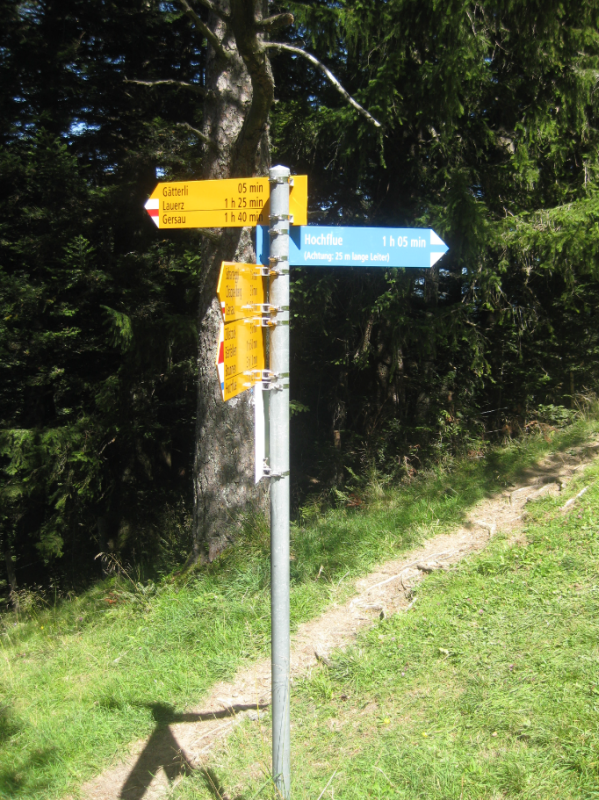
The summer is showing off, and a heat wave is rolling over Europe and Switzerland with temperatures above 30 degree Celsius. Knowing physics, a way to escape the heat is: going up. And this is what we did. The downside of this is: I postponed my exploration of the Freedom KL25Z board. So instead of a tech post, this is a picture post :grin:…