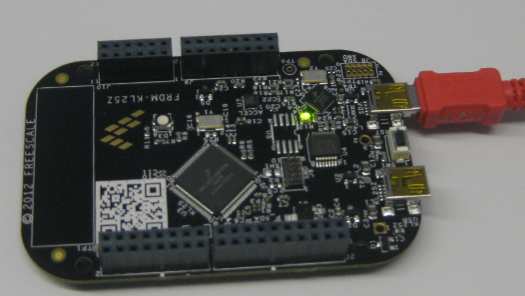
In “Optimizing the Kinetis gcc Startup” I stripped down the fat of my startup code. Now time to add some useful things. And what does a microcontroller like the KL25Z on the Freedom FRDM-KL25Z board have: Pins! And this means I have bits to set and read :-).
Getting Help on Processor Expert Components
That might be an obvious thing for me, but recent questions of readers of my blog let me think that it is not that obvious: How to use a Processor Expert component? How to find example code?
There is the context menu entry ‘Help on Component’ on the component itself, both in the Components Library view and on the component inside the project:
Optimizing the Kinetis gcc Startup
The GNU gcc tool chain integration in CodeWarrior/Eclipse MCU10.3 has a nice feature to show the code and data size of my application after linking (see this article how to enable this). So if I create an ’empty’ project with the wizard, get the code and data size without consulting the linker map file:
But wait! 2604 bytes of code for almost doing nothing? That’s not what I want! There are ways to get that puppy much, much slimmer. Down to 284 bytes .
SWD Debugging with the FRDM-KL25Z Board
The OpenSDA on the FRDM-KL25Z board is a cool feature: I do not need any external debugging device to program and debug my board :-). But my KL25Z custom board will not have that OpenSDA on it: first because it would add additional costs, and I do not see a way how I could use it for my board. I better start using a SWD/JTAG debugger for my Freedom board to have everything in place.
What I need to add to the black Freedom board is the SWD header:
How (not) to Secure my Microcontroller
There are several reports in the Freescale forums around having ‘secured’ the Freedom board. But what does ‘securing’ a board mean? And what does it mean if I get that ‘Device is Secure’ dialog?
There are different levels of protection you can find in many embedded microprocessors, and the terms might vary from vendor to vendor:
- Protect
- Secure
- Disable Mass Erase
Defining Variables at Absolute Addresses with gcc
Many compilers offer a way to allocate a variable at an absolute address. For example for the Freescale S08 compiler, I can place my variable at a given address:
unsigned char buf[128]@0x2000;
This is very useful (and needed) e.g. if the hardware (like USB) needs a buffer at given address. The advantage of the above (non-ANSI and thus not portable) syntax is that I can define a variable at an absolute address, without the need to allocate it in the linker.
I wanted to do something similar with gcc for Kinetis/ARM, and searched many forums on the internet. Obviously, I’m not alone with this question. The solution I have found comes close to what I use e.g. for the S08 compiler.
Foreign Characters for the Eclipse Build System
Having a problem with Eclipse and building files with foreign characters in the file name? If you are developing software, then read and follow this advice:
“Do ❗ NOT ❗ use foreign characters in file names, paths or for anything else!”
What I mean with ‘foreign characters’ are things like éöüàäü, or simply anything which is outside the 7bit ASCII or Windows-1252 code page table, even if they are allowed by the file system of your operating system (e.g. Windows).
Or in other words: only use these characters for file or directory names:
abcdefghijklmnopqrstuvwxyzABCDEFGEHIJKLMNOPQRSTUVWXYZ1234567890_
Speeding up the Debug Launch in CodeWarrior
Whenever I do a debug launch in the Eclipse based CodeWarrior, it takes some time until actually I’m ready to step through my code on the target. Yes, a good part of that is by Eclipse. But another part is that Eclipse helps me to do stupid things (which is a good thing). But say if I know what I’m doing, I could remove some of that safety belts and still doing fine. But only if I know what I’m doing.
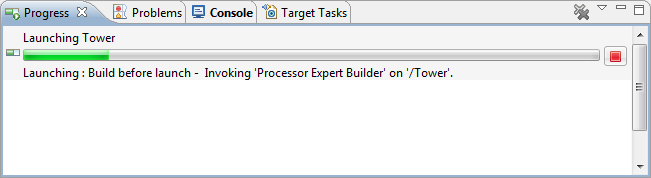
A good indicator where Eclipse is spending time is to have a look in the Progress View:
It shows an interesting information: ‘Build before Launch’….
Using the 8 MHz Crystal on the FRDM-KL25Z Freedom Board
The ARM Cortex-M0+ on the KL25Z Freedom Board (FRDM-KL25Z) runs up to 48 MHz. For this, the 8 MHz crystal on the board is used. A 48 MHz is required for USB communication, to have the needed oversampling on USB data lines. I have shown in my USB CDC post how such a clock is configured, using the white pre-production board. To my surprise, when I tried the same code on the black production boards, it did not work on the production black boards. Even worse: it worked on some, but not on every board :-(.
Assembly Instruction Stepping
Usually I debug and step on C and C++ level: means I step on C/C++ source lines. But sometimes a finer stepping detail is required. What I need is stepping on assembly level. For first time users of Eclipse, that might not be that obvious, so here is the hint:
In the Debug view toolbar (while debugging), there are the normal stepping commands like ‘step’, ‘step over’ or ‘step out’. All these stepping can be performed on assembly instruction level if I enable the ‘Instruction Stepping Mode’: