Adding Symbols to the CodeWarrior Debugger

On the TWR-LCD, I’m using a USB MSD bootloader. In Programming part of flash I showed how to download and debug the application on top of the bootloader. But how to debug both the bootloader and the application? At the same time with CodeWarrior for MCU? The magic key is tell CodeWarrior to use ‘Other Executables’.

Continue reading

KL25Z and I2C: Missing Repeated Start Condition

I really hate this kind of stuff: I know it should work, but it does not. I’m loosing a lot of time (hours, days, even weeks) to track it down to the root cause. Yes, I create my own bugs. Yes, there are bugs in tools, sources, libraries and components. But what many might not believe: there are bugs in silicon too :-(. If you do not believe, here is one: there is a hardware I2C problem on the KL25Z used on the Freedom board. It worked in one project, but not in another.

❗ The silicon bug described here is present on many Kinetis devices, not only the KL25Z!
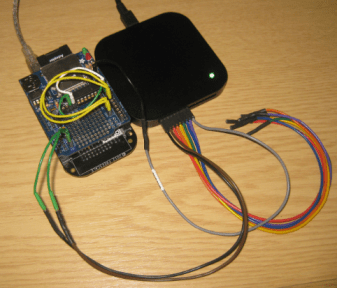
Logic Analyzer attached to the FRDM-KL25Z board

Logic Analyzer attached to the FRDM-KL25Z board

So if you are facing a problem where you read 0xFF or wrong values from the I2C bus with the KL25Z, here is probably why (and how to workaround it). The problem showed up with a modified version of the Freedom Accelerometer tutorial….

Continue reading

Debugging Hard Faults on ARM Cortex-M

It is as bad as this: my application stopped in an unhandled interrupt service routine:

Cpu_Interrupt
Cpu_Interrupt

That does not tell much. I’m using Processor Expert generated code, and with this all my ‘unhandled’ vectors are pointing the same handler:

Continue reading

Thumbs up with Assembly on ARM Cortex

Sometimes it is necessary to write an interrupt service routine in assembly language. This is the case as well for the ARM Cortex-M0+ which is found in the KL25Z on my Freedom board. But there is something important about the ARM Cortex architecture: Thumb Mode.

Thumb mode the ‘ARM way’ to reduce the code size with a reduced (16bit wide) instruction set. The ARM architecture can implement a ‘mixed’ mode, on a function level. To distinguish between ‘normal’ ARM functions and ‘thumb’ functions, the processor is checking if the LSB (Least Significant Bit) of a function pointer (or function call destination) is set. So a jump address of 0x410 is for a ‘normal’ function, while a function jump to the address 0x411 (even if the function is located at the address 0x410) denotes a ‘thumb’ function.

Continue reading

Tutorial: Bits and Pins with Kinetis and the FRDM-KL25Z Board

In “Optimizing the Kinetis gcc Startup” I stripped down the fat of my startup code. Now time to add some useful things. And what does a microcontroller like the KL25Z on the Freedom FRDM-KL25Z board have: Pins! And this means I have bits to set and read :-).

FRDM-KL25Z Board

FRDM-KL25Z Board

Continue reading

Getting Help on Processor Expert Components

That might be an obvious thing for me, but recent questions of readers of my blog let me think that it is not that obvious: How to use a Processor Expert component? How to find example code?

There is the context menu entry ‘Help on Component’ on the component itself, both in the Components Library view and on the component inside the project:

Continue reading

Optimizing the Kinetis gcc Startup

The GNU gcc tool chain integration in CodeWarrior/Eclipse MCU10.3 has a nice feature to show the code and data size of my application after linking (see this article how to enable this). So if I create an ’empty’ project with the wizard, get the code and data size without consulting the linker map file:

Console View with Code and Data Size

Console View with Code and Data Size

But wait! 2604 bytes of code for almost doing nothing? That’s not what I want! There are ways to get that puppy much, much slimmer. Down to 284 bytes :mrgreen: .

Continue reading

SWD Debugging with the FRDM-KL25Z Board

The OpenSDA on the FRDM-KL25Z board is a cool feature: I do not need any external debugging device to program and debug my board :-). But my KL25Z custom board will not have that OpenSDA on it: first because it would add additional costs, and I do not see a way how I could use it for my board. I better start using a SWD/JTAG debugger for my Freedom board to have everything in place.

What I need to add to the black Freedom board is the SWD header:

SWD J6 (populated) and J11 (unpopulated)

SWD J6 (populated) and J11 (unpopulated)

Continue reading

How (not) to Secure my Microcontroller

There are several reports in the Freescale forums around having ‘secured’ the Freedom board. But what does ‘securing’ a board mean? And what does it mean if I get that ‘Device is Secure’ dialog?

Device is Secure. Erase to unsecure?

Device is Secure. Erase to unsecure?

There are different levels of protection you can find in many embedded microprocessors, and the terms might vary from vendor to vendor:

  1. Protect
  2. Secure
  3. Disable Mass Erase

Continue reading

Defining Variables at Absolute Addresses with gcc

Many compilers offer a way to allocate a variable at an absolute address. For example for the Freescale S08 compiler, I can place my variable at a given address:

unsigned char buf[128]@0x2000;

This is very useful (and needed) e.g. if the hardware (like USB) needs a buffer at given address. The advantage of the above (non-ANSI and thus not portable) syntax is that I can define a variable at an absolute address, without the need to allocate it in the linker.

I wanted to do something similar with gcc for Kinetis/ARM, and searched many forums on the internet. Obviously, I’m not alone with this question. The solution I have found comes close to what I use e.g. for the S08 compiler.

Continue reading