Some of my robotics projects take a rather long time do a full build. When I developed applications with Visual C++ on the host, using precompiled headers gave me a big boost in compilation speed. I was looking for the same in similar with GNU and gcc, and as expected: gcc does support precompiled headers too. And indeed, I was able to cut down compilation time by 30% :-). So this post is about how to use gcc with precompiled headers in Eclipse/CDT to give my builds a boost.
Category Archives: Embedded
New in Eclipse Mars: Launchbar
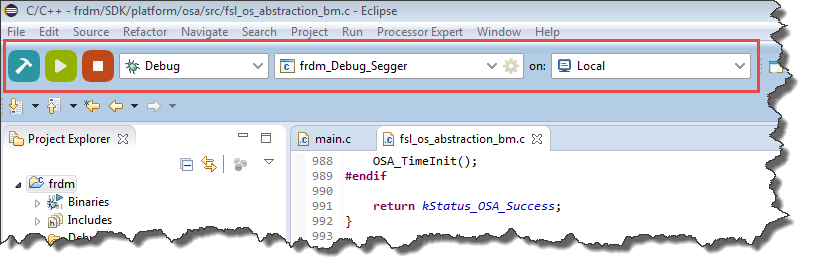
In “Going to Mars: Building a DIY Eclipse IDE for ARM Embedded Microcontrollers” I described how to install an Eclipse based IDE for ARM, based on Eclipse Mars (4.5) and CTD (8.7). There are many great new features in Eclipse Mars which makes that switch worthwhile: the Launchbar:
A dream is are now a reality: a really, really easy way to build, run/debug an application!
Going to Mars: Building a DIY Eclipse IDE for ARM Embedded Microcontrollers
It has been a while since I published my ‘build my own DIY IDE’ (see “DIY Free Toolchain for Kinetis: Part 1 – GNU ARM Build Tools“). I have used that approaches in my classes successfully. Now a new semester is coming up, so time to update the instructions using the latest Eclipse IDE (Mars) and tools (GCC ARM Embedded (launchpad) with GNU ARM Eclipse).
Better Debugging with Eclipse: Step Into Selection
Some might say that Eclipse is too powerful and has too many features. But to me, the many small and somehow hidden gems can make a big difference in my daily life. One of these features is ‘Step Into Selection’ while debugging.
Very often I have a source line with nested function calls like this:
Programming Kinetis with CodeWarrior from the DOS Shell
In “CodeWarrior Flash Programming from a DOS Shell” I showed how to program a device from the DOS shell. Because that example was for ColdFire and CodeWarrior for MCU10.2, here is the same for a Kinetis (FRDM-KL25Z) and CodeWarrior for MCU10.6. In my workspace (c:\tmp\wsp_10.6) I have a project folder (FRDM-KL25Z).
I’m using the ‘Flash Programmer’ to sneak the needed commands:
Updating Segger Tools in Eclipse Kinetis Design Studio
Segger releases often new application and firmware updates. If I install an IDE like the Freescale Kinetis Design Studio, it comes with that firmware version available at that time. How to take advantage of a new Segger release?
Batch Programming with GDB: Segger J-Link and P&E Multilink
I need to program several boards with a firmware: a number too small for serious batch/factory programming, but a number too high doing this with the debugger. I want this:
- Connect the board with the debug probe and power it
- Run a script to flash the program and run it
- Disconnect and restart step 1.
Tutorial: Using GNU Profiling (gprof) with ARM Cortex-M
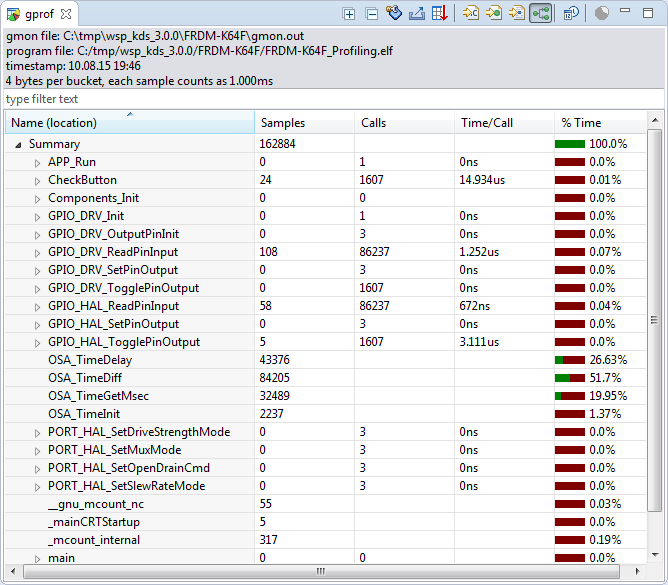
I have published a Sneak Preview how GNU gprof profiling looks for an embedded target ARM Cortex-M in an earlier post:

This tutorial explains how to profile an embedded application (no RTOS needed) on ARM Cortex-M devices with GNU gprof. Additionally I explain the inner workings to generate the data necessary for gprof.
Continue readingDebugging STM32F103RB NUCLEO Board with Segger J-Link
The STMicroelectronics STM32F103 (ARM Cortex-M3) Nucleo boards include the on-board ST-Link v2 circuit which allows to debug the board. This circuit is similar to the OpenSDA circuit found on Freescale boards. Unlike the Freescale OpenSDA, the ST-Link is only the ST-Link: it is not possible to load a P&E Multilink or Segger J-Link or firmware on it. Luckily, the ST-Link has a SWD connector, but this connector is a non-standard one. So how can I debug that board with an Eclipse based environment with GNU ARM Eclipse plugins and a Segger J-Link?
GNU Static Stack Usage Analysis
Stack overflows are a big problem: If I see a system crash, the first thing usually is I try to increase the stack size to see if the problem goes away. The GNU linker can check if my global variables fit into RAM. But it cannot know how much stack I need. So how cool would it be to have a way to find out how much stack I need?
And indeed, this is possible with the GNU tools (e.g. I’m using it with the GNU ARM Embedded (launchpad) 4.8 and 4.9 compilers :-). But it seems that this ability is not widely known?