Eclipse Spell Checker

One of the nice things of modern IDE’s are: they offer many extras for free. Many times it is related to programming and coding. But I love as well the ones which makes things easier and better which is not directly related to the executed code. One thing Eclipse offers is an on-the-fly spell-checking, similar to Microsoft Word:
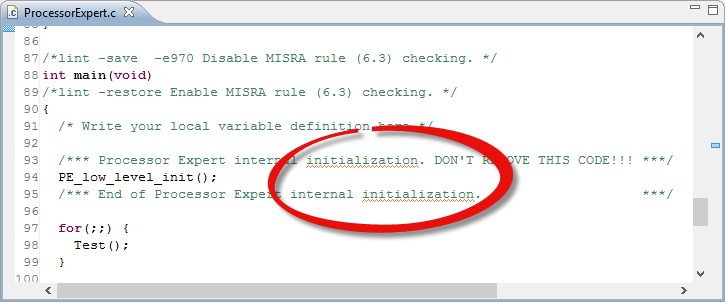
Spellchecked Sources

Spellchecked Sources

Hovering over the text offers me to correct the flagged error:
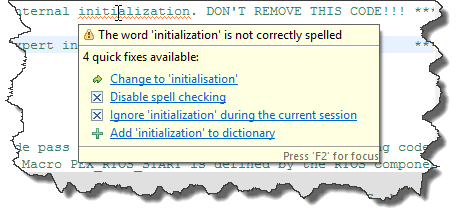
Initialization vs. Initialisation

Initialization vs. Initialisation

But wait: is that example not spelled correctly?

Continue reading

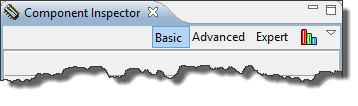
Enabling the Expert Level in Processor Expert

Processor Expert in Eclipse and CodeWarrior is cool thing, and acts as the ‘expert’ for anything around the microcontroller used. But by default, it is acting in the ‘Basic’ level only.

Component Inspector Levels

Component Inspector Levels

But there are ways to get it to the Expert level :-).

Continue reading

Live View for Variables and Memory

Debugging is usually a ‘stop-inspect-continue’ process. That does not work very well for watching a system which continuously changes its state. For this usually I toggle an LED, or write things to the console to watch with a human eye what is going on. But there is something very powerful in the CodeWarrior debugger too: to display variables and memory content while the target is running.

Variable Live View

Variable Live View

Continue reading

Debugging ARM Cortex-M0+ Hard Fault with MTB Trace

And here it is again: a Hard Fault exception raised by the ARM Cortex-M0+ on my Freedom board:

Hard Fault in Debug View

Hard Fault in Debug View

A reason for hard faults are for example dereferencing a NULL pointer. The issue with the ARM Cortex hard fault exception stack is: it is not easy to find out where in the code the problem is.I have created a Processor Expert component to help me to find the location of such an exception. With the Eclipse based CodeWarrior for MCU10.3 there is another way: Trace with the MTB (Micro Trace Buffer)!

Continue reading

Reducing the build time with gcc for ARM and CodeWarrior

Eclipse based CodeWarrior for MCU10.3 comes with gcc build tools for Kinetis/ARM cores. While it features the parallel build make, I noticed that especially for larger projects build times are not as fast as it should be. The good news is: I was able to cut down my build time to less than half with a simple change :-).

When I looked at the output folder where all the object and make files are stored by Eclipse, I noticed that it has as well the listing files generated:

Listing Files in output folder

Listing Files in output folder

Continue reading

McuOnEclipse goes Git

When I have asked by a student last year if I’m uing Git, I said “Git what?”. Yep, a shame I did not know what Git was a this time. But it is never to late to learn new things.

I was coming from CVS, moved to the successor of it (SVN) and was happy with it. Especially with having a local SVN server and repository, that was (and still is) a great thing. But to truely collaborate with a worldwide community, it is time to use something different: Git.

GitHub Bootcamp: 4 simple steps to git

GitHub Bootcamp: 4 simple steps to git

Continue reading

Free Static Code Analysis with Eclipse

I know for myself: the earlier I’m able to fix a bug, the better. So I’m always grateful for things which help me to find issues in my sources as early in the development process as possible. Eclipse and CodeWarrior already help me to find syntax errors in my code while I’m typing:

Eclipse highlighting syntax error

Eclipse highlighting syntax error

With the built-in syntax checker of Eclipse, this helps me many times to get things right without the need to build my code with the compiler. But when I’m able to compile successfully my code, this does not mean it is without bugs. It would be good to catch as many errors *before* downloading and running it on the target.

Continue reading

Migrating Kinetis-L Projects from Beta to Final MCU 10.3

I have successfully used CodeWarrior for MCU10.3 beta version for many projects. With the advent of the final CodeWarrior for MCU10.3, I want to migrate my existing projects to the new and final version. First: my existing projects work as well in the final version, which is good news. But there are two things to change to take advantage of the final 10.3:

  1. Linker file memory split
  2. ARM Micro Trace Buffer (MTB) support

Continue reading

HD44780 2×16 Character Display for Kinetis and Freedom Board

In my earlier Nokia LCD post I described a ‘free of charge’ way to add a LCD display to my FRDM-KL25Z board. If that Nokia display is not available, or an alphanumeric display is enough, then the Hitachi HD44780 display is a low cost option as well.

The HD44780 (or compatible) display is one of the most common displays available. And they usually conly costs around $10 or less. I have used a ‘blue’ 3.3V version of such a display already in my lectures with a Freescale S08 microcontroller. So I thought it would be nice to port the driver to the Kinetis and the KL25Z on it.

LCD Boards with FRDM-KL25Z

LCD Boards with FRDM-KL25Z

A recent post of TKJ Electronics about such a really inexpensive (only $5) HD44780 display caught my attention. And finally I had two of such TKJ displays in my postal mail box yesterday. Time to have some fun on a weekend 🙂

Continue reading