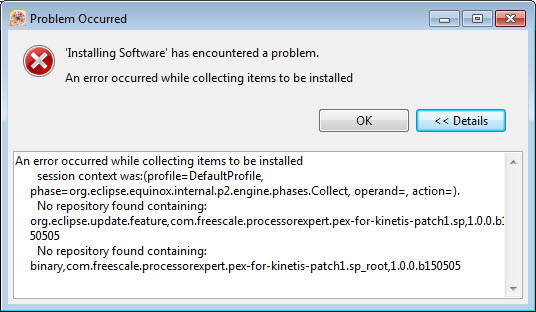
I wanted to install an update in Eclipse with Help > Install new Software or Help > Check for updates. I pointed to the update site, selected what I wanted to install, but then during installation I received an error dialog like this:
😦
I wanted to install an update in Eclipse with Help > Install new Software or Help > Check for updates. I pointed to the update site, selected what I wanted to install, but then during installation I received an error dialog like this:
😦
So here is a problem I have observed for a while, and several users have reported that to me: the problem is that for some reasons and only for some projects, when I do a ‘build’ in Eclipse CDT, it does a ‘full’ build. It does not only build the changed files, it builds all or many files in the project.
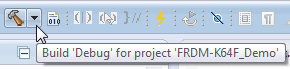
I expect that only the changed files will be rebuild. Instead, it compiles many files it should not compile/build, with the result that a build takes a very long time. That’s clearly wrong, and not what I expect. So what is causing this problem?
What makes Eclipse great: using open source tools there are a lot of tools and techniques available which usually are only provided for desktop development.
A while back I described how to do code coverage with Eclipse Kepler and the GNU ARM Embedded (launchpad) tools (see “Code Coverage for Embedded Target with Eclipse, gcc and gcov“). With Kinetis Design Studio out, time to do the same with that Eclipse distribution, especially as Freescale is now using the stock GNU ARM Embedded tools too.
In case you are running into the following GNU linker error about a missing __end__:
'Building target: MyProject.elf' 'Invoking: Cross ARM C++ Linker' ... toolchain/bin/../lib/gcc/arm-none-eabi/4.8.4/../../../../arm-none-eabi/lib/armv6-m/rdimon-crt0.o: In function `_start': (.text+0xdc): undefined reference to `__end__' collect2.exe: error: ld returned 1 exit status make: *** [MyProject.elf] Error 1
The GNU linker complains that rdimon-crt0.o needs the symbol __end__. This symbol marks the end of the user data/RAM section, and is needed by the rdimon library specs which is used with semihosting.
So NXP announced here a $40 Billion Merger with Freescale. Frequent readers of my blog will know that I’m using in my own and university projects many Freescale devices with Eclipse based tools (Eclipse Kepler/Luna, Emprog ThunderBench, Atollic TrueSTUDIO, Freescale CodeWarrior and of Freescale Kinetis Design Studio) in combination with Processor Expert. In a few projects I have used NXP devices with the CodeRed Eclipse base tools too. So I was curious how that merger of the two silicon companies could look like, if you merge the Freescale and NXP Eclipse based tools, and mix it with Processor Expert and the Freescale Kinetis SDK? The result looks like this:
Freescale has released the v3.0.0 version of the Kinetis Design Studio: this one comes with a great positive change: instead of a custom toolchain, it is coming with the standard GNU ARM Embedded (launchpad) toolchain from ARM. Beside of better code density and less RAM needed, there is one change which affects semihosting. Previously, semihosting was enabled by default in the V2.0.0 libraries. Now semihosting needs to be turned on. This post is how to do this.
SWO (Serial Wire Output) is a cool feature defined by ARM as part of the CoreSight debug block. However, not every debug connection supports SWO, as it requries extra pins routed from the microcontroller to the debug JTAG/SWD header.
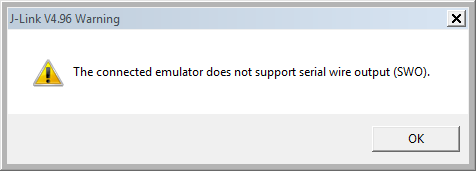
If I’m using the Segger J-Link, and if my hardware does not support SWO, I will get a dialog telling me “The connected emulator does not support serial wire output (SWO).”
In case you face problems with launching GDB: Then I have a quick solution (well: workaround): kill the GDB server and or client process. The problem can show up in many way, but in general gdb is stuck or does not respond:
But it could be an error message like this too:
Error in services launch sequence Starting J-Link GDB Server timed out.
Wondering why the Eclipse Project view might not show all files in the Project Explorer view? For example it shows this:
But on disk I have more files? Where are they?
I very much liked the CodeRed Eclipse based IDE (see “Red Suite 5: Eclipse Juno, Processor Expert and unlimited FRDM-KL25Z“). But back in May 2013 CodeRed was acquired by NXP. I have not used much NXP devices for my projects, and as CodeRed was focusing on the NXP parts, CodeRed was not running daily on my desk any more :-(. Well, things might make a full back circle, as NXP announced back March 1st 2015 to acquire Freescale :-). And maybe as a taste how things might come out, the GNU ARM Eclipse plugin release from March 22nd 2015 includes a CodeRed debug view 🙂 🙂
That debug perspective mimics a CodeRed debug perspective. The advantage of this Eclipse perspective is that it works very well with small screens. This post is about adding this perspective to the recently release Kinetis Design Studio v3.0.0.