HD44780 2×16 Character Display for Kinetis and Freedom Board

In my earlier Nokia LCD post I described a ‘free of charge’ way to add a LCD display to my FRDM-KL25Z board. If that Nokia display is not available, or an alphanumeric display is enough, then the Hitachi HD44780 display is a low cost option as well.

The HD44780 (or compatible) display is one of the most common displays available. And they usually conly costs around $10 or less. I have used a ‘blue’ 3.3V version of such a display already in my lectures with a Freescale S08 microcontroller. So I thought it would be nice to port the driver to the Kinetis and the KL25Z on it.

LCD Boards with FRDM-KL25Z

LCD Boards with FRDM-KL25Z

A recent post of TKJ Electronics about such a really inexpensive (only $5) HD44780 display caught my attention. And finally I had two of such TKJ displays in my postal mail box yesterday. Time to have some fun on a weekend 🙂

Continue reading

Zero Cost 84×48 Graphical LCD for the Freedom Board

The Freedom KL25Z board has a great price of less than $15. Adding a typical LCD usually will add a multiple of that price to the budget. But hey, there is a way to add a LCD to that board at almost no costs! With the idea that I have an old outdated Nokia phone, and the cost of a small capacitor plus some wires are considered as ‘zero’ ;-).

Say Hello from the Freedom Board

Say Hello from the Freedom Board

Continue reading

Adding Symbols to the CodeWarrior Debugger

On the TWR-LCD, I’m using a USB MSD bootloader. In Programming part of flash I showed how to download and debug the application on top of the bootloader. But how to debug both the bootloader and the application? At the same time with CodeWarrior for MCU? The magic key is tell CodeWarrior to use ‘Other Executables’.

Continue reading

Speeding up the Debug Launch in CodeWarrior

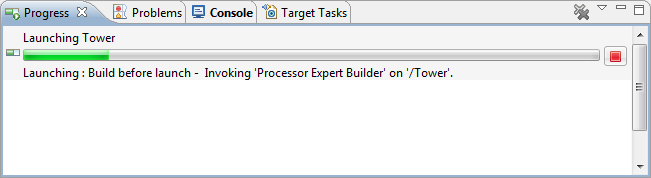
Whenever I do a debug launch in the Eclipse based CodeWarrior, it takes some time until actually I’m ready to step through my code on the target. Yes, a good part of that is by Eclipse. But another part is that Eclipse helps me to do stupid things (which is a good thing). But say if I know what I’m doing, I could remove some of that safety belts and still doing fine. But only if I know what I’m doing.

A good indicator where Eclipse is spending time is to have a look in the Progress View:

Progress information during launch

Progress information during launch

It shows an interesting information: ‘Build before Launch’….

Continue reading

Copy my CodeWarrior Project

I have a project working, and then I want to do a copy. Unfortunately, this is not as simple as it should be :-(. In order to copy a project with all the settings, some knowledge about the internals of the project structure is required, which is the topic of this post.

In “Copy my Project” I was using a ColdFire V2 project which is not an easy case, as is using a Target Task to flash the microcontroller. Fortunately, all other targets in CodeWarrior for MCU are *not* using target tasks :-). With little help and preparation, a copy a project is not that difficult to do.  I’m showing how to do this with the FRDM-KL25Z project I have created in this post.

Continue reading

Removal of Processor Expert for a Project

Yes, I’m using Processor Expert *a lot*. But there might be reasons to go without it. Because then I really want to do it the hard-hard-hard core way. Or maybe because I have configured my system, and want to freeze my code. And nothing prevents me to do it ‘my way’.

In any case, it is easy to transform a CodeWarrior Processor Expert project, and then decide to remove that technology from it, and go further with the ‘traditional’ technology.

Continue reading

Hot-Sync: Attach, Connect & Download

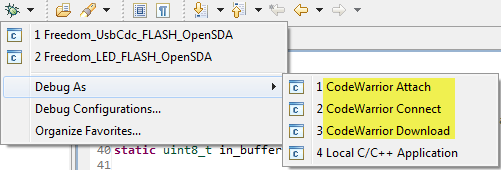
Usually I compile my sources, link it and pass it to the debugger for downloading it to the target. And ‘downloading’ means for me: flashing to the target (RAM debugging is something for the non-hardcore programmers ;-)). But there are more options than only downloading and flashing. There is definitely more which helps me to do post-mortem (yes, I *love* Latin :cool:) debugging.

Downloading means to me that the debugger will program my application into the device, then loads the symbolics (debug information, source file information, …) and then I debug my application. Looking at the ‘Debug As’ options, there is as well Attach and Connect:

Debug as Attach, Connect and Download

Debug as Attach, Connect and Download

Continue reading

Tutorial: Touching the Freedom KL25Z Board

I have covered several aspects of the Freescale KL25Z Freedom board with a tutorial: LED, Accelerometer and RTOS. One peripheral on the board is missing so far: the touch slider area:

Freedom KL25Z Board Touch Slider Area

Freedom KL25Z Board Touch Slider Area

Continue reading

CodeWarrior for MCU10.3 beta is now available

Today is the ‘L Day’ for Freescale: After the announcement of the Cortex-M0+ family (Kinetis-L) earlier this year, it has been launched on the Freescale web site. Given the positive echo on my post around the KL25Z Freedom board (which has a Kinetis Cortex-M0+ KL25 on it) and the fact that production board is shipping these days, a lot of engineers were waiting for the CodeWarrior for MCU10.3 as it is in my view the development tool of choice as well for ARM Kinetis-L. And right on time, the MCU10.3 beta is available for download on http://www.freescale.com/cwmcu10. Time to show what I have noticed as new and noteworthy…

Continue reading

Tutorial: Accelerating the KL25Z Freedom Board

In “Tutorial: Enlightning the Freedom KL25Z Board” I used the RGB LED on the FRDM-KL25Z board. This tutorial extends it to use the MMA8451Q inertial sensor on the board which is connected through I2C to the KL25Z processor:

Freedom Board Block Diagram

Freedom Board Block Diagram with MMA8451Q (lower right corner)

The goal is show the accelerometer x, y and z-axis on the RGB LED.

Continue reading