Defining Variables at Absolute Addresses with gcc

Many compilers offer a way to allocate a variable at an absolute address. For example for the Freescale S08 compiler, I can place my variable at a given address:

unsigned char buf[128]@0x2000;

This is very useful (and needed) e.g. if the hardware (like USB) needs a buffer at given address. The advantage of the above (non-ANSI and thus not portable) syntax is that I can define a variable at an absolute address, without the need to allocate it in the linker.

I wanted to do something similar with gcc for Kinetis/ARM, and searched many forums on the internet. Obviously, I’m not alone with this question. The solution I have found comes close to what I use e.g. for the S08 compiler.
Continue reading

Foreign Characters for the Eclipse Build System

Having a problem with Eclipse and building files with foreign characters in the file name? If you are developing software, then read and follow this advice:

“Do ❗ NOT ❗ use foreign characters in file names, paths or for anything else!”

What I mean with ‘foreign characters’ are things like éöüàäü, or simply anything which is outside the 7bit ASCII or Windows-1252 code page table, even if they are allowed by the file system of your operating system (e.g. Windows).

Or in other words: only use these characters for file or directory names:

abcdefghijklmnopqrstuvwxyzABCDEFGEHIJKLMNOPQRSTUVWXYZ1234567890_

Continue reading

Speeding up the Debug Launch in CodeWarrior

Whenever I do a debug launch in the Eclipse based CodeWarrior, it takes some time until actually I’m ready to step through my code on the target. Yes, a good part of that is by Eclipse. But another part is that Eclipse helps me to do stupid things (which is a good thing). But say if I know what I’m doing, I could remove some of that safety belts and still doing fine. But only if I know what I’m doing.

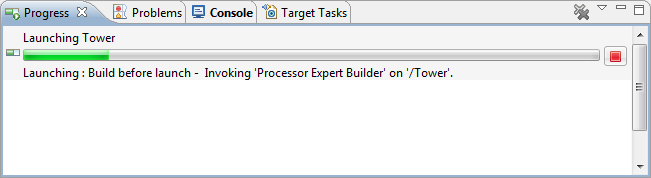
A good indicator where Eclipse is spending time is to have a look in the Progress View:

Progress information during launch

Progress information during launch

It shows an interesting information: ‘Build before Launch’….

Continue reading

Copy my CodeWarrior Project

I have a project working, and then I want to do a copy. Unfortunately, this is not as simple as it should be :-(. In order to copy a project with all the settings, some knowledge about the internals of the project structure is required, which is the topic of this post.

In “Copy my Project” I was using a ColdFire V2 project which is not an easy case, as is using a Target Task to flash the microcontroller. Fortunately, all other targets in CodeWarrior for MCU are *not* using target tasks :-). With little help and preparation, a copy a project is not that difficult to do.  I’m showing how to do this with the FRDM-KL25Z project I have created in this post.

Continue reading

Tutorial: printf() and “Hello World!” with the Freedom KL25Z Board

Sometimes I show to much in a tutorial: only writing something to the UART? Sounds boring, so why not adding tasks, LEDs and a full shell implementation to the mix as in this post? Yes, definitely too much to start with at the beginning :-(. So less is more, and if it is just about the UART. And I promise: it is doable with around 50 lines of application code :shock:.

AND: I admit, this post title is a trap ;-). It is not about printf(). But it *is* about using the UART on the KL25Z Freedom board and to do things like printf(), and even more. Trust me. It is about how to write *and* read from the UART. While I’m using here the Kinetis-L ARM Cortex-M0+ KL25Z Freedom board, it is applicable to any other Kinetis device.

Continue reading

Removal of Processor Expert for a Project

Yes, I’m using Processor Expert *a lot*. But there might be reasons to go without it. Because then I really want to do it the hard-hard-hard core way. Or maybe because I have configured my system, and want to freeze my code. And nothing prevents me to do it ‘my way’.

In any case, it is easy to transform a CodeWarrior Processor Expert project, and then decide to remove that technology from it, and go further with the ‘traditional’ technology.

Continue reading

A Library with ARM gcc and Eclipse

When I create a new bare-board project with the Eclipse based CodeWarrior 10.3 for my FRDM-KL25Z board and GNU gcc, then the ‘Library’ option is grayed out:

Library Option in New Project Wizard

Library Option in New Project Wizard

This does *not* mean that libraries cannot be built :-). In fact it is very easy to do this with the GNU tools and Eclipse, and here is how….

Continue reading

Compiler Defines and Eclipse Editor Highlighting

In this post I have found settings for Eclipse Indexer to show the state if defines correctly. Usually I have something like this in my projects:

debug me

debug me

So I define the macro DEBUG_ME on the compiler command line. And it is cool to see that the Eclipse editor correctly grays out the code which is not enabled. But for this the Eclipse Editor view needs to know about the macro, but how does this work?

Continue reading

Processor Expert, gcc C++ and Kinetis-L with MQXLite

The Kinetis-L is a 32bit microprocessor family, based on ARM Cortex M0+. It comes with ARM gcc in CodeWarrior. Although the Kinetis-L does not have much RAM, it is very possible to use gcc with C++, especially as a programmer I keep the limited RAM amount in mind. So I thought I try C++ and Processor Expert for my Kinetis-L KL25Z Freedom board.

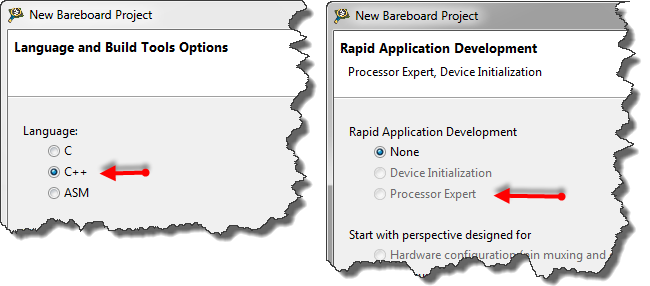
If I select C++ as language in the New Bareboard Project Wizard of CodeWarrior, then I cannot select Processor Expert or Device Initialization:

C++ in the New Project Wizard

C++ in the New Project Wizard

That makes somewhat sense, as Processor Expert creates normal C code and C files, but no C++. Still, what if I need C++? This is doable, but with anything advanced, I need to know exactly what I want and what I do. Here is the ‘How to use C++ with Processor Expert’.

Continue reading