Tutorial: USB CDC with the KL25Z Freedom Board

Question: What to do on a rainy Sunday?
Answer: Having fun with USB and the KL25Z Freedom board! :-).

In “A shell for the Freedom board” I used the UART-to-USB OpenSDA capability of the KL25Z Freedom board: The KL25Z processor uses the OpenSDA K20 microprocessor as Serial-to-USB converter. But this only works because of the P&E OpenSDA USB CDC (Communication Device Class) implementation. If I create my board without OpenSDA, I need a different approach: I want to do USB CDC with the KL25Z :twisted:.

USB CDC Device on COM22
USB CDC Device on COM22

Continue reading

Processor Expert, gcc C++ and Kinetis-L with MQXLite

The Kinetis-L is a 32bit microprocessor family, based on ARM Cortex M0+. It comes with ARM gcc in CodeWarrior. Although the Kinetis-L does not have much RAM, it is very possible to use gcc with C++, especially as a programmer I keep the limited RAM amount in mind. So I thought I try C++ and Processor Expert for my Kinetis-L KL25Z Freedom board.

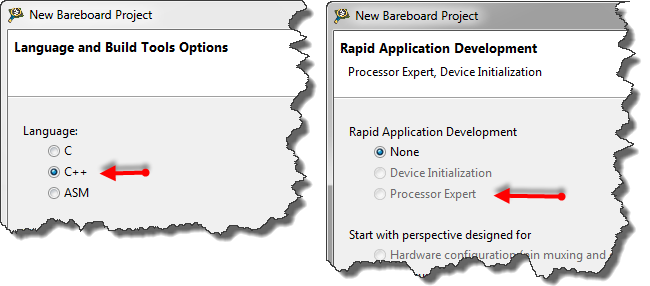
If I select C++ as language in the New Bareboard Project Wizard of CodeWarrior, then I cannot select Processor Expert or Device Initialization:

C++ in the New Project Wizard

C++ in the New Project Wizard

That makes somewhat sense, as Processor Expert creates normal C code and C files, but no C++. Still, what if I need C++? This is doable, but with anything advanced, I need to know exactly what I want and what I do. Here is the ‘How to use C++ with Processor Expert’.

Continue reading

Tutorial: Touching the Freedom KL25Z Board

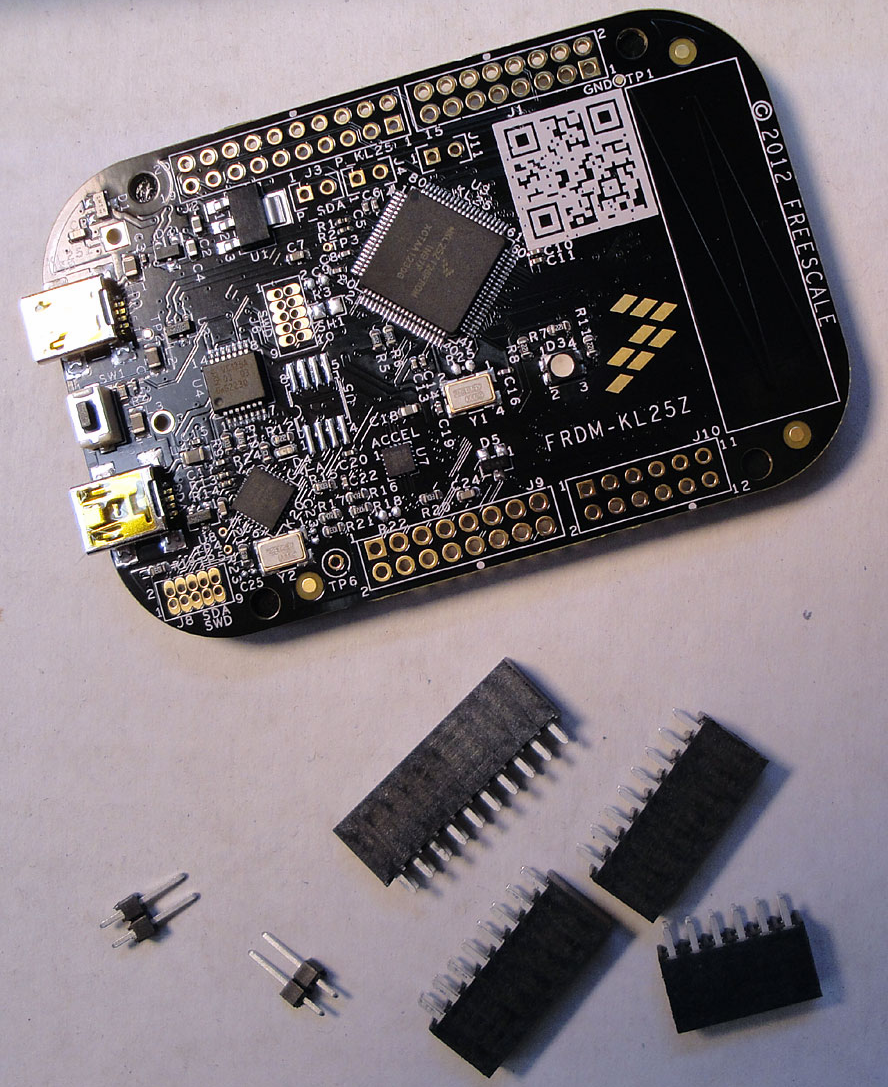
I have covered several aspects of the Freescale KL25Z Freedom board with a tutorial: LED, Accelerometer and RTOS. One peripheral on the board is missing so far: the touch slider area:

Freedom KL25Z Board Touch Slider Area

Freedom KL25Z Board Touch Slider Area

Continue reading

Tutorial: Freedom with FreeRTOS and Kinetis-L

In my earlier tutorials “Enlightning the Freedom KL25Z Board” and “Accelerating the KL25Z Freedom Board” I have not used an RTOS. In this one I’m creating a project from scratch and run it with the open source FreeRTOS operating system, using the FRDM-KL25Z Freedom board. MCU10.3 comes with gcc, and is nicely integrated with Eclipse and CodeWarrior. With this tutorial, it is possible to get an RTOS up and running on a Kinetis device very quickly.

I have a KL25Z which has 128 KByte FLASH and 16 KByte of RAM. What I want to explore is if things could fit as well to the KL0 family where the smallest device has only 8 KByte of FLASH and 1 KByte of RAM. Can this work?

Continue reading

A Seminar, and Freedom with it

Today I attended the regional ‘Design with Freescale’ seminar. It had a part with a hands-on training using PEG for the Tower K60 + TWR-LCD board. It was the first time I had my hands on PEG which is a good learning experience. I learned that it is possible to fill more than 200 KByte of Flash with a simple LCD Touchscreen application which only has two screens, two buttons, a static text and two small bitmaps ;-).

Continue reading

Tutorial: Accelerating the KL25Z Freedom Board

In “Tutorial: Enlightning the Freedom KL25Z Board” I used the RGB LED on the FRDM-KL25Z board. This tutorial extends it to use the MMA8451Q inertial sensor on the board which is connected through I2C to the KL25Z processor:

Freedom Board Block Diagram

Freedom Board Block Diagram with MMA8451Q (lower right corner)

The goal is show the accelerometer x, y and z-axis on the RGB LED.

Continue reading

OpenSDA on the Freedom KL25Z Board

P&E has released information and firmware instructions for using the OpenSDA, see pemicro.com/opensda. Future has posted a very useful article about using OpenSDA here. So time to upgrade OpenSDA bootloader and firmware v10.1. My FRDM-KL25Z board is a pre-production board, and I assume the production boards expected next week will have the new firmware on it. But it is always useful to know how to change/upgrade the firmware, as I expect there will be new versions of it in the future.

Continue reading

S-Record Generation with gcc for ARM/Kinetis

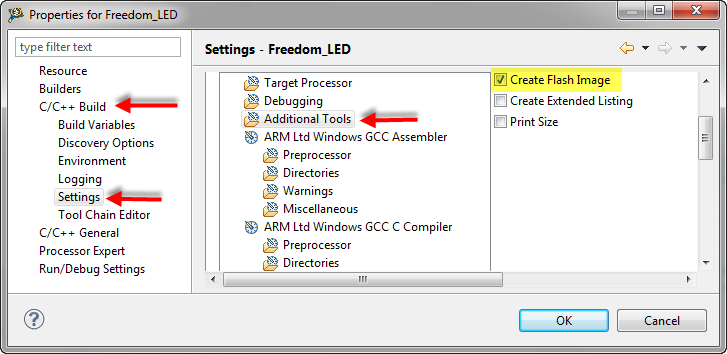
With my Freedom KL25Z board I’m using the GNU/gcc build tools and Eclipse/CodeWarrior. When I wanted to create an S19 file of my application using the GNU tools, this was not that easy to find out. So here are the steps to do this:

I open the project setting using the menu Project > Properties and go to C/C++ Build > Settings > Additional Tools and enable’Create Flash Image‘:

Additional Tools gcc Settings

Additional Tools gcc Settings

Continue reading

Tutorial: Enlightning the Freedom KL25Z Board

The schematics for the Freedom board is now available on the element14 Freedom Board site (you need to log into the element14 community first) as FRDM-KL25Z Schematics (SPF-27556_D).pdf (314.7 K)). So time to write a tutorial how to use the LED on that board.

❗ Note: since this tutorial, the LED component has been simplified. So some of the steps below are much simpler and easer. Please see LED’s for Kinetis, simplified | MCU on Eclipse. I have updated this post with the new instructions and images.

In “FreeRTOS with GCC, Cortex-M0+ and Kinetis KL25Z Freedom Board” and “A Shell for the KL25Z Freedom Board” I have used that board with an RTOS: FreeRTOS. But it is really easy to use that board without an RTOS (‘bare metal’) too. In this tutorial I’m providing step by step instructions to use the RGB LED on the Freedom KL25Z board with Processor Expert and the open source LED component.

Continue reading