The FRDM-K64F board as other Freescale Freedom board have an onboard debugging device. For everyone who wants to debug the FRDM-K64F board with say a P&E Universal Multilink, here is my setup in case you do not get it working out of the box:
Category Archives: Boards
Proof of Concept: Open Source ARM SWD Debug and General Purpose Board
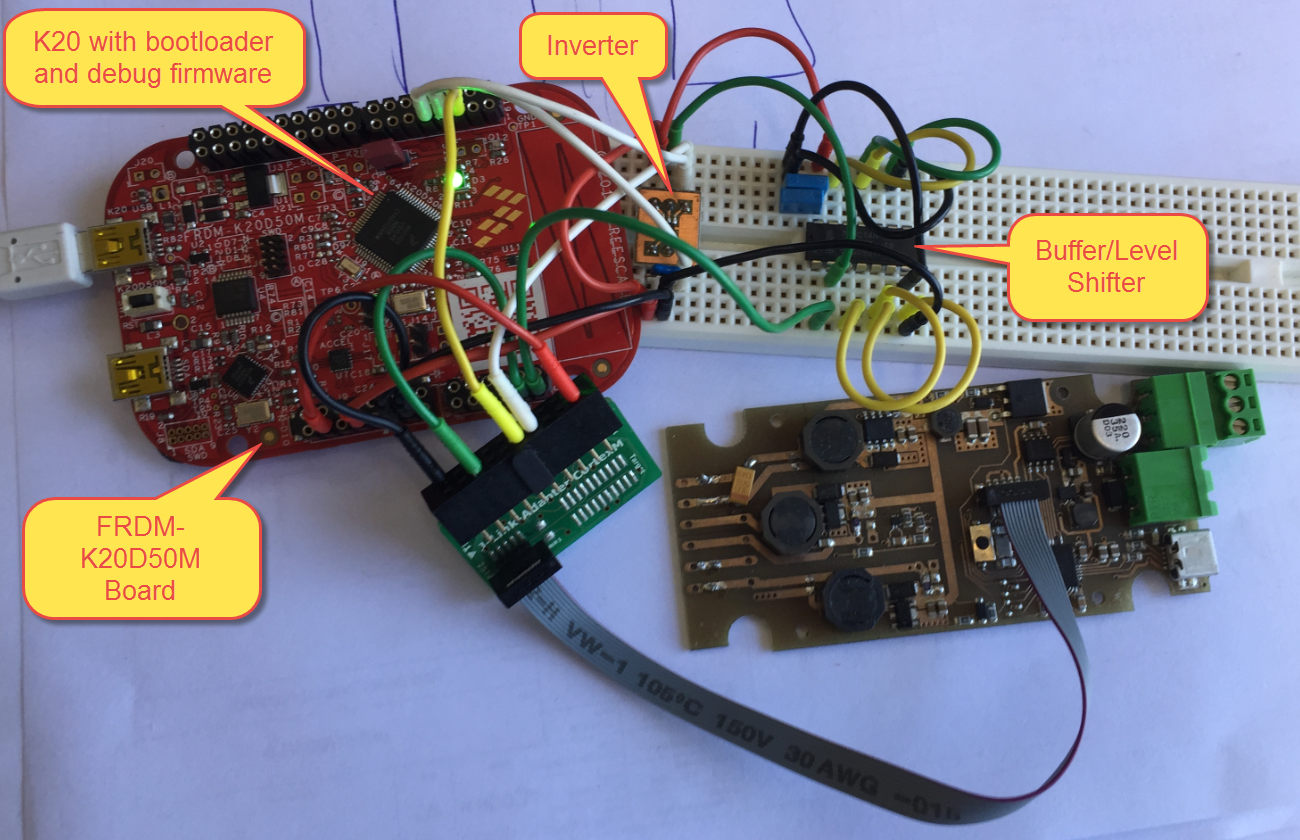
The Teensy is a great and tiny board (see “USB CDC with the Teensy 3.1 Board“), but it lacks real SWD/JTAG debugging capabilities (see “Hacking the Teensy V3.1 for SWD Debugging“). The Freescale Freedom boards are great, but for many applications too big, and have potentially too many components on it. So what about building a breadboard friendly tiny board which *has* SWD debugging ability *and* can be used to debug another boards?
So here is a working prototype based on the FRDM-K20D50M:
UART with the FRDM-KL02Z Board
In my classes I’m mainly using the Freescale FRDM-KL25Z board, as it provides the best value for the money, and 128 kByte FLASH with 16 kByte of RAM is enough for many smaller projects. I do have as well the FRDM-KL02Z Board (32 KByte FLASH, 4 KByte of RAM) which is an inexpensive board to evaluate the smaller KL02Z microcontroller. Because someone reported a problem not being able to use the UART over OpenSDA/USB-to-CDC bridge, I have created a demo project which communicates with a console on the host.
USB CDC with the Teensy 3.1 Board
For a project I want to use the Teensy 3.1 board (see “Hacking the Teensy V3.1 for SWD Debugging“) in USB CDC mode: that way the Teensy board can connect to the host and exchange data or attach a console to the Teensy board: that way I can connect the Teensy over USB to the host use the USB as communication interface:
Sensirion SHT11 Temperature and Humidity Sensor on a MikroElektronika Click Board
In one of my earlier posts (“Using the DHT11/DHT22 Temperature/Humidity Sensor with a FRDM Board“) I’m using the DHT11/DHT22 temperature/humidity sensors with the FRDM-KL25Z board. These sensors are very inexpensive, but have limited measurement range and accuracy. As pointed out by a reader of that article, Sensirion (a Swiss company :-)) has good sensors too, and I decided I would like to try the SHT11 sensor:
- 0-100% Relative Humidity
- +/- 3% Relative Humidity accuracy
- -40 – +125°C
- 2.4 – 5.5V supply voltage
Poor Man’s Trace: Free-of-Charge Function Entry/Exit Trace with GNU Tools
There are cases where my application runs find for days, weeks or even months, but then from time to time there is an application crash. Yes, the watchdog will recover it, but still it would be good to know what happened? One solution would be to hook up a trace probe (like the one I have described in this post: “First Steps with the P&E Tracelink“). But having such a trace probe attached all the time is first not cheap and second not always possible. So what if the application would leave ‘breadcrumbs’ behind which would tell me the flow of the program leading to the problem? I have found a functionality in the GNU tools which seems not be widely known or use, but is incredibly helpful in such cases.
So what if I could get a log like this telling me which functions get called by whom?
{ 00000E88->00000DA0 ???->DEMO_Init
} 00000E88<-00000DA0 ???<-DEMO_Init
{ 00000E8C->00000D40 ???->DEMO_Run
{ 00000D62->00000CE8 DEMO_Run:0x0022->decide
{ 00000D0E->00000C60 decide:0x0026->calcValue
} 00000D0E<-00000C60 decide:0x0026<-calcValue
{ 00000D16->00000CA0 decide:0x002E->getValue
{ 00000CC6->00000C60 getValue:0x0026->calcValue
} 00000CC6<-00000C60 getValue:0x0026<-calcValue
} 00000D16<-00000CA0 decide:0x002E<-getValue
} 00000D62<-00000CE8 DEMO_Run:0x0022<-decide
{ 00000D62->00000CE8 DEMO_Run:0x0022->decide
Using the DHT11/DHT22 Temperature/Humidity Sensor with a FRDM Board
For a home automation project I need to know the room temperature and humidity percentage of the room air. Adafruit has an inexpensive DHT11 sensor from http://www.aosong.com which I decided to use for that project.
Continue reading
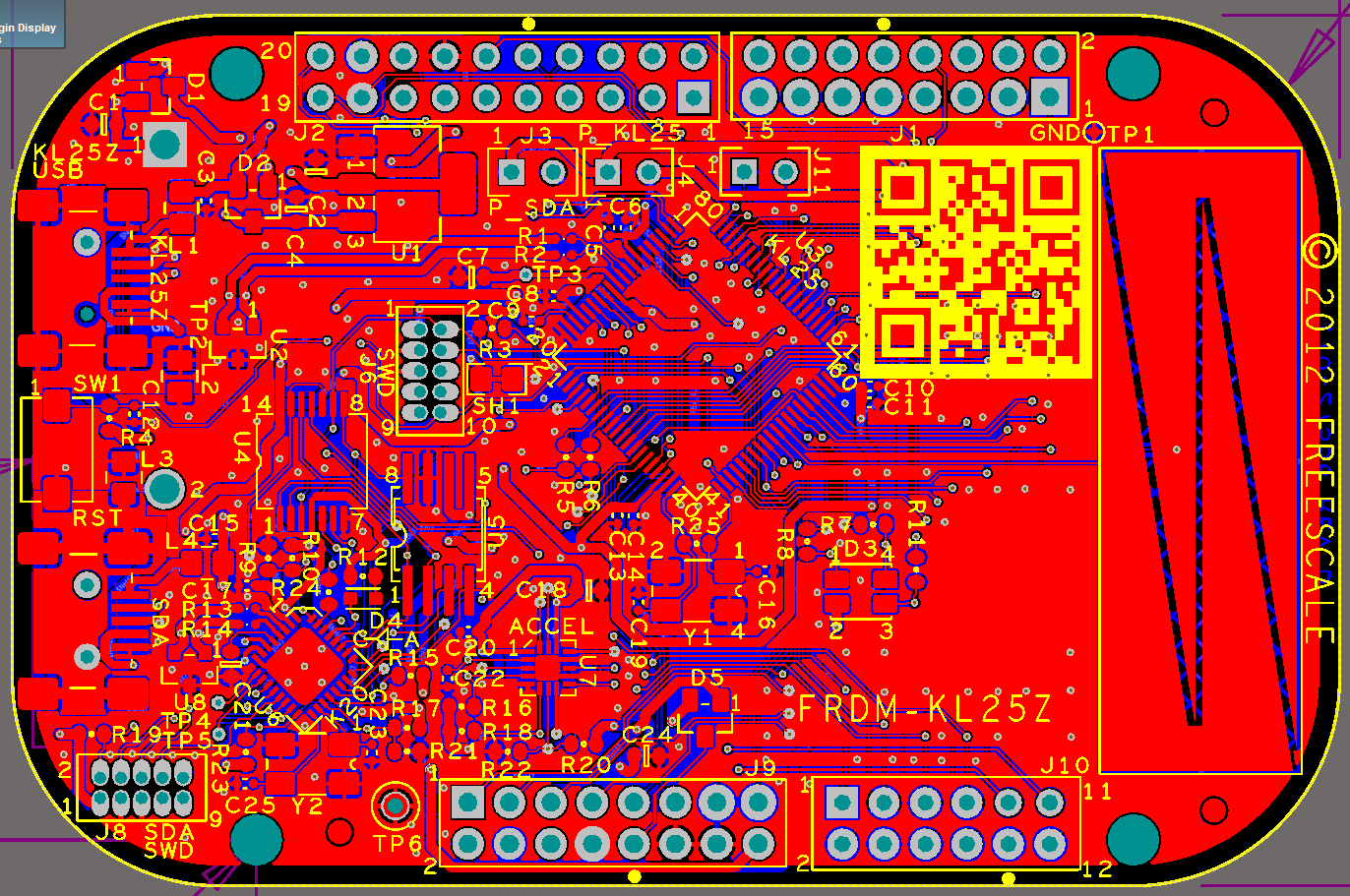
Altium File for Freescale FRDM-K25Z Board
If you are designing your own board for the Freescale FRDM boards, then having the matching PCB design files is a good thing to have. I have posted this week an Altium contribution on GitHub for the FRDM headers (see “FRDM-KL25Z Arduino Headers with Altium“). And here there is yet another contribution I received from [Darren]: the FRDM-KL25Z board in Altium :-):
Command Line Programming and Debugging with GDB
Eclipse with GDB is great: it comes with a graphical front end for debugging. But sometimes it is all about to download a program. Is it really necessary to launch an IDE like Eclipse to program or quickly debug a board? With the GNU Debugger (GDB), the answer is ‘no’: GDB comes with a command line debugger which is designed exactly for this: providing a command line interface for programming/downloading and debugging, bypassing any GUI (Graphical User Interface).
FRDM-KL25Z Arduino Headers with Altium
In case you are using Altium to design your boards, then this one might be useful for you: