Hiking through the Alps means watching beautiful mountains. But the small and tiny wildflowers are even more beautiful. So here is a small from today…

Wildflower

Hiking through the Alps means watching beautiful mountains. But the small and tiny wildflowers are even more beautiful. So here is a small from today…
Wildflower

Zugspitz Arena (click to enlarge)
The Zugspitze mountain on the left with the Sonnenspitze mountain on the right builds a beautiful natural arena.

Wild Bee
Hiking in the Austrian mountains, and with the first sun beams wild bees are around us …
With my DIY tool chain (see “Constructing a Classroom IDE with Eclipse for ARM“) I get a complete tool chain. I do not need to build that tool chain from the sources for Windows, as all the binaries are nicely pre-compiled and made available. But there is one issue I face from time to time: as the libraries provided by ARM do not come with sources and debug information enabled, I end up with that “No source available for …” message in the debugger:

No Source Available
The solution is to grab the C/C++ library sources from the ARM launchpad site and get it built locally the way I need it.
Frequent readers of this blog know that I do not like printf (see “Why I don’t like printf()“), because the standard printf() adds a lot of overhead and only causes troubles. But like small kids, engineers somehow get attracted by troubles ;-). Yes, printf() and especially sprintf() are handy for quick and dirty coding. The good news is that I have added a lightweight printf() and sprintf() implementation to my set of components: the XFormat component. And best of all: it supports floating point formatting :-).

XFormat Component
Eclipse is not the fastest and snappiest IDE of the world, but in my view the most versatile and open one. And as with any tool: using it the wrong way does not make it better. Sometimes I have students in my classes which complain that Eclipse is slow, even on a decent machine. Looking at their notebook screens and Eclipse workspace usually tells me right away what they are doing ‘wrong’: there are many, many projects open in the workspace, the most I have seen was more than 50 projects (yikes!!!)!
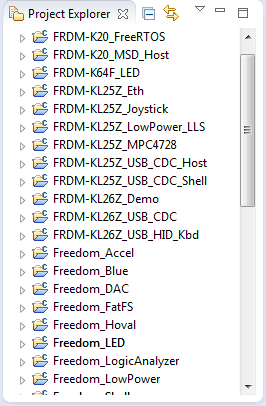
Many many projects open
In my earlier post (“Adding the CAM8000-D Camera Module to the RIoT Board“) I was running into the ‘single camera’ trap of the current RIoT Android OS image: with only one camera attached, and switching between front/back camera, Android is stuck and needs to be flashed again to the board. Because this is so painful and can happen easily, I ordered a USB camera for the RIoT board: with this that problem should go away, and I would have a front and a back camera.
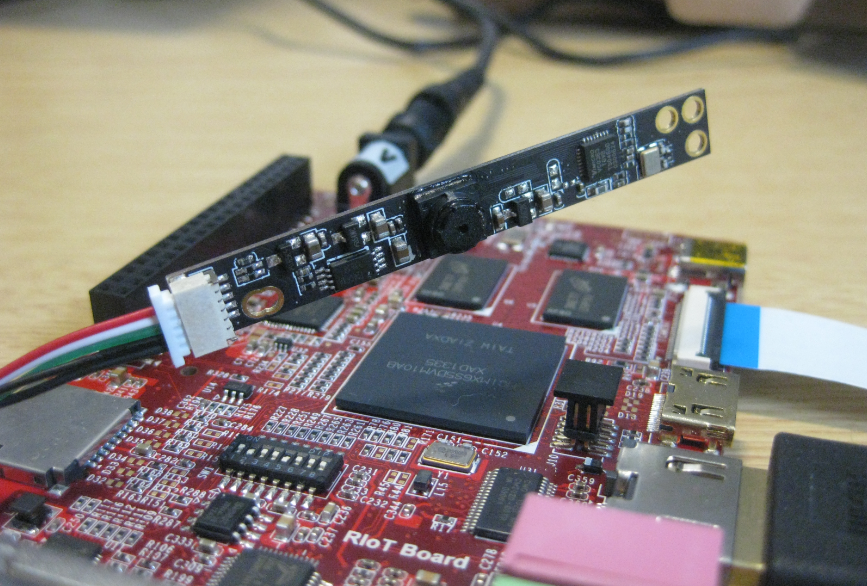
CAM8100-U Camera Module with RIoT Board
Eclipse projects have the nice features that they can link to files and folders: so instead of having the physical file, it is just a pointer to a file. This is very cool as that way I can point to shared files, or keep files in a common place referenced from projects, and so on.

Linked Folder and File in Eclipse
As with most things in Eclipse, there is not a single way how to do things. So I’m showing in this post several ways how to link to files and folders.
I start liking the GNU linker (ld) more and more. Yes, that linker command file syntax needs some time to learn, but it is very powerful. I stumbled over an interesting way how to define linker symbols:
/* Linker file for GNU C Compiler */

/* Entry Point */
ENTRY(Reset_Handler)

HEAP_SIZE  = DEFINED(__heap_size__)  ? __heap_size__  : 0x00000400;
STACK_SIZE = DEFINED(__stack_size__) ? __stack_size__ : 0x00000400;
The interesting part is how the HEAP_SIZE and STACK_SIZE symbols are defined.
It checks if e.g. __heap_size__ is DEFINED, and if so, it uses that symbol, otherwise it is using 0x400. Very similar to the C/C++ ‘?’ operator. So I can overwrite the default of 0x400 with my value or symbol. The questions is: from where does the symbol come from?
This post is for the geeks of us: the ones writing Processor Expert components with CDE (Components Development Environment). The problem is the following: In the Components Library view I have all my components listed, such as the USB stack components:

USB Stack Components
 MCU on Eclipse