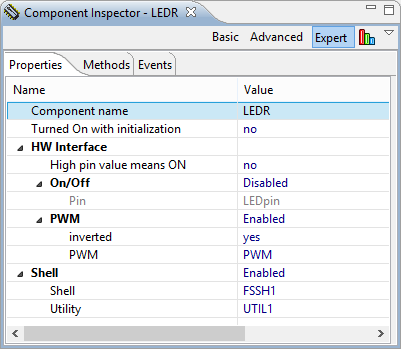
Controlling a LED is a great starter for any embedded project: simple and you immediately get feedback if it works :-). Even better: as driving a LED is not different from working with another digital I/O or controlling a solenoid, the ‘LED’ concept and driver is very universal. I recently have simplified my Processor Expert LED component, so it might be a good time to add some more functionality again ;-). Let’s add support for PWM, and adding a shell interface on top of it. That way the LED is dimmable, plus I can do everything with a command interface as well:
Tag Archives: Processor Expert
Pin and Signal List with Processor Expert
With Processor Expert projects, I have a nice overview of pins used in my application:
While that Processor View is nice, I want a list of pins and signals too:
An Idea for the New Year, and Asking for Your Opinion
The year 2012 is coming to an end, and luckily the end of the world is postponed :-). So time to make plans for the year 2013! And here is one I would like to ask your opinion about it: A public repository for Processor Expert components.
A Processor Expert Component to Help with Hard Faults
Ahrg! Again my ARM application crashed somewhere and I ended up in a HardFault exception :-(. In my earlier post I used a handler to get information from the processor what happened. But it is painful to add this handler again and again. So I decided to make things easier for me: with a special HardFault Processor Expert component :-).
After adding this HardFault component to my project, it automatically adds an entry to the vector table. So no manual steps are needed: having the component in the project and enabled will do the needed steps.
Migrating Kinetis-L Projects from Beta to Final MCU 10.3
I have successfully used CodeWarrior for MCU10.3 beta version for many projects. With the advent of the final CodeWarrior for MCU10.3, I want to migrate my existing projects to the new and final version. First: my existing projects work as well in the final version, which is good news. But there are two things to change to take advantage of the final 10.3:
- Linker file memory split
- ARM Micro Trace Buffer (MTB) support
LED’s for Kinetis, simplified
Sometimes it takes a while until things get better. Same thing applies to software: from time to time a refactoring and simplification makes sense. Especially if the underlying technology has been improved. With CodeWarrior for MCU10.3 available, it is time to refactor the LED component.
CSI Crime Scene Investigation with I2CSpy and Freedom Board
The CSI is one of my favorite crime drama television series: not because it reflects the true reality, but because it is fun watching how they always find new ways how to investigate a crime scene with ‘close to reality’ tools. Real CSI is different: you only do a small part of the investigation chain. As for myself, I’m engaged in a research project at the university to develop hardware and software for crime scene investigation :-).
One area of that research project is to retrieve and data from credit card (ATM) skimming devices: these are devices are attached or inserted into credit or debit card machines and ‘skim’ the card information and the PIN code used. With that information, it is possible to clone a credit card for credit card fraud. Such devices are a big problem, and newer devices are very hard to spot. Simply ‘google’ for pictures for “skimming device” and you will get an idea of the diversity and madness of such devices :-(.
HD44780 2×16 Character Display for Kinetis and Freedom Board
In my earlier Nokia LCD post I described a ‘free of charge’ way to add a LCD display to my FRDM-KL25Z board. If that Nokia display is not available, or an alphanumeric display is enough, then the Hitachi HD44780 display is a low cost option as well.
The HD44780 (or compatible) display is one of the most common displays available. And they usually conly costs around $10 or less. I have used a ‘blue’ 3.3V version of such a display already in my lectures with a Freescale S08 microcontroller. So I thought it would be nice to port the driver to the Kinetis and the KL25Z on it.
A recent post of TKJ Electronics about such a really inexpensive (only $5) HD44780 display caught my attention. And finally I had two of such TKJ displays in my postal mail box yesterday. Time to have some fun on a weekend 🙂
Zero Cost 84×48 Graphical LCD for the Freedom Board
The Freedom KL25Z board has a great price of less than $15. Adding a typical LCD usually will add a multiple of that price to the budget. But hey, there is a way to add a LCD to that board at almost no costs! With the idea that I have an old outdated Nokia phone, and the cost of a small capacitor plus some wires are considered as ‘zero’ ;-).
FRDM-KL25Z with the Arduino Motor Shield
The great thing with the Freedom FRDM-KL25Z board is its compatibility with Arduino Shields: a great set of board available at very reasonable prices. I had my hands on the Adafruit Data Logger shield, and now it was time to use the original Arduino Motor Shield R3.


