USB with the TWR-K60F120M and TWR-K70F120M

If you read my posts, then you probably know: I *love* the FRDM boards! But: Freescale has only the lower-end processors available with a FRDM board (yet?). As I need something more powerful for my Raspberry Pi Camera project, I’m using Tower boards instead. This gives me an ARM Cortex-M4 with 120 MHz, Floating Point unit plus 128 KByte SRAM :-).

For that project I need USB. So this post is about using the TWR-K60F120M and TWR-K70F120M with USB connectivity, using the USB CDC device class as example. Initially I thought I can do as easily with the FRDM boards. It turned out, that things are not that easy.
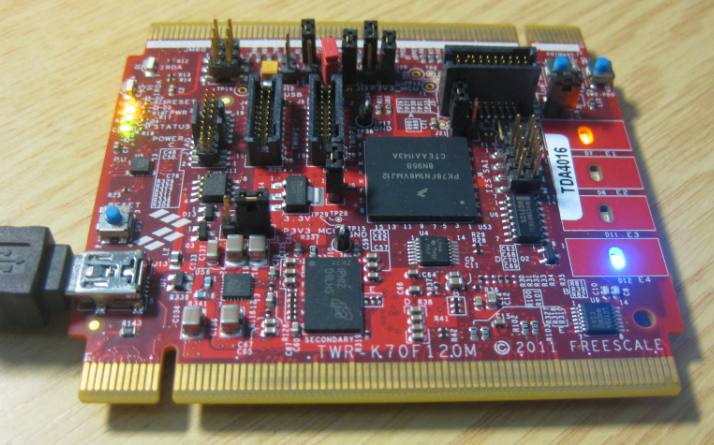
Freescale TWR-K70F120M Tower Board

Freescale TWR-K70F120M Tower Board

Continue reading

Using the FRDM-KL25Z with CMSIS-DAP to program non-Freescale ARM Microcontrollers

Freescale might not have thought about this: how to use Freescale boards and silicon to develop for non-Freescale silicon? šŸ˜‰

I tinkered around using the FRDM (e.g. FRDM-KL25Z) board as a general purpose programming or debugging device. See the links to the posts at the end of this article. I have used it to program and debug other Freescale ARM processors. It requires board changes and the usage of a different OpenSDA firmware which has its own limitations (no USB CDC serial bridge). But for about $15-20 I have a device to program my own external boards :-).

If you are using Keil tools, then the good news is: With CMSIS-DAP you can debug any other (even non-Freescale) ARM device as long it is supported by the IDE :mgreen:

FRDM-KL25Z debugging the nRF51422-DK (Source: Keith Wakeham)

FRDM-KL25Z debugging the nRF51422-DK (Source: Keith Wakeham)

Continue reading

FRDM Board Bootloader fails with Windows 8.1 Preview

Microsoft has released the Windows 8.1 Preview. So you can try out the next update of Windows 8. In short: Do NOT use Windows 8.1 Preview if you are using a Freescale FRDM board! Otherwise you will not be able to change the OpenSDA firmware (MSD or debug application).

ā— Update: P&E has released a new firmware v114 which combines USB CDC, MSD bootloader and debug application, and this firmware fixes the issue described in this post.

Well, I have not used it personally: I never use ‘test’ or ‘preview’ versions on my ‘production’ machine. It is ok to try things out on separate ‘scratch’ machines, but not on something I need to have stable for my work. Well, some of the students in my INTRO class were not able to resist and downloaded and installed Windows 8.1 Preview on their machines. With the result that the OpenSDA Bootloader does not work with Windows 8.1 Preview:

ā— It seems that the problem exists as well with the Windows 8.1 ‘final’ release.

Continue reading

FRDM Board not responding? Check your Virus Scanner!

In case you have this problem with the FRDM boards: You are using the FRDM bootloader mode (it shows up as BOOTLOADER) or the MSD mode (e.g. it shows up as FRDM-KL25Z) (see OpenSDA on the Freedom KL25Z Board) and it does not respond any more, or does not work as expected, then read on…

Continue reading

The Freescale OpenSDA Trap: “No Device Available”, or something like that….

Self-Motivation: I write this post in the hope to cut the number of ‘please help me’ emails in my inbox ;-):

If you want to debug one of the Freescale boards with OpenSDA (FRDM-KL25Z, FRDM-K20, FRDM-KL05Z, FRDM-KL46Z48M, FRDM-KL02Z, TWR-KL47Z48M, …), and if you get this dialog …

No Device Available

No Device Available

… then read on.

Continue reading

Bricking and Recovering FRDM-KL25Z Boards: Reset, SWD Clock and Low Power

I’m working with a student on building a small autonomous robot platform, based on the FRDM-KL25Z board. We integrated new software modules, compiled and linked, and then downloaded the application to the board. While debugging and stepping through the application startup, I had this:

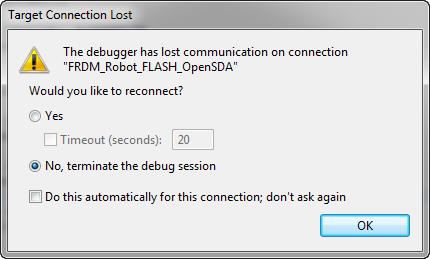
The Debugger has lost communication on connection

The Debugger has lost communication on connection

Outsch! That’s not good. Even worse, trying to connect again to the board failed :-(. What happened?

Continue reading

Freedom Board with Segger OpenSDA Debug Firmware

Looks like there is some movement on the ‘OpenSDA Front’: After CodeRed has released their RedProbe OpenSDA firmware, now Segger has released an OpenSDA firmware.

With this, I get a low-cost debugging solution similar to the well-known J-Link run control devices. The OpenSDA Segger Firmware is something like a J-Link-lite.

FRDM-KL25Z with Segger OpenSDA Debug Firmware

FRDM-KL25Z with Segger OpenSDA Debug Firmware

Continue reading

Adding USBDM to CodeWarrior for MCU10.4

If you are following my recent posts, then you know I started using USBDM on OpenSDA as an alternative run control solution. Now with the advent of MCU10.4, the question is: how to use USBDM with it, because the USBDM installer obviously only knows the version up to MCU10.3?

USBDM 4.10.4a Installer

USBDM 4.10.4a Installer

Continue reading

Can MCU10.4 recover a bricked OpenSDA Freedom Board?

Ok, this one might not work for everyone. And maybe I’m seeing a ghost. But a nice and real one, at least for me :-). It seems that with the new CodeWarrior for MCU10.4 installation I was able to recover a bricked OpenSDA FRDM-KL25Z board 😯

Recovered OpenSDA Board

Recovered OpenSDA Board

Continue reading

Debug External Processors with USBDM and Freedom Board

Teaching at a university means to work in a very special environment. What students love is ‘Open Source’: because it allows them to ‘see’ things and learn from the technology. The other thing is: students have a low budgets, so they appreciate if they can use inexpensive or low-cost hardware and software. The FRDM-KL25Z Freedom board for sure meets that low price, and no extra programming device needed.

Now they are building their own boards, and they wish to program and debug it. They can borrow the Segger J-Links and P&E Multilinks we have available at the university. But why not use the Freedom board as ‘hobby’ debug and programming solution? As explored in “Using the Freedom Board as SWD Programmer“, they can use the default factory installed OpenSDA to program another microcontroller of same type. But not to debug it.

While writing theĀ “Using the Freedom Board as SWD Programmer” article, I was looking into USBDM. USBDM has added in January 2013 support for OpenSDA. But at that time, it was somehow not working for me, and I had not enough time to find out what the problem was. Time to get that fixed. Good news: With help and tips from the USBDM community, I have it finally working šŸ™‚

USBDM Debugging another FRDM-KL25Z

USBDM Debugging another FRDM-KL25Z

Continue reading