Eclipse provides in the Editor view great tool tips (called ‘hovers’) which shows what is behind a macro: I can move my mouse over it, and it shows me the content behind it:
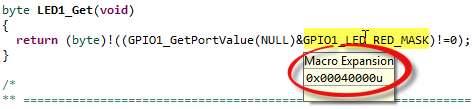
Macro Expansion Hover in Editor View

Eclipse provides in the Editor view great tool tips (called ‘hovers’) which shows what is behind a macro: I can move my mouse over it, and it shows me the content behind it:
Macro Expansion Hover in Editor View
There are always hidden treasures in Eclipse, and here is one: By default, variables might look like which is not always what I want:

Variables View
How to change the format to hexadecimal (or any other format)?
P&E has released information and firmware instructions for using the OpenSDA, see pemicro.com/opensda. Future has posted a very useful article about using OpenSDA here. So time to upgrade OpenSDA bootloader and firmware v10.1. My FRDM-KL25Z board is a pre-production board, and I assume the production boards expected next week will have the new firmware on it. But it is always useful to know how to change/upgrade the firmware, as I expect there will be new versions of it in the future.
The schematics for the Freedom board is now available on the element14 Freedom Board site (you need to log into the element14 community first) as FRDM-KL25Z Schematics (SPF-27556_D).pdf (314.7 K)). So time to write a tutorial how to use the LED on that board.
❗ Note: since this tutorial, the LED component has been simplified. So some of the steps below are much simpler and easer. Please see LED’s for Kinetis, simplified | MCU on Eclipse. I have updated this post with the new instructions and images.
In “FreeRTOS with GCC, Cortex-M0+ and Kinetis KL25Z Freedom Board” and “A Shell for the KL25Z Freedom Board” I have used that board with an RTOS: FreeRTOS. But it is really easy to use that board without an RTOS (‘bare metal’) too. In this tutorial I’m providing step by step instructions to use the RGB LED on the Freedom KL25Z board with Processor Expert and the open source LED component.
Maybe a better title for this post would be “Eclipse Debugging with Strings Attached’? Digging a bit more into the domain of string debugging, things are not always the way I wish they are.
I’m using here CodeWarrior for MCU10.2, which is based on Eclipse 3.6. Let’s use the following piece of code with the ARM Cortex-M4 Kinetis K60 core and the Freescale ARM compiler:
char buf[] = "abcd";
char *p = &buf[0];

unsigned char ubuf[]="ABCD";
unsigned char *up = &ubuf[0];

signed char sbuf[]="1234";
signed char *sp = &sbuf[0];
Here I am: past midnight, and debugging why my Kinetis ARM Cortex-M4 K60N512 application. So now you know what keeps me up at night :-). Stepping through some code which is using all kind of strings:

Debugging the K60 with Eclipse and CodeWarrior
The challenge is: how to debug my strings?
I’m a big fan of physical UART/RS-232 ports on boards. So I was somewhat disappointed not to see a serial 9pin connector on the Freedom KL25Z board. But it is perfectly understood that for this price costs are critical, and a serial header or connector is pushing the budget for that board very likely out of the water. Still, I want serial connectivity for my applications.

Freedom Board with RGB LED
I can do test automation or standalone flash programming using the Debugger Shell. But this requires me to use a view inside of Eclipse. What would be nice is to do such things from a lower level: from a Windows Command window (CMD or DOS Shell). This is possible with usage of Eclipse/CodeWarrior in command line mode.
In Scripting, the Debugger Shell and Debugger Shell: Test Automation I was exploring how to use the Debugger Shell for automation. For my lectures at the university I need to program multiple boards with the same application. I don’t want (and need) a debugger for this: all what I need is a ‘Standalone Flash Programmer’: the ability to flash one or multiple boards without debugging.
The development cycle does not end with debugging. Debugging is something manual, but for testing and automation I want to develop scripts I can run in an automated fashion. For this I use a tool in CodeWarrior: the Debugger Shell as command line debugger and using TCL as scripting language. This gives me a powerful way into automation and scripting with the debugger: from basic access to memory, to stepping and controlling the execution up to programming the flash memory.
 MCU on Eclipse