Breakpoints with Special Effects

As promised back in Percepio, I want to have it ported and working with the Freescale Cortex-M4/Kinetis in CodeWarrior. That’s what I’m working on now, deep into the night. While doing this, I had to generate a lot of trace data, and I used the script I presented in that earlier post: Setting a breakpoint in the trace buffer wrapper event and then export the data. But there has to be an even better way, and indeed there is one: Breakpoints with Special Effects!

Continue reading

Debugging Global Variables

If I’m debugging my application in Eclipse or CodeWarrior, it shows in the Variables view the local and global variables of the current Thread and stack frame only:

Debug View with Variables View

Debug View with Variables View

This makes sense as this is usually where my focus is. And this is good from a performance point of view: The debugger does not need to read a lot of other variables from the target which I’m not interested in. But the question is: how to show the variables which are in other files if I really need to look at them?

Continue reading

Percepio FreeRTOS+Trace V2.2.2 released

Percepio has released a new V2.2.2 library of FreeRTOS+Trace (see Tracing with FreeRTOS+Trace from Percepio). The new release comes with many improvements. The trace recording is optimized for more efficient recording and longer trace with the same amount of memory.

Note: Because the trace data structure is changed and optimized, I need the latest tool on the PC/host from http://www.percepio.com.

I have updated the Percepio Processor Expert component to generate and use the new trace library V2.2.2. This includes the new settings in the component properties as shown below:
Continue reading

Killing Me Softly: Zombies and Debugger Engines

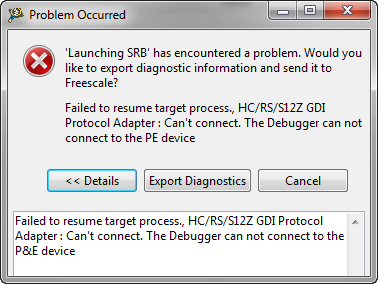
I’m stressing the CodeWarrior debugger a lot: having multiple boards attached, debugging things in parallel, switching and unplugging boards all the time. I have my eclipse IDE running for several days and nights (up to a week or more), with constantly suspending and resuming and switching networks. And sometimes it is my fault (see Device is Secure?). But well, sometimes the CodeWarrior debugger has a problem too. Luckily, a simple trick gets things back on track.

Continue reading

Device is secure?

It is one of these long weekends which allow to catch up on many things. One thing I finally completed was the move to FreeRTOS V7.1.1. With this I did some tests using the Tower boards, including the Kinetis one. So I have rebuild my Kinetis K60 application and was ready to flash the device. But then to my surprise I got this dialog:

Device is secure. Erase to unsecure?

Device is secure. Erase to unsecure?

Continue reading

Dump my Device Memory

Maybe this situation is familiar to you: My embedded software stopped in the field. I am in front of it, hooked up with my laptop and debugger. And I see: indeed, it has a problem. Maybe just a one-time-thing? Maybe I do a reset and things will work as expected? Not really, according to Debugging Rules.

The thing is this: I’m in a situation which requires some deep investigation. But I do not have the time now. Or my boss, the boss-boss or the customer are standing behind me asking all the good questions for which I don’t have an answer. So in this situation it would be great if you could take a dump of the device memory, reset that board, move on and investigate what happened offline? Here are several ways how to do this…

Continue reading

Flashing with a Button (and a Magic Wand)

In eclipse and CodeWarrior for MCU10 the usual thing I do is:

  1. I have a project in my eclipse workspace
  2. I compile and build it
  3. I download and flash it to the target for debugging

If I need to program another board with the same binary, then I download it to that board too. Fine. But what if I want to skip point 1 and 2? What if I do not have or want a project? All what I have (and need) is a binary file, and I want is to flash that file to my boar. By pressing a button.

Continue reading

Watchpoints: Data Breakpoints

Sometimes my embedded application is not doing what I want it to do. I can solve many problems with normal ‘step/stop mode debugging‘: setting breakpoints, step, stop, inspect data, and so on. But not always. If a piece of code is changing a global variable unintentionally, I do not know where to set my breakpoint. Something is changing my variable, and I have no clue from where. It could be a dangling pointer, a stack overflow or something similar which I cannot track down with code breakpoints. What I need is a breakpoint on data: watchpoints!

Continue reading