Defining Variables at Absolute Addresses with gcc

Many compilers offer a way to allocate a variable at an absolute address. For example for the Freescale S08 compiler, I can place my variable at a given address:

unsigned char buf[128]@0x2000;

This is very useful (and needed) e.g. if the hardware (like USB) needs a buffer at given address. The advantage of the above (non-ANSI and thus not portable) syntax is that I can define a variable at an absolute address, without the need to allocate it in the linker.

I wanted to do something similar with gcc for Kinetis/ARM, and searched many forums on the internet. Obviously, I’m not alone with this question. The solution I have found comes close to what I use e.g. for the S08 compiler.

Continue reading

Using the 8 MHz Crystal on the FRDM-KL25Z Freedom Board

The ARM Cortex-M0+ on the KL25Z Freedom Board (FRDM-KL25Z) runs up to 48 MHz. For this, the 8 MHz crystal on the board is used. A 48 MHz is required for USB communication, to have the needed oversampling on USB data lines. I have shown in my USB CDC post how such a clock is configured, using the white pre-production board. To my surprise, when I tried the same code on the black production boards, it did not work on the production black boards. Even worse: it worked on some, but not on every board :-(.

Continue reading

Unsecuring the KL25Z Freedom Board

In ‘Device is Secure‘ I had a case where this was a false alarm. But recently there has been a report in the Freescale Forum that this can be a real problem with the Freedom KL25Z board I’m using too. I was not able to reproduce this on my end, so a reader of this blog who sent me a binary file to reproduce it.

Well, I was really scared to try that ‘killer’ file on my board, but well, that board is not that expensive, and I have 5 pieces of silicon at hand from a sample order :-). So I took some risk, and programmed that binary using the simple flash programmer. And indeed, when I wanted to debug it again, I got that dialog with my black Freedom board:

Device is Secure. Erase to unsecure?

Device is Secure. Erase to unsecure?

Continue reading

Completing the FRDM-KL25Z Board

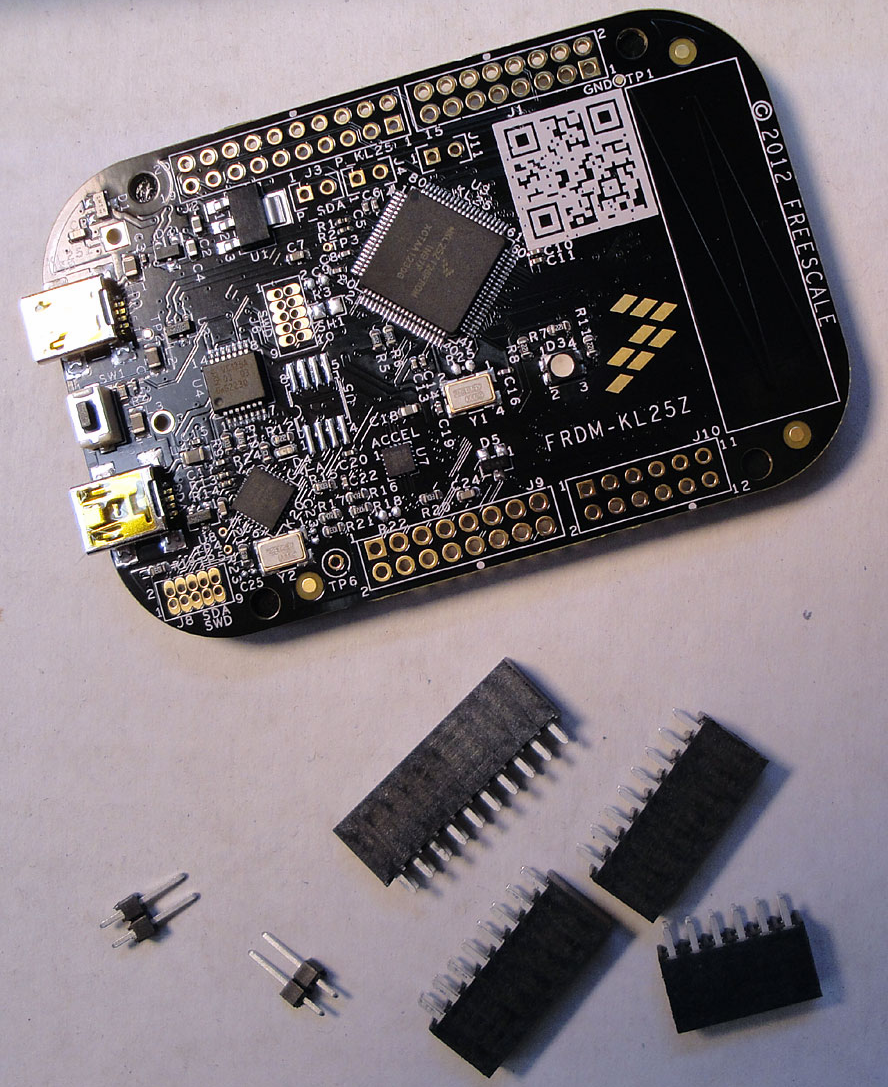
I had pre-ordered some FRDM-KL25Z boards, and they came with the extra headers in plastic bags (see this post):

Pre-ordered Freedom board with headers

Pre-ordered Freedom board with headers

I have received as well a batch of the production boards, and for these I need to order the missing parts. So for everyone else, here are the Farnell part numbers:

Continue reading

Tutorial: printf() and “Hello World!” with the Freedom KL25Z Board

Sometimes I show to much in a tutorial: only writing something to the UART? Sounds boring, so why not adding tasks, LEDs and a full shell implementation to the mix as in this post? Yes, definitely too much to start with at the beginning :-(. So less is more, and if it is just about the UART. And I promise: it is doable with around 50 lines of application code :shock:.

AND: I admit, this post title is a trap ;-). It is not about printf(). But it *is* about using the UART on the KL25Z Freedom board and to do things like printf(), and even more. Trust me. It is about how to write *and* read from the UART. While I’m using here the Kinetis-L ARM Cortex-M0+ KL25Z Freedom board, it is applicable to any other Kinetis device.

Continue reading

Fixing the USB Drivers

USB has two sides: if it works, it is great :-). If it does not, it is really bad :-(. It took a while in the desktop and PC world until USB for common devices (mouse, keyboard, memory sticks, …) was working without issues. But ‘non-standard’ devices like a USB debugging probe/cable are not of that kind of category.

Occasionally I run into USB driver issues in my class. So this post is about identifying the different USB driver parts for the P&E OpenSDA, P&E OSBDM/OSJTAG and P&E Multilinks. And how to install the drivers manually if something is not going well.

Continue reading

A Library with ARM gcc and Eclipse

When I create a new bare-board project with the Eclipse based CodeWarrior 10.3 for my FRDM-KL25Z board and GNU gcc, then the ‘Library’ option is grayed out:

Library Option in New Project Wizard

Library Option in New Project Wizard

This does *not* mean that libraries cannot be built :-). In fact it is very easy to do this with the GNU tools and Eclipse, and here is how….

Continue reading

Tutorial: USB CDC with the KL25Z Freedom Board

Question: What to do on a rainy Sunday?
Answer: Having fun with USB and the KL25Z Freedom board! :-).

In “A shell for the Freedom board” I used the UART-to-USB OpenSDA capability of the KL25Z Freedom board: The KL25Z processor uses the OpenSDA K20 microprocessor as Serial-to-USB converter. But this only works because of the P&E OpenSDA USB CDC (Communication Device Class) implementation. If I create my board without OpenSDA, I need a different approach: I want to do USB CDC with the KL25Z :twisted:.

USB CDC Device on COM22

USB CDC Device on COM22

Continue reading

Compiler Defines and Eclipse Editor Highlighting

In this post I have found settings for Eclipse Indexer to show the state if defines correctly. Usually I have something like this in my projects:

debug me

debug me

So I define the macro DEBUG_ME on the compiler command line. And it is cool to see that the Eclipse editor correctly grays out the code which is not enabled. But for this the Eclipse Editor view needs to know about the macro, but how does this work?

Continue reading

Processor Expert, gcc C++ and Kinetis-L with MQXLite

The Kinetis-L is a 32bit microprocessor family, based on ARM Cortex M0+. It comes with ARM gcc in CodeWarrior. Although the Kinetis-L does not have much RAM, it is very possible to use gcc with C++, especially as a programmer I keep the limited RAM amount in mind. So I thought I try C++ and Processor Expert for my Kinetis-L KL25Z Freedom board.

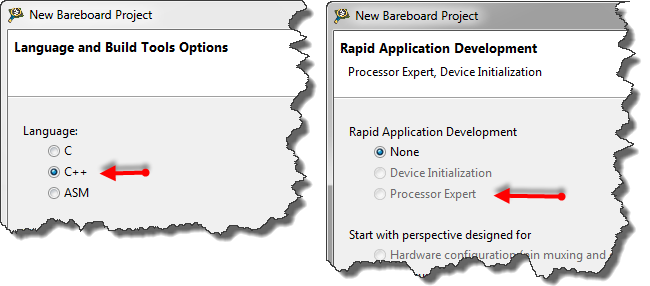
If I select C++ as language in the New Bareboard Project Wizard of CodeWarrior, then I cannot select Processor Expert or Device Initialization:

C++ in the New Project Wizard

C++ in the New Project Wizard

That makes somewhat sense, as Processor Expert creates normal C code and C files, but no C++. Still, what if I need C++? This is doable, but with anything advanced, I need to know exactly what I want and what I do. Here is the ‘How to use C++ with Processor Expert’.

Continue reading