This is Part 1 of a Mini Series. Manya has challenged herself to use the Adafruit NeoPixels (WS2812B RBG LEDs) with the Freescale FRDM-K64F board and the Kinetis SDK (see “Let’s play with Freescale FRDM-K64F“). I did a while back that with the FRDM-KL25Z board (see “NeoShield: WS2812 RGB LED Shield with DMA and nRF24L01+“). I used Processor Expert in my project (without the Kinetis SDK), and with this setup it is very easy. However, Manya wanted to do this with the Kinetis SDK and without Processor Expert. No surprise to me, she has found out that this setup with the Kinetis SDK and without the usage of Processor Expert is much more challenging (see “Not done yet!!“). I promised to Manya to give her a helping hand, so here we go! 🙂
Category Archives: CPU’s
To write a program using KDS with Kinetis SDK!!
Starting from the baby steps for our project seems like a good idea but not very helpful though. Learning and understanding Kinetis SDK seems like a lot of work. Meanwhile, I would like to share an important piece of information that I found on my path of working on this project. Many of you might already know, but being a first time user of Kinetis SDK 1.2.0, I found that there are few differences between Kinetis SDK 1.1.0 and Kinetis SDK 1.2.0. I was trying my hands on to use the KDS with KSDK.
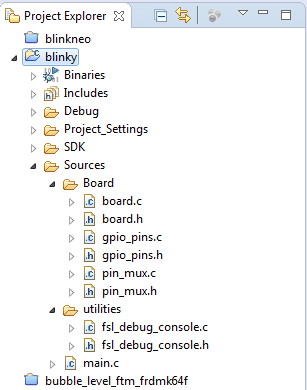
So, In order to create a KDS project with Kinetis SDK, I need to create new folders, add different files and the libraries to my project. I didn’t look into all this with much detail before. I would recommend all to go through this link in order to understand using KDS with Kinetis SDK1.1.0 and Kinetis SDK 1.2.0.
This is how it looks after you have added everything:
FRDM K64F Data Logger using FatFs with KSDK 1.2.0
Check out the article by Wesley Hunter about how to use the FRDM-K64F as a data logger. He describes all the steps how to use the Kinetis SDK v1.2.0 with FatFS.
Happy Logging 🙂
This blog is a guide on how to setup using the FatFs library included with the Kinetis SDK 1.2.0 using mostly the Processor expert within Eclipse Luna. FatFs is a generic FAT file system module for small embedded systems written by Chan. I prefer to use Processor Expert when possible as this will often generate code that is smaller in size than using the KSDK library files direct. I experienced many gotcha’s and complication setting this up and wanted to share how I finally managed to get it to work.
- Prerequisites
- Create New Project
- Open Processor Expert
- Add SD card component
- Add Init_Port component
- Add GPIO component
- Configure the clock
- Import FatFs
- Add Card detection code
- FAT file appender function
- Disable the MPU
Prerequisites
Before you begin please make sure your development environment is setup and you can already compile and debug code using KSDK 1.2.0 on Eclipse Luna…
View original post 2,197 more words
Unboxing the Freescale FRDM-KL43Z Board
I’m preparing for the next semester at the university starting in September this year. As part of that, I’m currently evaluating the Freescale Kinetis FRDM-KL43Z board:
Freescale Freedom Board Tutorials on Element14
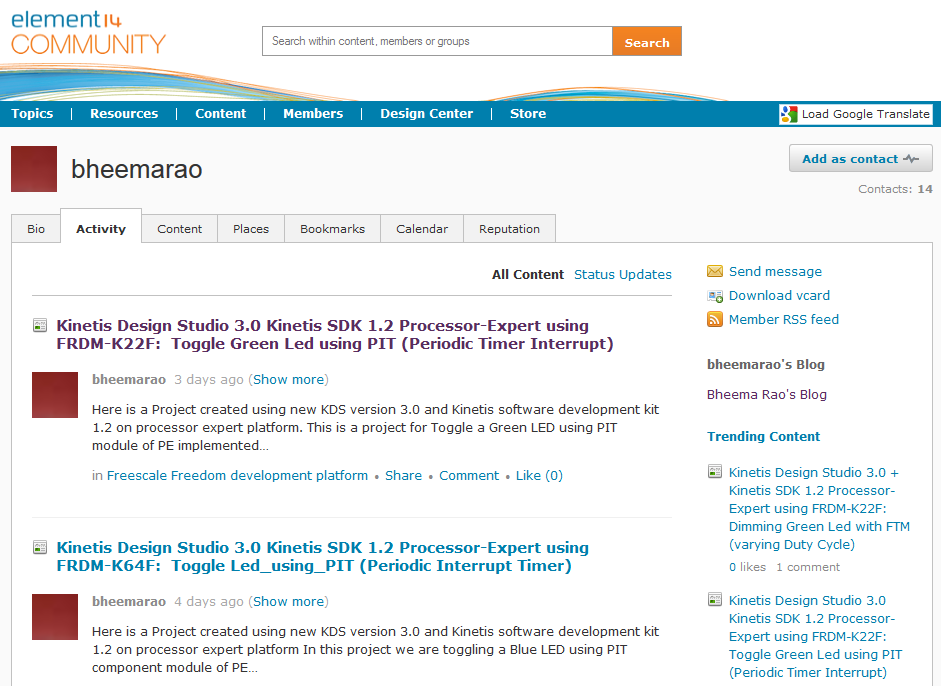
I have found several excellent tutorials created by Bheema Rao on element14: He uses many of the McuOnEclipse components, features Kinetis Design Studio/Eclipse and shows how to use the Kinetis SDK, toggling/dimming LED’s on Freescale Freedom Boards.
Using Kinetis Design Studio V3.0.0 with the Launchpad 4.9-2015-q2 Release
The Kinetis Design Studio v3.0.0 comes with the GNU/GCC ARM Embedded (launchpad) version 4.8-2014-q3. End of June 2015, ARM released a new version, the 4.9-2015-q1.So why not using that newer release?
- It comes with GDB version 7.8 and has the ‘return of function display’ feature.
- GDB has Phyton scripting support.
- It fixes that nasty GDB bug ‘breakpoint on removed code’ issue.
Is that already enough to make that switch?
How to use Kinetis Design Studio!!
Getting the hands on an embedded project has always been exciting for me. So, here I am again with my blog trying to provide you with an easy to use guide for the Kinetis Design Studio 3.0.0 (KDS_3.0.0). Well, as you all know I am an intern at Freescale working for the first time on KDS, I will tell you what all we can do to start working on it with a perspective of a novice. But personally I feel KDS is one of the most encouraging IDE you can work on. So how do I start with my code for our NeoMatrix board? I am currently working with one of the demo codes for the NeoMatrix:
https://mcuoneclipse.com/2015/07/10/lets-play-with-freescale-frdm-k64f/
So, my first task is to write the code in KDS for the NeoMatrix_Demo. How do I do that? After opening the KDS 3.0.0, I need to go to File and select New and then Kinetis Project. You can see that the New Kinetis Project wizard appears once you click the File>New> Kinetis Project. Type a name and click next.
Show Opcodes in Eclipse Disassembly View
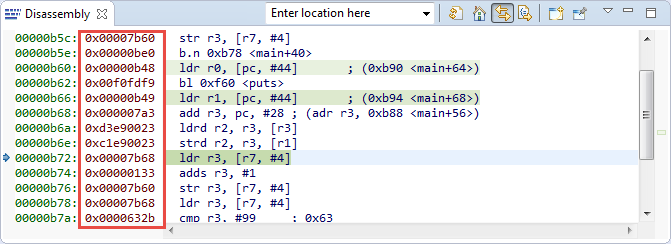
One new feature in CDT 8.4 or later is the ability to see the instruction opcode in the disassembly view:
Learning about Kinetis SDK!!:)
We all know that for an application to develop, for a project to work we need hardware along with the software. So here we are with our FRDM-K64F development boards, but the question is-how to make them work? I wrote in my second blog about the new getting started process by Freescale for the FRDM-K64F: http://www.freescale.com/webapp/sps/site/prod_summary.jsp?code=FRDM-K64F&tab=In-Depth_Tab
This link gives me the opportunity to download the very helpful Kinetis Software Development Kit (SDK) along with the Integrated Development Environment which includes the toolchain Kinetis Design Studio. Let us talk a bit about the Kinetis SDK in this blog. So what does Kinetis SDK is responsible for? In simple terms, it is just software framework which helps us in developing applications across all Kinetis Microcontrollers. It is a package of pre-written code that developers can re-use in order to minimize the amount of unique code that they need to develop themselves.
Automatic Variable, Expression and Memory Display with GDB and Eclipse
One of the great features in CodeWarrior for MCU10.x is the ability to read memory/variables while running (see “Live View for Variables and Memory“). This technology of ‘live view’ is based on the CodeWarrior debugger engine. How can I do something like this with stock GDB and Eclipse? What I need is a periodic update of variables/expressions/memory while the program on the board is running, without the need to stop the board with the debugger first: