In Eclipse opening a large file might cause the following dialog:

Editor Scalability Dialog
What does this mean? Well, Eclipse does a lot behind the scenes with source files. And this includes Eclipse Indexer, Outline View or Syntax Coloring.

In Eclipse opening a large file might cause the following dialog:
Editor Scalability Dialog
What does this mean? Well, Eclipse does a lot behind the scenes with source files. And this includes Eclipse Indexer, Outline View or Syntax Coloring.
The good thing with many vendors is: they offer development tools free of charge. And the limitations are typically reasonable for many projects. The Eclipse based CodeWarrior for MCU10 is not an exception: it comes in a free (‘Special’) Edition which allows up to 128 KByte of code to download for my ARM/Kinetis projects.
But, when I tried to debug an Example I have downloaded from the web, I get this dialog:
“Download size limit has been exceeded. Please check your license.”
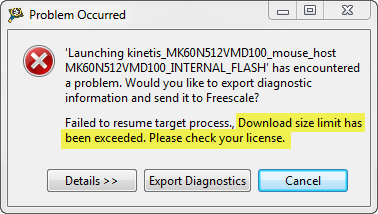
Download Size Limit Has Been Exceeded
I’m a big fan of physical UART/RS-232 ports on boards. So I was somewhat disappointed not to see a serial 9pin connector on the Freedom KL25Z board. But it is perfectly understood that for this price costs are critical, and a serial header or connector is pushing the budget for that board very likely out of the water. Still, I want serial connectivity for my applications.

Freedom Board with RGB LED
Many new notebooks do not have a serial port any more: everything is USB. This can lead to problems (see USB or not: CDC with Processor Expert) as many embedded targets use normal RS-232. In my classes I’m using the Tower boards: some Tower boards have an on-board 2 pin RS-232 header, e.g. the Tower TWR-MCF52259. Others like the TWR-K60N512 use the added TWR-SER board. The Tower boards have as well a USB capable S08JM60 which is used for debugging (OSBDM/OSJTAG), so why not using the OSBDM microcontroller as Serial-to-USB gateway?
I can do test automation or standalone flash programming using the Debugger Shell. But this requires me to use a view inside of Eclipse. What would be nice is to do such things from a lower level: from a Windows Command window (CMD or DOS Shell). This is possible with usage of Eclipse/CodeWarrior in command line mode.
In Scripting, the Debugger Shell and Debugger Shell: Test Automation I was exploring how to use the Debugger Shell for automation. For my lectures at the university I need to program multiple boards with the same application. I don’t want (and need) a debugger for this: all what I need is a ‘Standalone Flash Programmer’: the ability to flash one or multiple boards without debugging.
A central concept of the Eclipse framework is the concept of a workspace. The workspace holds project and project references, among with other settings. I’m using multiple workspaces all the time, and in parallel. How to know which workspace I’m using? By default, the CodeWarrior Eclipse IDE main window comes up like this:

Default CodeWarrior Eclipse Main Frame
 MCU on Eclipse