Tutorial: Adafruit WS2812B NeoPixels with the Freescale FRDM-K64F Board – Part 2: Software Tools

This is Part 2 of a Mini Series. In Part 1, I described how to set up the hardware (see “Tutorial: Adafruit WS2812B NeoPixels with the Freescale FRDM-K64F Board – Part 1: Hardware“). Now it is time to have the software tools ready. In this post I describe to have the IDE (Freescale Kinetis Design Studio) with the Freescale SDK installed, along with the correct firmware on the FRDM-K64F Board. The goal is to drive Adafruit’s NeoPixel (WS2812B) with the Freescale FRDM-K64F board:

Freescale FRDM-K64F with NeoPixels

Freescale FRDM-K64F with NeoPixels
Continue reading

Tutorial: Adafruit WS2812B NeoPixels with the Freescale FRDM-K64F Board – Part 1: Hardware

This is Part 1 of a Mini Series. Manya has challenged herself to use the Adafruit NeoPixels (WS2812B RBG LEDs) with the Freescale FRDM-K64F board and the Kinetis SDK (see “Let’s play with Freescale FRDM-K64F“). I did a while back that with the FRDM-KL25Z board (see “NeoShield: WS2812 RGB LED Shield with DMA and nRF24L01+“). I used Processor Expert in my project (without the Kinetis SDK), and with this setup it is very easy. However, Manya wanted to do this with the Kinetis SDK and without Processor Expert. No surprise to me, she has found out that this setup with the Kinetis SDK and without the usage of Processor Expert is much more challenging (see “Not done yet!!“). I promised to Manya to give her a helping hand, so here we go! 🙂

Adafruit 8x8 NeoPixel Shield with Freescale FRDM-K64F Board

Adafruit 8×8 NeoPixel Shield with Freescale FRDM-K64F Board

Continue reading

Using Kinetis Design Studio V3.0.0 with the Launchpad 4.9-2015-q2 Release

The Kinetis Design Studio v3.0.0 comes with the GNU/GCC ARM Embedded (launchpad) version 4.8-2014-q3. End of June 2015, ARM released a new version, the 4.9-2015-q1.So why not using that newer release?

Release GCC ARM Embedded 4.9 update 2

Release GCC ARM Embedded 4.9 update 2

  1. It comes with GDB version 7.8 and has the ‘return of function display’ feature.
  2. GDB has Phyton scripting support.
  3. It fixes that nasty GDB bug ‘breakpoint on removed code’ issue.

Is that already enough to make that switch?

Continue reading

Using Segger Real Time Terminal (RTT) with Eclipse

I have used semihosting more and more in my projects. However, there are several disadvantage of using it:

  • Without special handlers, it only works with an active debug connection going on. Without a debugger attached, the application blocks otherwise.
  • Because it needs debugger interactions, it is rather slow (only several hundreds of bytes per second)

The good news is that Segger supports with their debug probes a faster approach with what they name Real Time Terminal (RTT). And it even runs without a debugger attached to the board: all what I need is a Segger J-Link probe (or Segger J-Link OpenSDA) plus a telnet client.

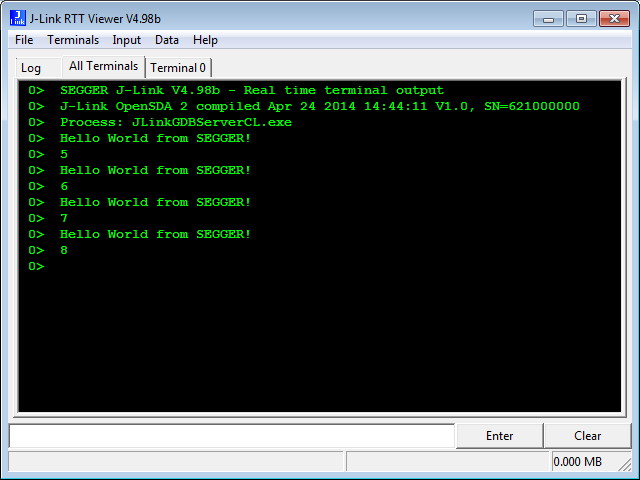
Segger RTT Viewer

Segger RTT Viewer

Continue reading

Processor Expert Component Repositories

Processor Expert for Kinetis v3.0.0 (which is part of Freescale Kinetis Design Studio v3.0.0, KDS) has now the concept of ‘repositories’ for the components.

Previously, Processor Expert was able to use two paths for its components (e.g. in KDS v2.0.0):

  1. The ‘System‘ directory inside the Eclipse installation
  2. The ‘User‘ directory: a fixed path, global for all installations

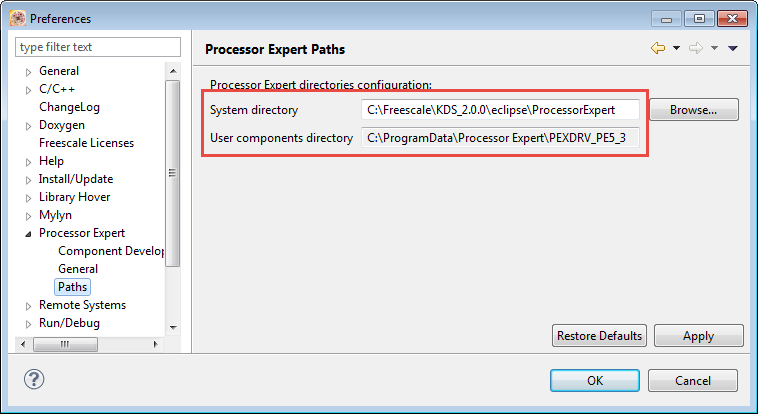
These directories are listed in the workspace settings (menu Window > Preferences > Processor Expert > Paths):

Processor Expert Paths in v2.0.0

Processor Expert Paths in v2.0.0

Continue reading

Open Source Static Code Analysis: Cppcheck with Eclipse

I have a challenge for you: Can you spot the problem in the following source?

TMOUT1_CounterHandle TMOUT1_GetCounter(TMOUT1_CounterType nofTicks)
{
  TMOUT1_CounterHandle handle;
  CS1_CriticalVariable();
  handle = 0;
  if (nofTicks==0) {
    nofTicks = 1; /* wait at least for one tick, otherwise will timeout immediately */
  }
  CS1_EnterCritical();
  while (!TMOUT1_FreeCounters[handle] && handle<TMOUT1_NOF_COUNTERS) {
    handle++;
  }
  if (handle<TMOUT1_NOF_COUNTERS) {
    TMOUT1_FreeCounters[handle]=FALSE;
    TMOUT1_Counters[handle] = nofTicks;
  }
  CS1_ExitCritical();
  if (handle==TMOUT1_NOF_COUNTERS) {
    return TMOUT1_OUT_OF_HANDLE;
  }
  return handle;
}

No? Well, I have not spotted the problem the first time neither. However, a reader of this blog did: he used a cool tool named ‘cppcheck’: that tool reported the following:

Continue reading

Code Coverage with gcov, launchpad tools and Eclipse Kinetis Design Studio V3.0.0

What makes Eclipse great: using open source tools there are a lot of tools and techniques available which usually are only provided for desktop development.

A while back I described how to do code coverage with Eclipse Kepler and the GNU ARM Embedded (launchpad) tools (see “Code Coverage for Embedded Target with Eclipse, gcc and gcov“). With Kinetis Design Studio out, time to do the same with that Eclipse distribution, especially as Freescale is now using the stock GNU ARM Embedded tools too.

Coverage with multiple Files

Coverage with multiple Files

Continue reading

Problem: undefined reference to ‘__end__’ if using Semihosting

In case you are running into the following GNU linker error about a missing __end__:

'Building target: MyProject.elf'
'Invoking: Cross ARM C++ Linker'
...
toolchain/bin/../lib/gcc/arm-none-eabi/4.8.4/../../../../arm-none-eabi/lib/armv6-m/rdimon-crt0.o: In function `_start':
(.text+0xdc): undefined reference to `__end__'
collect2.exe: error: ld returned 1 exit status
make: *** [MyProject.elf] Error 1
Failed link because missing __end__

Failed link because missing __end__

The GNU linker complains that rdimon-crt0.o needs the symbol __end__.  This symbol marks the end of the user data/RAM section, and is needed by the rdimon library specs which is used with semihosting.

Continue reading

Breadcrumbing Mother’s Day: Minimized Debugging View with Eclipse

What I love with Eclipse: it has lots of small and useful features, either built-in or available as plug-in. Recently I started to use a feature which is present in Eclipse for some time: the ability to save screen real estate during debugging with the ‘breadcrumb’ view option:

Expanded Breadcrumb View

Expanded Breadcrumb View

Continue reading

Serial Terminal View in Eclipse Luna

If you have read my article “Serial Terminal View with Eclipse Kepler“, then you are aware that using a Terminal view to a serial connection (COM port) under Eclipse Kepler is pretty much broken. I’m moving some of my projects to the more recent Eclipse Luna release, and the good news is that support is back 🙂

Terminal View with connection to board

Terminal View with connection to board

Continue reading