GNU Static Stack Usage Analysis

Stack overflows are a big problem: If I see a system crash, the first thing usually is I try to increase the stack size to see if the problem goes away. The GNU linker can check if my global variables fit into RAM. But it cannot know how much stack I need. So how cool would it be to have a way to find out how much stack I need?

Static Stack Usage Analysis with GNU

Static Stack Usage Analysis with GNU

And indeed, this is possible with the GNU tools (e.g. I’m using it with the GNU ARM Embedded (launchpad) 4.8 and 4.9 compilers :-). But it seems that this ability is not widely known?
Continue reading

Sneak Preview: Profiling Bare Metal Microcontroller Applications with GNU gprof

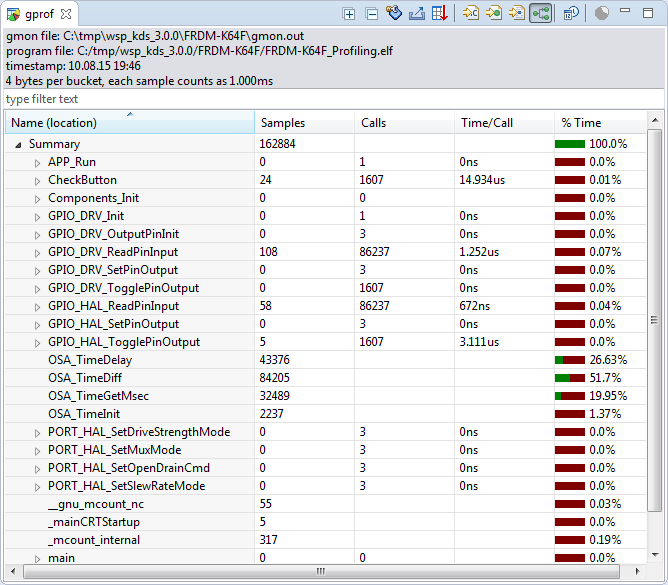
I’m working on a conference paper and presentation, and tonight I had a break-through :-). So how cool is this: Profiling with GNU gprof a bare-metal embedded Cortex-M application (Freescale Kinetis K64F running the Freescale Kinetis SDK) in Eclipse:

Freescale Kinetis Microcontroller Application Profiling

Freescale Kinetis Microcontroller Application Profiling

Continue reading

Tutorial: Adafruit WS2812B NeoPixels with the Freescale FRDM-K64F Board – Part 4: Timer

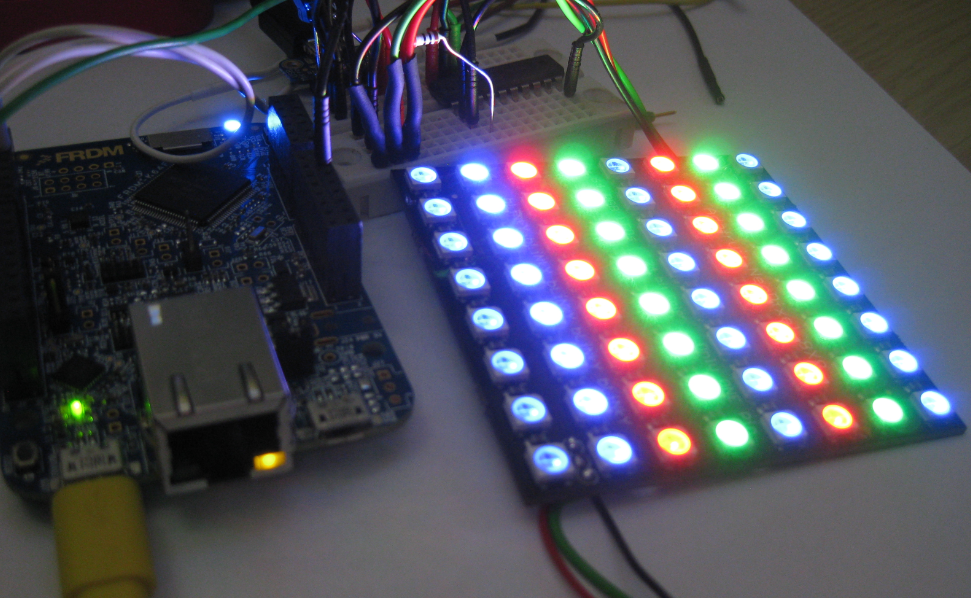
This is Part 4 of a Mini Series. In Part 3, I described the software concepts (see “Tutorial: Adafruit WS2812B NeoPixels with the Freescale FRDM-K64F Board – Part 3: Concepts“). In this post I describe how to set-up the timer to trigger later DMA operations. The goal is to drive Adafruit’s NeoPixel (WS2812B) with the Freescale FRDM-K64F board:

NeoPixels with FRDM-K64F

NeoPixels with FRDM-K64F

Continue reading

Tutorial: Adafruit WS2812B NeoPixels with the Freescale FRDM-K64F Board – Part 2: Software Tools

This is Part 2 of a Mini Series. In Part 1, I described how to set up the hardware (see “Tutorial: Adafruit WS2812B NeoPixels with the Freescale FRDM-K64F Board – Part 1: Hardware“). Now it is time to have the software tools ready. In this post I describe to have the IDE (Freescale Kinetis Design Studio) with the Freescale SDK installed, along with the correct firmware on the FRDM-K64F Board. The goal is to drive Adafruit’s NeoPixel (WS2812B) with the Freescale FRDM-K64F board:

Freescale FRDM-K64F with NeoPixels

Freescale FRDM-K64F with NeoPixels

Continue reading

Tutorial: Adafruit WS2812B NeoPixels with the Freescale FRDM-K64F Board – Part 1: Hardware

This is Part 1 of a Mini Series. Manya has challenged herself to use the Adafruit NeoPixels (WS2812B RBG LEDs) with the Freescale FRDM-K64F board and the Kinetis SDK (see “Let’s play with Freescale FRDM-K64F“). I did a while back that with the FRDM-KL25Z board (see “NeoShield: WS2812 RGB LED Shield with DMA and nRF24L01+“). I used Processor Expert in my project (without the Kinetis SDK), and with this setup it is very easy. However, Manya wanted to do this with the Kinetis SDK and without Processor Expert. No surprise to me, she has found out that this setup with the Kinetis SDK and without the usage of Processor Expert is much more challenging (see “Not done yet!!“). I promised to Manya to give her a helping hand, so here we go! 🙂

Adafruit 8x8 NeoPixel Shield with Freescale FRDM-K64F Board

Adafruit 8×8 NeoPixel Shield with Freescale FRDM-K64F Board

Continue reading

Using Kinetis Design Studio V3.0.0 with the Launchpad 4.9-2015-q2 Release

The Kinetis Design Studio v3.0.0 comes with the GNU/GCC ARM Embedded (launchpad) version 4.8-2014-q3. End of June 2015, ARM released a new version, the 4.9-2015-q1.So why not using that newer release?

Release GCC ARM Embedded 4.9 update 2

Release GCC ARM Embedded 4.9 update 2

  1. It comes with GDB version 7.8 and has the ‘return of function display’ feature.
  2. GDB has Phyton scripting support.
  3. It fixes that nasty GDB bug ‘breakpoint on removed code’ issue.

Is that already enough to make that switch?

Continue reading

Debugging ARM Cortex-M Hard Faults with GDB Custom Command

In “A Processor Expert Component to Help with Hard Faults” I’m using a C handler with some assembly code, created with Processor Expert, to help me with debugging hard faults on ARM Cortex-M. Inspired by a GNU gdb script here, I have now an alternative way. As this approach is using the GDB command line approach, it works both with an Eclipse GUI and with using GDB in command line mode only :-).

GDB script to debug ARM Hard Faults
Continue reading

Open Source Static Code Analysis: Cppcheck with Eclipse

I have a challenge for you: Can you spot the problem in the following source?

TMOUT1_CounterHandle TMOUT1_GetCounter(TMOUT1_CounterType nofTicks)
{
  TMOUT1_CounterHandle handle;
  CS1_CriticalVariable();
  handle = 0;
  if (nofTicks==0) {
    nofTicks = 1; /* wait at least for one tick, otherwise will timeout immediately */
  }
  CS1_EnterCritical();
  while (!TMOUT1_FreeCounters[handle] && handle<TMOUT1_NOF_COUNTERS) {
    handle++;
  }
  if (handle<TMOUT1_NOF_COUNTERS) {
    TMOUT1_FreeCounters[handle]=FALSE;
    TMOUT1_Counters[handle] = nofTicks;
  }
  CS1_ExitCritical();
  if (handle==TMOUT1_NOF_COUNTERS) {
    return TMOUT1_OUT_OF_HANDLE;
  }
  return handle;
}

No? Well, I have not spotted the problem the first time neither. However, a reader of this blog did: he used a cool tool named ‘cppcheck’: that tool reported the following:

Continue reading

Eclipse Project ‘Refresh Policy’: Broken Incremental Build with External Make?

So here is a problem I have observed for a while, and several users have reported that to me: the problem is that for some reasons and only for some projects, when I do a ‘build’ in Eclipse CDT, it does a ‘full’ build. It does not only build the changed files, it builds all or many files in the project.

Building

Building

I expect that only the changed files will be rebuild. Instead, it compiles many files it should not compile/build, with the result that a build takes a very long time. That’s clearly wrong, and not what I expect. So what is causing this problem?

Continue reading

Code Coverage with gcov, launchpad tools and Eclipse Kinetis Design Studio V3.0.0

What makes Eclipse great: using open source tools there are a lot of tools and techniques available which usually are only provided for desktop development.

A while back I described how to do code coverage with Eclipse Kepler and the GNU ARM Embedded (launchpad) tools (see “Code Coverage for Embedded Target with Eclipse, gcc and gcov“). With Kinetis Design Studio out, time to do the same with that Eclipse distribution, especially as Freescale is now using the stock GNU ARM Embedded tools too.

Coverage with multiple Files

Coverage with multiple Files

Continue reading