Hot-Sync: Attach, Connect & Download

Usually I compile my sources, link it and pass it to the debugger for downloading it to the target. And ‘downloading’ means for me: flashing to the target (RAM debugging is something for the non-hardcore programmers ;-)). But there are more options than only downloading and flashing. There is definitely more which helps me to do post-mortem (yes, I *love* Latin :cool:) debugging.

Downloading means to me that the debugger will program my application into the device, then loads the symbolics (debug information, source file information, …) and then I debug my application. Looking at the ‘Debug As’ options, there is as well Attach and Connect:
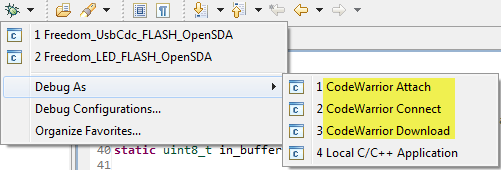
Debug as Attach, Connect and Download

Debug as Attach, Connect and Download

Continue reading

Tutorial: USB CDC with the KL25Z Freedom Board

Question: What to do on a rainy Sunday?
Answer: Having fun with USB and the KL25Z Freedom board! :-).

In “A shell for the Freedom board” I used the UART-to-USB OpenSDA capability of the KL25Z Freedom board: The KL25Z processor uses the OpenSDA K20 microprocessor as Serial-to-USB converter. But this only works because of the P&E OpenSDA USB CDC (Communication Device Class) implementation. If I create my board without OpenSDA, I need a different approach: I want to do USB CDC with the KL25Z :twisted:.

USB CDC Device on COM22

USB CDC Device on COM22

Continue reading

White Space or not, that’s the question

There are times when I want to know *exactly* what is inside my source files. In my article on EHEP explains how to get down to the hex bytes of a source file. But in many cases I’m interested to see the non printable/white characters only. Showing white spaces in the sources is easy in Eclipse: I use the ‘Show Whitespace Characters‘ toolbar icon:

Show Whitespace Characters

Show Whitespace Characters

Continue reading

CodeWarrior for MCU10.3 beta is now available

Today is the ‘L Day’ for Freescale: After the announcement of the Cortex-M0+ family (Kinetis-L) earlier this year, it has been launched on the Freescale web site. Given the positive echo on my post around the KL25Z Freedom board (which has a Kinetis Cortex-M0+ KL25 on it) and the fact that production board is shipping these days, a lot of engineers were waiting for the CodeWarrior for MCU10.3 as it is in my view the development tool of choice as well for ARM Kinetis-L. And right on time, the MCU10.3 beta is available for download on http://www.freescale.com/cwmcu10. Time to show what I have noticed as new and noteworthy…

Continue reading

Tutorial: Accelerating the KL25Z Freedom Board

In “Tutorial: Enlightning the Freedom KL25Z Board” I used the RGB LED on the FRDM-KL25Z board. This tutorial extends it to use the MMA8451Q inertial sensor on the board which is connected through I2C to the KL25Z processor:

Freedom Board Block Diagram

Freedom Board Block Diagram with MMA8451Q (lower right corner)

The goal is show the accelerometer x, y and z-axis on the RGB LED.

Continue reading

S-Record Generation with gcc for ARM/Kinetis

With my Freedom KL25Z board I’m using the GNU/gcc build tools and Eclipse/CodeWarrior. When I wanted to create an S19 file of my application using the GNU tools, this was not that easy to find out. So here are the steps to do this:

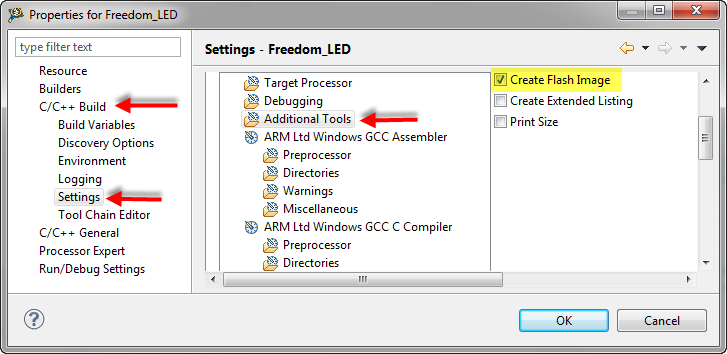
I open the project setting using the menu Project > Properties and go to C/C++ Build > Settings > Additional Tools and enable’Create Flash Image‘:

Additional Tools gcc Settings

Additional Tools gcc Settings

Continue reading

SMAC with Processor Expert

Freescale offers a free wireless SMAC stack  for their ZigBee and IEEE802.15.4 transceivers as found in the MC1321x (SRB and NCB) wireless kits, or as used on the MC13201 daughter card. The ‘S’ in SMAC stands for ‘Simple’. But it is not that simple to use that stack. So that’s why I’m using it transformed into a Processor Expert components. I have received recently requests and questions about it, and finally it is available on this site. If you are wondering for what it can be used, then read this post.

Created Tower Radio Card with MC13201 daughter board, SD card and Realtime Clock

Created Tower Radio Card with MC13201 daughter board, SD card and Realtime Clock

The stack is using the Freescale SMAC stack as base, and consists of four components: MC13192, SSEC, SPHY and SMAC. This post provides hopefully an entry point how to use them.

Continue reading

Changing the CPU with Processor Expert

I have an example project with Processor Expert and CodeWarrior. The problem I have is that I want to use it for another CPU derivative. So how can I migrate the project?

There are three different approaches:

  1. Change Wizard: In MCU10.2 there is the menu Project > Change Device/Connection. While this sounds promising, it only works for the very simple projects. And it does not change the project in-place: it simply creates a copy of the project and applies some (many times wrong) settings. So I do not recommend to use that option.
  2. New Project Wizard: For me in most cases this is the best way: this creates a new project for the new device, with everything set up correctly. In a second step I copy my source files and compiler settings (if I have changed them). The Processor Expert component I can transfer with using drag&drop.
  3. Changing the CPU: With Processor Expert, I can change the CPU. For this I add a new CPU to the project and change other settings (debugger, build tools settings) as needed.

Continue reading

Sports Timing System in a Lunch Box

The 2012 London Olympics are over. And I had my own special sports event last weekend. Although not part of the Olympics, it is part of the Switzerland Central Mountain Race Championship. This is a series of mountain running challenges. And no, I did not run the race. I love the mountains, and I love hiking in the mountains, but this is definitely for the greatest athletes. Instead to run the race, I have chosen to implement and run the timing system :-).

Athletes approaching the finish line

Athletes approaching the finish line

Continue reading

Tutorial: Timer (LED) with Processor Expert for Kinetis

In the ‘Pre-LDD age’, setting up a periodic timer event with Processor was really easy. With the concept of LED’s (see “There is a Time and Date for both Worlds”) things are a bit different. But once things are clear, it is not that hard. So here I’m doing a very exciting thing: blinking an LED using a timer! 😎

So I’m going to have an LED blinking every second. I’m using the TWR-K60N512 with an ARM Cortex-M4 and the Eclipse based CodeWarrior for MCU10.2. But it is easy to adopt it to any other Kinetis board.

Continue reading