
Percepio FreeRTOS+Trace V2.2.2 released

Percepio has released a new V2.2.2 library of FreeRTOS+Trace (see Tracing with FreeRTOS+Trace from Percepio). The new release comes with many improvements. The trace recording is optimized for more efficient recording and longer trace with the same amount of memory.

Note: Because the trace data structure is changed and optimized, I need the latest tool on the PC/host from http://www.percepio.com.

I have updated the Percepio Processor Expert component to generate and use the new trace library V2.2.2. This includes the new settings in the component properties as shown below:
Continue reading
Debug vs. Release?

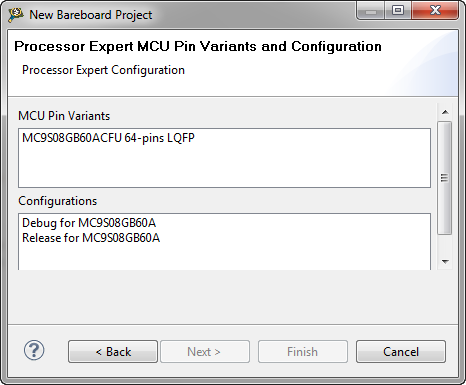
When I create a project with CodeWarrior for MCU using Processor Expert and S08GB60, I’m asked if I want to have a Debug and/or Release configuration:

Debug or Release in Processor Expert

Debug or Release in Processor Expert

Debug or Release? For an embedded microcontroller? Does this make any sense?

Continue reading

MQX Eclipse Working Sets

Working Sets are a very useful feature in the Eclipse Framework (see Working Sets Explained). But: with a standard Eclipse distribution it is not possible to import or export working sets. The good news is: the AnyEdit plugins (see 5 Best Eclipse plugins) provides that missing functionality. The other good news is: Buried in the Freescale MQX 3.8 distribution for Eclipse CodeWarrior, there is an even better implementation for the Eclipse Working Sets.

Continue reading

CRC Calculation with MCU10

With USB goes medical I have a serial-to-USB (CDC) support for my TWR-S08MM128 board. What makes these devices targeted for medical applications interesting for other applications are features like bootloader support and a CRC (Cyclic Redundancy Check)  engine. But how can I generate the required CRC numbers with MCU10?

Continue reading

Templates and Stationeries with MCU10.2

Classic CodeWarrior used the concept of ‘Stationeries’ or ‘Project Templates’: If I have a project which you want to use as a starting point for ‘Create new project’, then I moved that project into the ‘Stationery’ sub-folder of my classic CodeWarrior. When I did a File > New Project…, it showed up in the project wizard:

My own stationery project in the classic new project wizard

My own stationery project in the classic new project wizard

This is very useful if I have my corporate template or using projects in a classroom environment. How can I do this in eclipse and CodeWarrior for MCU10.2?

Continue reading

Using Parallel Builds: what is optimal?

One of the new features in CodeWarrior for MCU10.2 is the ability to build in parallel. Does not sound exciting? Well, when I tried this the first time in MCU10.2, I noticed immediately the reduction in build time: twice as fast compared to MCU10.1!!!. Wow! This improvement is based on using a make utility which can spawn multiple jobs on multicore host machines. CodeWarrior tries to use an optimized setting to make the build as fast as possible using parallel builds. The question is: is it really optimal?

Continue reading

Sneaking from Processor Expert

Processor Expert is great: it generates initialization code and driver sources for me. This makes it a great knowledge and source base for non-Processor Expert projects too. Wondering how to initialize the SCI? What are again the register settings to use the CPU with a 6 MHz clock rate using an external crystal in low power mode? Lets generate a Processor Expert project to find out. Then copy-past the drivers or parts of it into my non-Processor Expert project. But How to do this?

Continue reading

Linting without a plugin

With “Eclipse and PC-lint: Linticator” I have a plugin to lint my sources in a comfortable way. But I can do this as well without a plugin. For this I use a batch file with a build configuration, plus settings to get the PC-lint messages into the Problems view. Yes, this does not sound easy, but is very doable and straight forward once I have set it up. It gives me complete control on every little detail. Here is how I do it… Continue reading

Eclipse and PC-lint: Linticator

PC-lint from Gimpel has set the standard for static code analysis: it is used by many companies developing safety critical applications. Additionally PC-lint can check the MISRA rules which are standard for many coding guide lines. PC-lint has detected many subtle bugs in my sources. Thank you, PC-lint!

CodeWarrior classic provided a plugin for the PC-lint compiler: To bad that this does not exist in the eclipse based CodeWarrior. You might think that given PC-lint so popular, there should be an eclipse plugin available? Yes, there are many attempts on this: all of them did not work well enough for me. The good news: There is the Linticator eclipse plugin. The bad news: it is not for free.

Continue reading