Freescale S08 controllers have an internal clock generator (ICG) which allows the device to run without an external clock signal. But as devices differ, they need to be calibrated and trimmed. The microcontrollers are usually trimmed in the factory. How can I trim it myself if I need something better?
Exporting and Importing Projects in Eclipse
I admit that I have (a few? or not so few) bad habits: one of it is that usually I find a way to do things, and if that works, I stick with it. I know that there are other ways to do things, but hey, why bother? And sometimes a good friend asks an excellent question (are there any bad questions?), and this let me review the way I’m doing things. And here is such a thing: exporting and importing projects in Eclipse.
CRC Calculation with MCU10
With USB goes medical I have a serial-to-USB (CDC) support for my TWR-S08MM128 board. What makes these devices targeted for medical applications interesting for other applications are features like bootloader support and a CRC (Cyclic Redundancy Check) engine. But how can I generate the required CRC numbers with MCU10?
Copy my Component Settings: Processor Expert Templates
Once I have a carefully configured Processor Expert component, I can use the approach described in Drag&Drop in Processor Expert to copy that component to a different project. However, this requires that the destination project is present in the same workspace. So how can I transfer a component with its settings from one workspace to another? Or from one machine to another?
Dump my Device Memory
Maybe this situation is familiar to you: My embedded software stopped in the field. I am in front of it, hooked up with my laptop and debugger. And I see: indeed, it has a problem. Maybe just a one-time-thing? Maybe I do a reset and things will work as expected? Not really, according to Debugging Rules.
The thing is this: I’m in a situation which requires some deep investigation. But I do not have the time now. Or my boss, the boss-boss or the customer are standing behind me asking all the good questions for which I don’t have an answer. So in this situation it would be great if you could take a dump of the device memory, reset that board, move on and investigate what happened offline? Here are several ways how to do this…
USB CDC goes medical
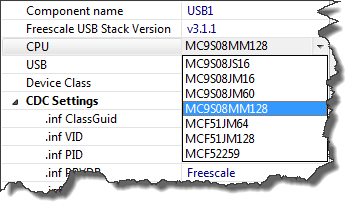
The FSL_USB_Stack Processor Expert component (see USB CDC reloaded) has been extended to support USB CDC for the Freescale S08MM128 targeted for medical devices:
Flashing with a Button (and a Magic Wand)
In eclipse and CodeWarrior for MCU10 the usual thing I do is:
- I have a project in my eclipse workspace
- I compile and build it
- I download and flash it to the target for debugging
If I need to program another board with the same binary, then I download it to that board too. Fine. But what if I want to skip point 1 and 2? What if I do not have or want a project? All what I have (and need) is a binary file, and I want is to flash that file to my boar. By pressing a button.
Watchpoints: Data Breakpoints
Sometimes my embedded application is not doing what I want it to do. I can solve many problems with normal ‘step/stop mode debugging‘: setting breakpoints, step, stop, inspect data, and so on. But not always. If a piece of code is changing a global variable unintentionally, I do not know where to set my breakpoint. Something is changing my variable, and I have no clue from where. It could be a dangling pointer, a stack overflow or something similar which I cannot track down with code breakpoints. What I need is a breakpoint on data: watchpoints!
Programming part of flash
In many cases I do a full erase-flash-debug cycle: I get my embedded microcontroller flash completely erased and then programmed with my application. Well, that does not work that way if I program with a bootloader. Yes, I can flash the bootloader and then load my target application with the bootloader, but that’s not the scenario I want to use in the development phase. I want to flash my application and keep the bootloader on the target. This means: I need to do erase and program a part of the memory. But how to do this?
Templates and Stationeries with MCU10.2
Classic CodeWarrior used the concept of ‘Stationeries’ or ‘Project Templates’: If I have a project which you want to use as a starting point for ‘Create new project’, then I moved that project into the ‘Stationery’ sub-folder of my classic CodeWarrior. When I did a File > New Project…, it showed up in the project wizard:
This is very useful if I have my corporate template or using projects in a classroom environment. How can I do this in eclipse and CodeWarrior for MCU10.2?