Percepio FreeRTOS+Trace V2.2.2 released

Percepio has released a new V2.2.2 library of FreeRTOS+Trace (see Tracing with FreeRTOS+Trace from Percepio). The new release comes with many improvements. The trace recording is optimized for more efficient recording and longer trace with the same amount of memory.

Note: Because the trace data structure is changed and optimized, I need the latest tool on the PC/host from http://www.percepio.com.

I have updated the Percepio Processor Expert component to generate and use the new trace library V2.2.2. This includes the new settings in the component properties as shown below:
Continue reading
Debug vs. Release?

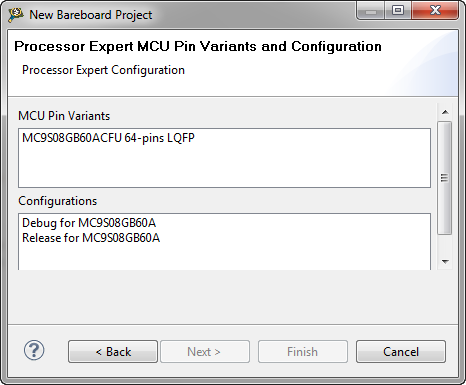
When I create a project with CodeWarrior for MCU using Processor Expert and S08GB60, I’m asked if I want to have a Debug and/or Release configuration:

Debug or Release in Processor Expert

Debug or Release in Processor Expert

Debug or Release? For an embedded microcontroller? Does this make any sense?

Continue reading

Killing Me Softly: Zombies and Debugger Engines

I’m stressing the CodeWarrior debugger a lot: having multiple boards attached, debugging things in parallel, switching and unplugging boards all the time. I have my eclipse IDE running for several days and nights (up to a week or more), with constantly suspending and resuming and switching networks. And sometimes it is my fault (see Device is Secure?). But well, sometimes the CodeWarrior debugger has a problem too. Luckily, a simple trick gets things back on track.

Continue reading

Device is secure?

It is one of these long weekends which allow to catch up on many things. One thing I finally completed was the move to FreeRTOS V7.1.1. With this I did some tests using the Tower boards, including the Kinetis one. So I have rebuild my Kinetis K60 application and was ready to flash the device. But then to my surprise I got this dialog:

Device is secure. Erase to unsecure?

Device is secure. Erase to unsecure?

Continue reading

FreeRTOS V7.1.1 released

FreeRTOS V7.1.1 was released beginning of May 2012. Finally I had some week-end time to integrate the changes and upgrade the Processor Expert component for it. V7.1.1 comes with smaller and larger changes. This includes maintenance and better support for various ports. One change is the removal of CLI from the original FreeRTOS distribution, an extra port macro and one trace hook macro.

Continue reading

Bit Banging I2C

The Freescale ColdFire V2 (MCF52259) is a great communication device: an embedded Processor like a Swiss Army Knife: Great peripherals, USB and Ethernet interface, a lot of flash application space and up to 64 KByte of RAM. I’m using that core in many projects, and there is great community support for it with boards and software. Unfortunately Freescale somehow provides Processor Expert support only half way for it. Support for the I2C bus is missing :-(.

Continue reading

Fixing the Morpho Core Exception

After running the MQX batch installation file for MCU10.2 (see MQX Eclipse Working Sets) I had an error dialog when I inspected my debug/run configuration:

“Error loading data producer reader: com.freescale.morpho.core.CWException: The function “getServiceByContractID” returned an error condition (0x80040154)”

Error loading data producer reader

Error loading data producer reader

Continue reading

MQX Eclipse Working Sets

Working Sets are a very useful feature in the Eclipse Framework (see Working Sets Explained). But: with a standard Eclipse distribution it is not possible to import or export working sets. The good news is: the AnyEdit plugins (see 5 Best Eclipse plugins) provides that missing functionality. The other good news is: Buried in the Freescale MQX 3.8 distribution for Eclipse CodeWarrior, there is an even better implementation for the Eclipse Working Sets.

Continue reading

Eclipse Working Sets Explained

Eclipse comes with a large set of different views: They allow the developer to represent the information in various forms and with different angles. Most of these views are navigation oriented: a perfect example for this is the projects view or the Outline view. But over time I add more projects, more resources to my project, and at a certain time things get overwhelming. I have a lot of projects, and I do not want to switch between workspace too often. Yes, I can open and close projects, but this gets cumbersome too. Thankfully, there is a solution in Eclipse: Working Sets.

Continue reading

5 Best Eclipse Plugins: #2 (AnyEdit Tools)

Small little helpers are the things in a developers hand which can make his life easier and simpler. The advantage with the Eclipse IDE is that there are many such helpers and extensions in the form of extra plugins you can install and use. And one of such a kind are the AnyEdit Tools provided by Andrey Loskutov. That Eclipse plugin comes with a wealth of useful extensions and utilities:

Continue reading