The Kinetis ARM Cortex-M4(F) is a wonderful machine: a 32bit architecture, plenty of FLASH and RAM, an ideal play field. I love the Kinetis Tower boards, and even more the Freedom board which has an ARM Cortex-M0+ on it. I have a lot of projects on S08, S12 and ColdFire at the university, and they are all using a lot of Processor Expert components. Processor Expert is such a great productivity tool: having software in components allows easy software re-use. With Processor Expert abstracting from the hardware, I can easily port my applications to new boards and processors. Well, until Processor Expert changed for Kinetis :-(.
Category Archives: CPU’s
FreeRTOS with GCC, Cortex-M0+ and Kinetis KL25Z Freedom Board
Yesterday was my ‘lucky day’: My Kinetis-L Freedom board arrived :-). This board is really nice and features the KL25Z from the recently announced Kinetis L Family. And guess what is the first thing I want to flash on that processor? Yep: some FreeRTOS tasks. But to get there, a few important things have to be sorted out:
Freescale Announces $13 ARM Cortex-M0+ Microcontroller Board
Exactly the thing I was looking for! A small and affordable 32bit board with easily accessible microcontroller signals. The Freescale Tower boards are great, but the PCI Express connectors are not that ideal. I love that normal Berg connectors 🙂
There is an ARM to Trace
When I added ‘support for ARM/Kinetis‘ to my bucket list in my Percepio+Trace post, I knew it will not be straight forward. But it was a lot harder than I thought. I had to burn many week-end hours. But finally I have Percepio Trace with FreeRTOS up and running for Kinetis and ARM Cortex-M4 with CodeWarrior for MCU10.2 :-).
Stop on startup
Occasionally I run into this kind of problem: I have downloaded my application, and it immediately crashes or looses the connection:
What is the problem? It is helpful to understand what happens if I press ‘debug’ in CodeWarrior or any other debugger:
Device is secure?
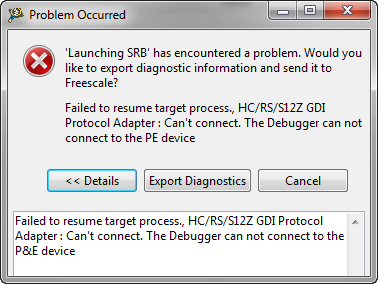
It is one of these long weekends which allow to catch up on many things. One thing I finally completed was the move to FreeRTOS V7.1.1. With this I did some tests using the Tower boards, including the Kinetis one. So I have rebuild my Kinetis K60 application and was ready to flash the device. But then to my surprise I got this dialog:
Bit Banging I2C
The Freescale ColdFire V2 (MCF52259) is a great communication device: an embedded Processor like a Swiss Army Knife: Great peripherals, USB and Ethernet interface, a lot of flash application space and up to 64 KByte of RAM. I’m using that core in many projects, and there is great community support for it with boards and software. Unfortunately Freescale somehow provides Processor Expert support only half way for it. Support for the I2C bus is missing :-(.
Trimming S08 with P&E
Freescale S08 controllers have an internal clock generator (ICG) which allows the device to run without an external clock signal. But as devices differ, they need to be calibrated and trimmed. The microcontrollers are usually trimmed in the factory. How can I trim it myself if I need something better?
USB CDC goes medical
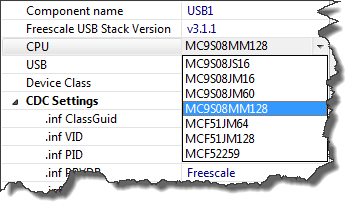
The FSL_USB_Stack Processor Expert component (see USB CDC reloaded) has been extended to support USB CDC for the Freescale S08MM128 targeted for medical devices:
Programming part of flash
In many cases I do a full erase-flash-debug cycle: I get my embedded microcontroller flash completely erased and then programmed with my application. Well, that does not work that way if I program with a bootloader. Yes, I can flash the bootloader and then load my target application with the bootloader, but that’s not the scenario I want to use in the development phase. I want to flash my application and keep the bootloader on the target. This means: I need to do erase and program a part of the memory. But how to do this?