My earlier posts were around the Kinetis gcc compiler which comes with CodeWarrior for MCU10.3. MCU10.3 comes as well with the Freescale Kinetis compiler as in MCU10.2. In “S-Record Generation with gcc for ARM/Kinetis” I explored how to generate S19 or other output files with gcc. However, you only can produce one file format at a time. What if I need multiple formats or a different format. What if I need to do the same with non-gcc build tools? S-Records are usually easy as supported in the linker. Other formats need a bit more plumbing. So this post is how I can create and manipulate the different output formats, so I can use it with a bootloader.
Category Archives: Building
Code Size Information with gcc for ARM/Kinetis
Working with the Freescale S08 and S12 build tools, there is something I really appreciated: that the linker reports on the console the code size of the application:
This is especially handy as it allows you to see the impact on code size immediately e.g. if I change a compiler option or do a source code change. Simple and easy. Yes, I could get that kind of information from the linker map file too. But this means I need to open that file, scroll down/etc: many steps just to find out the code size.
S-Record Generation with gcc for ARM/Kinetis
With my Freedom KL25Z board I’m using the GNU/gcc build tools and Eclipse/CodeWarrior. When I wanted to create an S19 file of my application using the GNU tools, this was not that easy to find out. So here are the steps to do this:
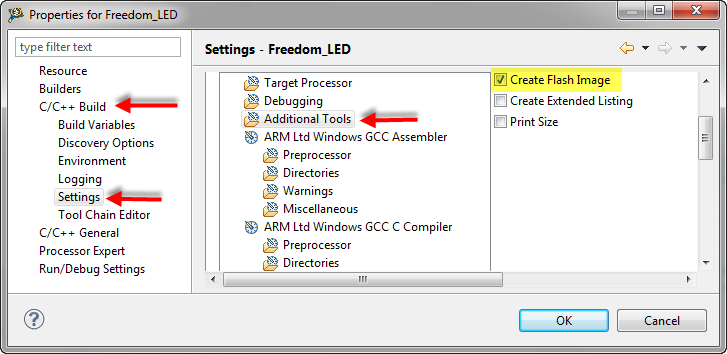
I open the project setting using the menu Project > Properties and go to C/C++ Build > Settings > Additional Tools and enable’Create Flash Image‘:
Icon and Label Decorators in Eclipse
From time to time, I scratch my head and ask myself: Gee, that file icon looks interesting and different, what does it mean? What I’m wondering about is on Eclipse Icon Decorators. Label and Icon Decorations allow additional information to be displayed in an item’s label and icon. Very powerful. But as with many powerful things: if you don’t know it, it might cause harm or confusion. Unfortunately, that’s not so easy to find out.
FreeRTOS with GCC, Cortex-M0+ and Kinetis KL25Z Freedom Board
Yesterday was my ‘lucky day’: My Kinetis-L Freedom board arrived :-). This board is really nice and features the KL25Z from the recently announced Kinetis L Family. And guess what is the first thing I want to flash on that processor? Yep: some FreeRTOS tasks. But to get there, a few important things have to be sorted out:
MQX Eclipse Working Sets
Working Sets are a very useful feature in the Eclipse Framework (see Working Sets Explained). But: with a standard Eclipse distribution it is not possible to import or export working sets. The good news is: the AnyEdit plugins (see 5 Best Eclipse plugins) provides that missing functionality. The other good news is: Buried in the Freescale MQX 3.8 distribution for Eclipse CodeWarrior, there is an even better implementation for the Eclipse Working Sets.
CRC Calculation with MCU10
With USB goes medical I have a serial-to-USB (CDC) support for my TWR-S08MM128 board. What makes these devices targeted for medical applications interesting for other applications are features like bootloader support and a CRC (Cyclic Redundancy Check) engine. But how can I generate the required CRC numbers with MCU10?
Using Parallel Builds: what is optimal?
One of the new features in CodeWarrior for MCU10.2 is the ability to build in parallel. Does not sound exciting? Well, when I tried this the first time in MCU10.2, I noticed immediately the reduction in build time: twice as fast compared to MCU10.1!!!. Wow! This improvement is based on using a make utility which can spawn multiple jobs on multicore host machines. CodeWarrior tries to use an optimized setting to make the build as fast as possible using parallel builds. The question is: is it really optimal?
Symbol defined or not, that’s the question
I just ran into this problem: I know I have this file in my project, but still the linker complains that it cannot find the symbols: “Symbol X is undefined”? It must be something obvious, but somehow I cannot see it?
Sneaking from Processor Expert
Processor Expert is great: it generates initialization code and driver sources for me. This makes it a great knowledge and source base for non-Processor Expert projects too. Wondering how to initialize the SCI? What are again the register settings to use the CPU with a 6 MHz clock rate using an external crystal in low power mode? Lets generate a Processor Expert project to find out. Then copy-past the drivers or parts of it into my non-Processor Expert project. But How to do this?