The 2012 London Olympics are over. And I had my own special sports event last weekend. Although not part of the Olympics, it is part of the Switzerland Central Mountain Race Championship. This is a series of mountain running challenges. And no, I did not run the race. I love the mountains, and I love hiking in the mountains, but this is definitely for the greatest athletes. Instead to run the race, I have chosen to implement and run the timing system :-).

Author Archives: Erich Styger
Tutorial: Timer (LED) with Processor Expert for Kinetis
In the ‘Pre-LDD age’, setting up a periodic timer event with Processor was really easy. With the concept of LED’s (see “There is a Time and Date for both Worlds”) things are a bit different. But once things are clear, it is not that hard. So here I’m doing a very exciting thing: blinking an LED using a timer! 😎
So I’m going to have an LED blinking every second. I’m using the TWR-K60N512 with an ARM Cortex-M4 and the Eclipse based CodeWarrior for MCU10.2. But it is easy to adopt it to any other Kinetis board.
Continue reading
Eclipse Debugging with Strings – Part 2
Maybe a better title for this post would be “Eclipse Debugging with Strings Attached’? Digging a bit more into the domain of string debugging, things are not always the way I wish they are.
I’m using here CodeWarrior for MCU10.2, which is based on Eclipse 3.6. Let’s use the following piece of code with the ARM Cortex-M4 Kinetis K60 core and the Freescale ARM compiler:
char buf[] = "abcd"; char *p = &buf[0]; unsigned char ubuf[]="ABCD"; unsigned char *up = &ubuf[0]; signed char sbuf[]="1234"; signed char *sp = &sbuf[0];
Eclipse Debugging with Strings
Here I am: past midnight, and debugging why my Kinetis ARM Cortex-M4 K60N512 application. So now you know what keeps me up at night :-). Stepping through some code which is using all kind of strings:
The challenge is: how to debug my strings?
Eclipse Editor Scalability
In Eclipse opening a large file might cause the following dialog:
What does this mean? Well, Eclipse does a lot behind the scenes with source files. And this includes Eclipse Indexer, Outline View or Syntax Coloring.
Please Check Your License
The good thing with many vendors is: they offer development tools free of charge. And the limitations are typically reasonable for many projects. The Eclipse based CodeWarrior for MCU10 is not an exception: it comes in a free (‘Special’) Edition which allows up to 128 KByte of code to download for my ARM/Kinetis projects.
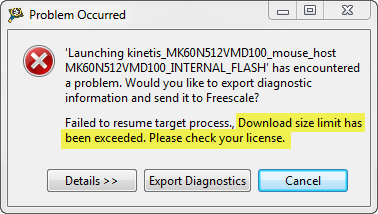
But, when I tried to debug an Example I have downloaded from the web, I get this dialog:
“Download size limit has been exceeded. Please check your license.”
A Shell for the Freedom KL25Z Board
I’m a big fan of physical UART/RS-232 ports on boards. So I was somewhat disappointed not to see a serial 9pin connector on the Freedom KL25Z board. But it is perfectly understood that for this price costs are critical, and a serial header or connector is pushing the budget for that board very likely out of the water. Still, I want serial connectivity for my applications.
Virtual COM/USB CDC for OSBDM/OSJTAG
Many new notebooks do not have a serial port any more: everything is USB. This can lead to problems (see USB or not: CDC with Processor Expert) as many embedded targets use normal RS-232. In my classes I’m using the Tower boards: some Tower boards have an on-board 2 pin RS-232 header, e.g. the Tower TWR-MCF52259. Others like the TWR-K60N512 use the added TWR-SER board. The Tower boards have as well a USB capable S08JM60 which is used for debugging (OSBDM/OSJTAG), so why not using the OSBDM microcontroller as Serial-to-USB gateway?
CodeWarrior Flash Programming from a DOS Shell
I can do test automation or standalone flash programming using the Debugger Shell. But this requires me to use a view inside of Eclipse. What would be nice is to do such things from a lower level: from a Windows Command window (CMD or DOS Shell). This is possible with usage of Eclipse/CodeWarrior in command line mode.
Standalone Flash Programmer
In Scripting, the Debugger Shell and Debugger Shell: Test Automation I was exploring how to use the Debugger Shell for automation. For my lectures at the university I need to program multiple boards with the same application. I don’t want (and need) a debugger for this: all what I need is a ‘Standalone Flash Programmer’: the ability to flash one or multiple boards without debugging.