The GNU Coverage (gcov) is a source code analysis tool, and is a standard utility in the GNU gcc suite. It works great in a hosted environment (e.g. Linux or Windows), where you have plenty of resources and a file system. But the gcov tools is relevant and usable for restricted embedded systems too. I have used it for years with the help of debug probes and file I/O semihosting. But semihosting does not come for free, depends on a library with support for constructors and destructors, plus relies on file I/O.
Fortunately, there is a way to use gcov without debugger, semihosting, file I/O and special system initialization: using a freestanding environment:

This article explains how to collect coverage information using a data stream for example over UART or USB-CDC. Key benefits are less code side, no need for a debugger or on-target file system, improved performance, better automation and flexible data collection.
Outline
This article describes how to build and use a freestanding environment to collect gcov (GNU Coverage) data. It explains the concept and the needed tools and settings. The basics are explained in https://gcc.gnu.org/onlinedocs/gcc/Freestanding-Environments.html, but not with an embedded target.
With the presented approach, one does not need a debug probe or semihosting to get the coverage data from the embedded target. Instead, a serial link, UART or USB CDC connection to the host is enough, for example with the USB connection on a NXP FRDM-MCXA153:

If you are new to GNU coverage, gcov or semihosting: please check the links to previous articles and extended information at the end of this article.
The key steps are:
- Configuring the application to use the freestanding environment
- Instruct the compiler to instrument the code
- Include gcov information section with the linker file
- Run the application and stream the coverage data over a serial connection to the host
- Encode the data and decode it
- Use gcov-tool to merge the data on the host
- Use gcov to generate the report
GNU Coverage with Debugger and Semihosting
In a ‘traditional’ embedded environment, gcov is used with a debugger and semihosting:

The gcc compiler compiles the sources files with semihosting functionality (McuSemihost) and instruments the binary, plus producing the notes (.gcno) files. The resulting binary (ELF/Dwarf) including the GNU libgcov library then gets loaded onto the embedded target and executed. The collected data then gets sent via debug probe and semihosting to the host, producing coverage data (.gdca) files. The GNU gcov utility then produces reports based on the notes and coverage data files.
In a freestanding environment, no file system support is needed, so less overhead for the embedded application. Additionally the freestanding environment with gcov does not need to call the application constructors and destructors: therefore it works nicely with a C++ environment as the OOP constructors do not interfere with the gcov constructors and can be used as ‘as is’, plus allows collecting coverage information from global object constructors and destructors.
GNU Coverage with Freestanding Environment
In a freestanding environment, no debugger or target related file system (semihosting) is needed. Instead, a freestanding environment with McuCoverage is used which produces an encoded data stream to the host. The data stream can use a UART, USB, SPI, I2C or for example a network socket. The data stream then is merged with the gcov-tool (part of the GNU gcov suite) which generates and updates the data (.gcda) files. Depending on the communication channel, the date gets encoded on the target and decoded on the host. From there, the normal gcov or other tools like gcovr can be used to produce reports.
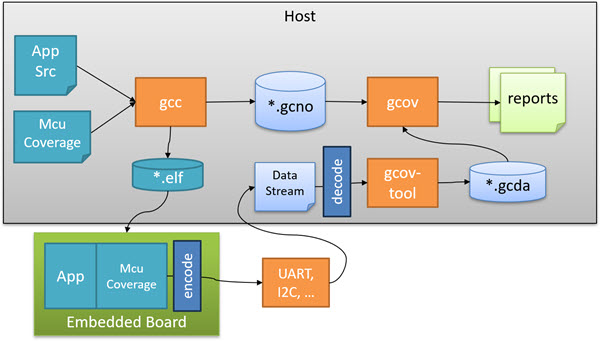
In the next sections, I’ll use above picture to guide you through the process.
McuCoverage Configuration
With a freestanding approach, no target file system is used. It does not use the expensive semihosting operations. And no debug probe or debugger is needed. Instead, a fast and inexpensive serial data connection to the host is used, for example UART.

To make using gcov for embedded simpler and easier, I have created the McuCoverage module in the McuLib.
The module uses a configuration file McuCoverageconfig.h, which has a setting to turn on the freestanding environment:
#ifndef McuCoverage_CONFIG_USE_FREESTANDING
  #define McuCoverage_CONFIG_USE_FREESTANDING         (1 && McuCoverage_CONFIG_IS_ENABLED)
    /*!< 1: Implementation using a freestanding environment, add -fprofile-info-section compiler option; 0: No freestanding environment */
#endif
Instrumenting code for Coverage

To instrument source files, add the --coverage option to the gcc compiler settings. One way to do this with CMake:
set_source_files_properties(
  main.c
  leds.c
  platform.c
  PROPERTIES COMPILE_FLAGS --coverage
)
Linking with gcov Library
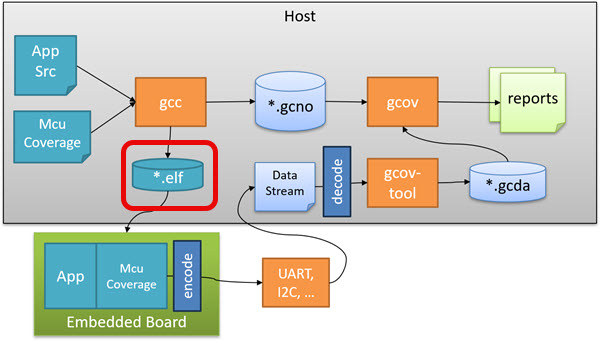
The application needs to link with the GNU gcov library, for example in a CMake CMakeLists.txt:
target_link_libraries(
  ${THIS_LIBRARY_NAME}
  PRIVATE McuLib   # includes McuCoverage module
  PUBLIC gcov      # GNU gcov library
...
)
💡 Be aware that recent ARM GNU tool chain and library distributions might not include a full gcov library. See for example this article: Tutorial: GNU gcov Coverage with the NXP i.MX RT1064.
In a freestanding environment, the gcov counter initialization is *not* handled with module constructors. Instead, the coverage information is collected inside the gcov_info linker section. For this, the following needs to be added to the GNU linker file:
    /* needed for freestanding coverage  */
    .gcov_info : {
        PROVIDE (__gcov_info_start = .);
        KEEP (*(.gcov_info))
        PROVIDE (__gcov_info_end = .);
    } > FLASH
The collection of coverage information for every instrumented module should then be visible in the linker map file, for example:
.gcov_info      0x100151a8       0x10
                0x100151a8                        PROVIDE (__gcov_info_start = .)
 *(.gcov_info)
 .gcov_info     0x100151a8        0x4 srcLib/libsrcLib.a(main.c.obj)
 .gcov_info     0x100151ac        0x4 srcLib/libsrcLib.a(platform.c.obj)
 .gcov_info     0x100151b0        0x4 srcLib/libsrcLib.a(gcov_test.c.obj)
 .gcov_info     0x100151b4        0x4 srcLib/libsrcLib.a(leds.c.obj)
                0x100151b8                        PROVIDE (__gcov_info_end = .)
It defines the two linker symbols __gcov_info_start and __gcov_info_end which are used inside the McuCoverage module, as we will see later.
Application
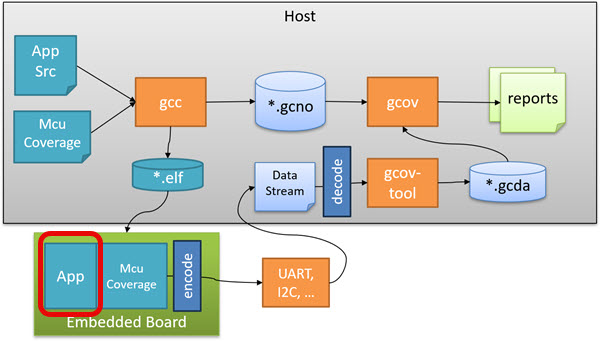
The application has to setup the McuCoverage module with the callback, then can write the data stream. Below is how this looks like:
int main(void) {
  /* initialize hardware and drivers .... */

  /* run application and tests ... */

  /* write coverage information */
#if McuCoverage_CONFIG_USE_FREESTANDING
  McuCoverage_SetOuputCharCallback(Cdc_SendChar); /* register a callback to use USB CDC to write the data */
  McuCoverage_OutputString("\n"); /* visual indicator to separate data streams */
  McuCoverage_WriteFiles(); /* write coverage data stream */
#endif
  for(;;) {
    /* do not return from main() */
  }
  return 0;
}
Data Stream
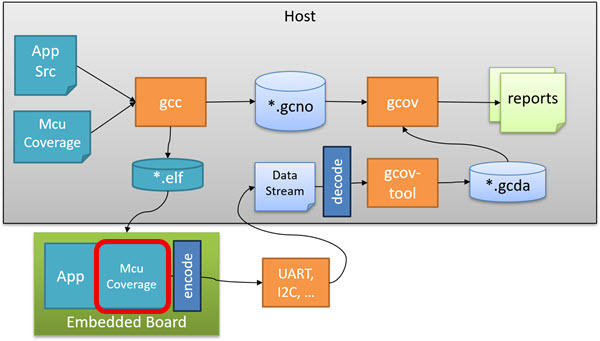
We can use any kind of way to send the data stream to the host. For this the application has to register a callback, for example:
McuCoverage_SetOuputCharCallback(Cdc_SendChar); /* register a callback to use USB CDC to write the data */
The callback is of the following type:
/*!
  * \brief Type of callback used for output data in freestanding mode.
  */
typedef void (*McuCoverage_OutputCharFct_t)(unsigned char);
With this, you can stream the data over any kind of channel (UART, I2C, SPI, …) to the host.
To write the coverage information, call the following function in the application code:
McuCoverage_WriteFiles();which internally calls dump_gcov_info():
extern const struct gcov_info *const __gcov_info_start[];
extern const struct gcov_info *const __gcov_info_end[];

/* Dump the gcov information of all translation units. */
static void dump_gcov_info (void) {
  const struct gcov_info *const *info = __gcov_info_start;
  const struct gcov_info *const *end = __gcov_info_end;

  __asm__ ("" : "+r" (info)); /* Obfuscate variable to prevent compiler optimizations.  */
  while (info != end) { /* iterate through all infos (or modules instrumented) */
    void *arg = NULL;
    __gcov_info_to_gcda(*info, filename, dump, allocate, arg); /* write record*/
    if (OutputCharFct!=NULL) { /* each record is terminated with a newline character */
      OutputCharFct('\n');
    }
    info++;
  }
}
It iterates through the data we have reserved above in the linker file. For each info block, we call:
__gcov_info_to_gcda(*info, filename, dump, allocate, arg);
That function __gcov_info_to_gcda() takes three callbacks:
- filename: For the gcov-tool merging part, we need to stream the file name. This callback
- dump:Function to write the data.
- allocate: Function to allocate dynamic memory.
Below the implementation of the above callbacks in McuCoverage.c:
First the function which writes the full file name:
/* The filename is serialized to a gcfn data stream by the
   __gcov_filename_to_gcfn() function.  The gcfn data is used by the
   "merge-stream" subcommand of the "gcov-tool" to figure out the filename
   associated with the gcov information. */
static void filename(const char *f, void *arg) {
  __gcov_filename_to_gcfn(f, dump, arg);
}
In case the libgcov needs dynamic memory, a memory allocation function is provided:
/* The __gcov_info_to_gcda() function may have to allocate memory under
   certain conditions.  Simply try it out if it is needed for your application
   or not.  */
static void *allocate (unsigned length, void *arg) {
  (void)arg;
  void *p;
  #if McuLib_CONFIG_SDK_USE_FREERTOS
    p = pvPortMalloc(length);
  #else
    p = malloc (length);
  #endif
  if (p==NULL) {
    McuLog_fatal("malloc failed");
    for(;;) {} /* error */
  }
}
A ‘dump’ function is used to send the data e.g. over the UART:
/* This function shall produce a reliable in order byte stream to transfer the
   gcov information from the target to the host system.  */
static void dump(const void *d, unsigned n, void *arg) {
  (void)arg;
  const unsigned char *c = d;
  unsigned char buf[2];

  for(unsigned int i = 0; i<n; i++) {
    if (OutputCharFct!=NULL) {
      encode(c[i], buf);
      OutputCharFct(buf[0]);
      OutputCharFct(buf[1]);
    }
  }
}
Stream Encoding

You might have noticed the encode() function in above dump() function. The purpose of this encode() is to write the binary data as ASCII stream:
static const unsigned char a = 'a';

/* each 8bit binary data value c gets encoded into two characters, each in rang 'a'-'p' (p is 'a'+16):
  buf[0]: 'a' + LowNibble(c)
  buf[1]: 'a' + HighNibble(c)
*/
static inline unsigned char *encode(unsigned char c, unsigned char buf[2]) {
  buf[0] = a + c % 16;
  buf[1] = a + (c / 16) % 16;
  return buf;
}
The encoding depends on the stream type used: here I want to send printable characters over the UART.
Sending Data Stream
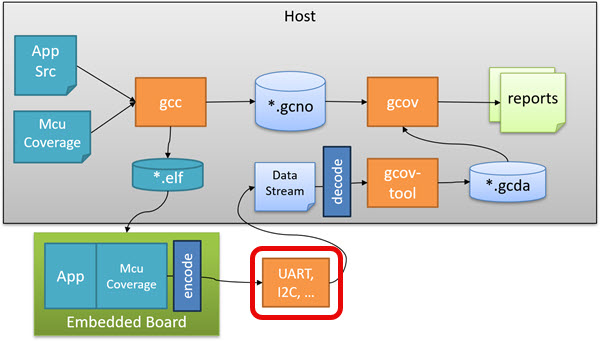
The encoded data is sent to the host. In my case here I’m using the USB CDC interface of the board to the host. The function below is what I have registered as callback for the libgcov implementation mentioned earlier.
void Cdc_SendChar(unsigned char ch) {
  McuShell_SendCh(ch, cdc_stdio.stdOut);
}
When I want to send the coverage information from the application to the host, I add a new-line as a visual separator and then dump the coverage information to the host:
McuCoverage_OutputString("\n"); /* visual indicator to separate data streams */
McuCoverage_WriteFiles(); /* write coverage data stream */
Data Stream File
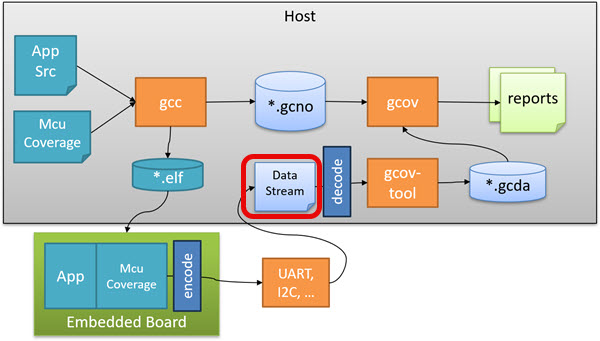
Below is how the encoded data stream looks like in a terminal program:

Later I need to decode the data: the easiest way is to store all the data in a file:

Save the data for example in a file named ‘stream.txt’
Decode

To decode the data, I wrote a simple C program (decode) on the host. You can find the sources on GitHub. Use ‘make’ to build it:

With the -f option I specify the input file and with -o the output file:
decode -f stream.txt -o stream.gcfn

gcov-tool

The gcov-tool is part of the GNU coverage tools and is used to merge and combine data files, including merging stream data files (aka gcfn files).
With the below command I merge the stream data information. It takes the stream.gcfn file as input:
arm-none-eabi-gcov-tool merge-stream < stream.gcfn
Because the data stream data has the full path to the source files used, it will automatically create and update the .gcda files! Below the location of the files as shown in VS Code:

Reports

The final part is common to freestanding and non-freestanding gcov: use your favorite IDE and tools to display the data, for example with gcovr:

Or for example in Eclipse:

Congratulations, you are now using a gcov freestanding environment!
Summary
The GNU Coverage (gcov) is a great framework to collect coverage information. By default it depends on a file system, and for embedded targets the semihosting technology is a solution. But semihosting is complex and depends on a debug probe.
Another solution is to use gcov in a freestanding environment, using a stream of data which then is processed by the gcov-tool to produce and merge gcov data files. That way no file system, debugger or semihosting is required.
It took me a while to get it setup and working. But is it worth the efforts? So here is the application code and data size with freestanding mode:
text       data     bss      dec    hex filename
338112        0  155932   494044  789dc TSM_App.elf
The same application in non-freestanding (semihosting) mode:
text	   data	    bss	    dec	    hex	filename
364800	      0	 155964	 520764	  7f23c	TSM_App.elf
I think 26 kByte less code size is a good reason to use the freestanding mode. Plus I don’t need a debug probe to collect the data, which makes things easier for a test farm too.
Happy covering 🙂
Links
- GNU: Profiling and Coverage in Freestanding Environment: https://gcc.gnu.org/onlinedocs/gcc/Freestanding-Environments.html
- GNU gcov: https://gcc.gnu.org/onlinedocs/gcc/Gcov.html
- GNU gcov-tool: https://gcc.gnu.org/onlinedocs/gcc/Gcov-tool.html
- Tutorial: GNU Coverage with MCUXpresso IDE
- Tutorial: GNU gcov Coverage with the NXP i.MX RT1064
- Adding GNU Coverage Tools to Eclipse
- GNU Coverage (gcov) for an Embedded Target with VS Code
- GNU Coverage (gcov) with NXP S32 Design Studio IDE
- Code Coverage for Embedded Target with Eclipse, gcc and gcov
- Implementing File I/O Semihosting for the RP2040 and VS Code
- Code Coverage with gcov, launchpad tools and Eclipse Kinetis Design Studio V3.0.0
- Tagged articles: https://mcuoneclipse.com/tag/gcov/
- McuLib: https://github.com/ErichStyger/McuOnEclipseLibrary
- McuCoverage module: https://github.com/ErichStyger/McuOnEclipseLibrary/blob/master/lib/src/McuCoverage.h
- Decode program on GitHub: https://github.com/ErichStyger/mcuoneclipse/tree/master/gcov


Hi,
i am going crazybwith 2 smoothieboard v1 they bothbdisconnect frim 5 laptops w10 and Ubuntu communicates with putty but open pnp cannot open IO ports could u pls help me a bit?
regards
LikeLike
check if you can open the ports with a normal console application, for exampe puTTY.
LikeLike