I’m a big fan of physical UART/RS-232 ports on boards. So I was somewhat disappointed not to see a serial 9pin connector on the Freedom KL25Z board. But it is perfectly understood that for this price costs are critical, and a serial header or connector is pushing the budget for that board very likely out of the water. Still, I want serial connectivity for my applications.
Tag Archives: Processor Expert
FatFs with Kinetis
An SD (Secure Digital) Card interface is kind of standard for many applications today: it provides a lot of memory at a reasonable cost. Still, I need a software stack for it, up to the level of a file system. So far I was really happy with using FatFs: an open source FAT file system provided by Elm-Chan. I’m using the FatFs Processor Expert component already in multiple designs. What was missing: a port to the Freescale Kinetis ARM Cortex-M4 family of processors.
Icon and Label Decorators in Eclipse
From time to time, I scratch my head and ask myself: Gee, that file icon looks interesting and different, what does it mean? What I’m wondering about is on Eclipse Icon Decorators. Label and Icon Decorations allow additional information to be displayed in an item’s label and icon. Very powerful. But as with many powerful things: if you don’t know it, it might cause harm or confusion. Unfortunately, that’s not so easy to find out.
There is a Time and Date for both Worlds
The Kinetis ARM Cortex-M4(F) is a wonderful machine: a 32bit architecture, plenty of FLASH and RAM, an ideal play field. I love the Kinetis Tower boards, and even more the Freedom board which has an ARM Cortex-M0+ on it. I have a lot of projects on S08, S12 and ColdFire at the university, and they are all using a lot of Processor Expert components. Processor Expert is such a great productivity tool: having software in components allows easy software re-use. With Processor Expert abstracting from the hardware, I can easily port my applications to new boards and processors. Well, until Processor Expert changed for Kinetis :-(.
FreeRTOS with GCC, Cortex-M0+ and Kinetis KL25Z Freedom Board
Yesterday was my ‘lucky day’: My Kinetis-L Freedom board arrived :-). This board is really nice and features the KL25Z from the recently announced Kinetis L Family. And guess what is the first thing I want to flash on that processor? Yep: some FreeRTOS tasks. But to get there, a few important things have to be sorted out:
CDE Hacking: Components with Multiple Files
Typically a Processor Expert component creates two files: a header file and a source file. That’s fine for normal drivers. But this does not work well for more complicated things like an RTOS or communication stacks: these are built from a whole set of source files. So how can I generate multiple files with a Processor Expert Component?
CDE Hacking: Processor and Compiler
Writing Processor Expert components is not always completely independent of the compiler and underlying microcontroller. In many cases I need to know the compiler for which the source code is generated. Or I need to know on which CPU architecture the code shall run. For this I need to know the compiler and the CPU family.
PID with Processor Expert
In my class at the university I’m using a microcontroller attached to a DC motor from Maxon. The job of the microcontroller is to implement (among other things) a PID controller for the motor speed (or position). In the lab we implement the PID and all the related parts of the control loop without Processor Expert. But it easily can be done as well with Processor Expert components, as described here.
CDE RTOS Hacking: Show it as an RTOS component
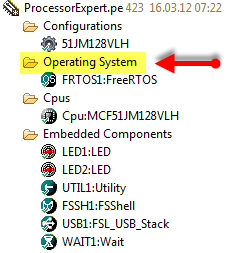
Technically, a normal user component can implement any RTOS. This is what I did with the Micrium MicroC/OS-II component. That way the component shows up in the ‘Embedded Components’ group. But how to make it showing up as RTOS component inside the ‘Operating System’ group as the FreeRTOS component? What I want is this: to show the RTOS component under the ‘Operating System’ group of my project:
CDE Hacking: Component Icon
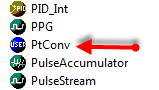
Ah, a lot of work went into a new Processor Expert component, and finally it shows up in the component library:
Oh, wait: *that* icon does not look nice enough for that amount of work behind the component?