Yesterday was my ‘lucky day’: My Kinetis-L Freedom board arrived :-). This board is really nice and features the KL25Z from the recently announced Kinetis L Family. And guess what is the first thing I want to flash on that processor? Yep: some FreeRTOS tasks. But to get there, a few important things have to be sorted out:
Tag Archives: CodeWarrior
Switching Source Files in the Eclipse Editor (CTRL+TAB)
Ever wondering what could be a keyboard shortcut for something in Eclipse? In my post on 10 Best Eclipse Shortcuts the question came up how to traverse through all the open files in the editor. Finding a shortcut is easy if you know the The Mother of all Eclipse Shortcuts :-). I press CTRL+3 and enter a search term like ‘switch’, and it shows me all shortcuts with ‘switch’ in the description:
Customize my Workspace Perspectives
Eclipse and CodeWarrior are great. But as with most great things, they get even better if I can customize it for my needs. As outlined in my earlier posts (Eclipse Full Screen Plugin, Hide and Show Eclipse Toolbar, Maximize Eclipse Views) there is already great flexibility.
There is an ARM to Trace
When I added ‘support for ARM/Kinetis‘ to my bucket list in my Percepio+Trace post, I knew it will not be straight forward. But it was a lot harder than I thought. I had to burn many week-end hours. But finally I have Percepio Trace with FreeRTOS up and running for Kinetis and ARM Cortex-M4 with CodeWarrior for MCU10.2 :-).
Breakpoints with Special Effects
As promised back in Percepio, I want to have it ported and working with the Freescale Cortex-M4/Kinetis in CodeWarrior. That’s what I’m working on now, deep into the night. While doing this, I had to generate a lot of trace data, and I used the script I presented in that earlier post: Setting a breakpoint in the trace buffer wrapper event and then export the data. But there has to be an even better way, and indeed there is one: Breakpoints with Special Effects!
CDE Hacking: *.inc Files
In my previous post I mentioned the Drivers\Common folder which has ‘include’ files. These files are maintained automatically by the Component Wizard. But what is the purpose of these files?
The Common Folder has *.inc files which are included in the driver as ‘function’ header. The .inc file contains documentation about the function and parameters for that function.
CDE Hacking: Where is my stuff? A dissection…
What I describe here is an overview about the different locations, folder and files you will see if you are importing or developing a Processor Expert User component. I’m showing below example screenshot for the FreeRTOS component, as this is probably the most complex one I ever have created.
The Making Of RTOS Processor Expert Components
OK, I think this topic is a very special one, and probably not of interest of many folks out there. Or how many want to create a Processor Expert Plugin for an RTOS? Well, I did this. And I think that topic might be very controversial too, especially for all the RTOS vendors out there :-). The thoughts expressed here about creating Processor Expert components do not only apply for an RTOS, but as well for any other ‘complex’ software or stack. So if you are interested about the ‘behind the scenes’ of creating Processor Expert components, especially in the context of an RTOS, then read on ;-).
Stop on startup
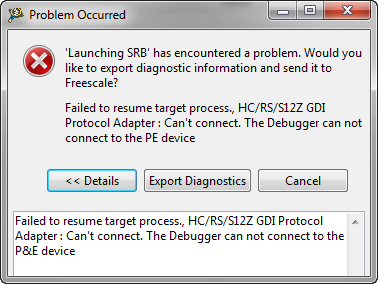
Occasionally I run into this kind of problem: I have downloaded my application, and it immediately crashes or looses the connection:
What is the problem? It is helpful to understand what happens if I press ‘debug’ in CodeWarrior or any other debugger:
Killing Me Softly: Zombies and Debugger Engines
I’m stressing the CodeWarrior debugger a lot: having multiple boards attached, debugging things in parallel, switching and unplugging boards all the time. I have my eclipse IDE running for several days and nights (up to a week or more), with constantly suspending and resuming and switching networks. And sometimes it is my fault (see Device is Secure?). But well, sometimes the CodeWarrior debugger has a problem too. Luckily, a simple trick gets things back on track.