My post in “An error occurred…”: Applied Debugging Rules gives some hints about how to isolate and solve some debugging problems. But here is a case where the tips did not help: I had this dialog with “Failed to resume target process” for my HCS08 project again:
Tag Archives: Building
Fixing the Eclipse Index
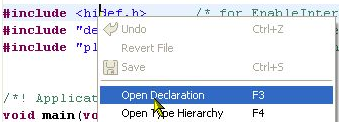
One of the greatest features in Eclipse is the Indexer: it parses automatically my code in the background. It creates all the needed information so I can browse around my sources. I can use the Open Declaration context menu in the source code:
Copy my Project
I’m using Subversion to keep track of changes in my eclipse MCU10 projects. That allows me to get back in time without the need to make copies of my project. But sometimes I do need to make a copy of my project: because I want to use a project as a base and then do something different with it. To make a copy of a project is simple, but requires some more steps if I’m using Target Tasks. Here is how I do this… Continue reading
Dissection of MCU10 Projects
Creating an eclipse managed make project with MCU10 is easy: Starting the wizard with File > New > Bareboard Project and after a few clicks I have a project. I don’t need to worry about all the files in the project structure, until……..well, until I need to put the files into a VCS.
No rule to make target
This error message is something I see nearly every day in the Problems View:
mingw32-make: *** No rule to make target ….
Quickstart for Processor Expert in Eclipse
Ok, you are probably new to Eclipse, and want to do the fun part: Creating an Eclipse Processor Expert project in CodeWarrior for MCU10.2. Cool! Here are some steps and tips to make it smooth from the beginning…
Configurations with Processor Expert
I have to make an application configuration decision: Using USB CDC or RS-232?
In the lab I use a Tower system which offers both RS-232 and USB connectivity. It uses a FSShell component to communicate with a terminal on the host. Typically this is using an RS-232 serial cable connected to the host. Well, the challenge is that today most notebooks do not have a serial port any more. But they have USB.
No Source Available…
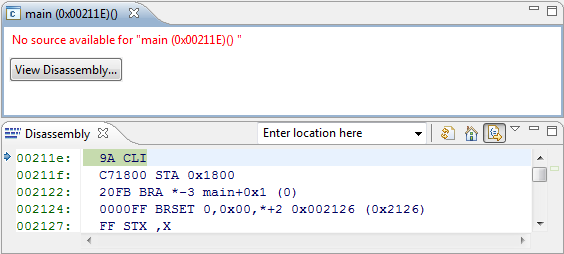
I just have run across a problem: I received a project for the S08QE128, and when I started a debug session with MCU10.2, the debugger was showing “no source available”. Ahhrg. Something must be wrong…
Well, at least I can debug on assembly level. But this is not the point. I have the sources, but somehow the debugger does not find them?
Continue reading
Make my Make with Eclipse and MCU10
I mentioned in Go Reference that MCU10 and eclipse come with a comfortable infrastructure: you add, remove, rename source files and set compiler options: managed make will take care and creates the make files for you. Make files are such a great thing because they allow you do to pretty much everything.
Classic CodeWarrior uses a different approach without make files. Exporting the project as make file did not really work, so make files were not something you could have used easily in classic. With the eclipse based MCU10 make files are the heart of the build system. In most cases using the managed make system is perfectly fine. But for a bare metal enthusiast it makes sense to use my own make file instead.
Continue reading
Go Reference! Or: Subprojects in eclipse and MCU10.2
I admit: I’m a big fan of eclipse.
But there is one thing I have missed from the ‘classic’ non-eclipse CodeWarrior for MCU: the ability to create hierarchical builds with subprojects.
It was sooooo simple and easy in classic CodeWarrior:
- I need to build a batch of projects in one step?
I have it organized as subprojects, and go! - I need a boot loader library included with my project, build it as part of my application build, plus I want to re-build my custom ANSI library for the small memory model?
I have it included as subprojects, set it up to be linked with my application project, done!