I just counted the number of active eclipse workspace I have: Eight! I’m sure there are other developers which even have more than eight? Eclipse maintains many settings inside the workspace .metadata folder (see my post on CodeWarrior Tool Tip #1: Improve performance by cleaning house in the Eclipse workspace). The question is: how can I copy or transfer my carefully balanced workspace settings to another workspace?
5 Best Eclipse Plugins: #4 (EHEP)
And here is number 4 of my ‘best of’ eclipse plugins: the Eclipse Hex Editor Plugin or EHEP. It is a great tool to inspect or change files in hex mode. Installation of the plugin is simple: Get it from the http://ehep.sourceforge.net/update site.
Eclipse and PC-lint: Linticator
PC-lint from Gimpel has set the standard for static code analysis: it is used by many companies developing safety critical applications. Additionally PC-lint can check the MISRA rules which are standard for many coding guide lines. PC-lint has detected many subtle bugs in my sources. Thank you, PC-lint!
CodeWarrior classic provided a plugin for the PC-lint compiler: To bad that this does not exist in the eclipse based CodeWarrior. You might think that given PC-lint so popular, there should be an eclipse plugin available? Yes, there are many attempts on this: all of them did not work well enough for me. The good news: There is the Linticator eclipse plugin. The bad news: it is not for free.
5 Best Eclipse Plugins: #5 (WickedShell)
Eclipse and CodeWarrior for MCU10 come with a wealth of functionality. But there is more out there: I can install more plugins from the eclipse market place. The possibilities are endless! Here are the five plugins I always add to my base installation, starting with rank #5: WickedShell. The plugin is installed from http://www.wickedshell.net/updatesite.
Problem Occurred: Flash programming with overlapping memory
My post in “An error occurred…”: Applied Debugging Rules gives some hints about how to isolate and solve some debugging problems. But here is a case where the tips did not help: I had this dialog with “Failed to resume target process” for my HCS08 project again:
Tracing with FreeRTOS+Trace from Percepio
As shown in Tracing FreeRTOS with a Hardware Probe: I have a nice hardware probe to trace out events from my application. But what about to use the target memory as trace buffer? New devices have much more on-chip memory, so this could be an attractive option. That was on my list of future extensions, but then the news came in: Percepio announced their collaboration with FreeRTOS+Trace: exactly what I needed!
It is using the same concept as the FreeRTOS Trace Probe: the trace hooks provided by the FreeRTOS API. But instead streaming it off the target as with the FreeRTOS Trace probe, it is using a RAM buffer on the device. The real cool thing is: the Percepio trace viewer is very, very nice!
Error importing task?
I was running into that dialog while opening my S08 project:
Hmm, that’s weird: the target task framework complains about a target task, but in my project I’m not using any target tasks?
Disable my Code Generation
Processor Expert in MCU10 generates a lot of files for me. But sometimes I need to tweak things a bit. I change the generated sources to fit my needs, and then I want to prevent that my changes get overwritten by the next code generation.
First, I need to know which files are generated: the information in “Dissection of MCU10 Projects” helps me to identify them. But how can I prevent code generation for each component? Or for other generated files? Or how to completely disable code generation?
CDE: Inherited Component Base Name
Inheriting Processor Expert components with CDE and the Component Wizard is easy. But sometimes it is tricky and requires some tweaking. Components should be easily accessible (see CDE: Show Inherited Methods), and names should make sense. And here is a challenge: changing the name for inherited components:
CDE: Show Inherited Methods
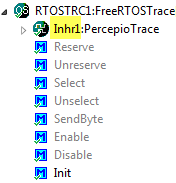
Using Processor Expert components makes my development faster and easier. And when I have a useful piece of software I want to distribute or use in another project, I transform it into a Processor Expert component. But recently I noticed a strange thing with my components: the inherited components did not show the methods and events?