Using the 8 MHz Crystal on the FRDM-KL25Z Freedom Board

The ARM Cortex-M0+ on the KL25Z Freedom Board (FRDM-KL25Z) runs up to 48 MHz. For this, the 8 MHz crystal on the board is used. A 48 MHz is required for USB communication, to have the needed oversampling on USB data lines. I have shown in my USB CDC post how such a clock is configured, using the white pre-production board. To my surprise, when I tried the same code on the black production boards, it did not work on the production black boards. Even worse: it worked on some, but not on every board :-(.

Continue reading

Assembly Instruction Stepping

Usually I debug and step on C and C++ level: means I step on C/C++ source lines. But sometimes a finer stepping detail is required. What I need is stepping on assembly level. For first time users of Eclipse, that might not be that obvious, so here is the hint:

In the Debug view toolbar (while debugging), there are the normal stepping commands like ‘step’, ‘step over’ or ‘step out’. All these stepping can be performed on assembly instruction level if I enable the ‘Instruction Stepping Mode’:

Instruction Stepping Mode: Assembly level stepping

Instruction Stepping Mode: Assembly level stepping

Continue reading

Tutorial: printf() and “Hello World!” with the Freedom KL25Z Board

Sometimes I show to much in a tutorial: only writing something to the UART? Sounds boring, so why not adding tasks, LEDs and a full shell implementation to the mix as in this post? Yes, definitely too much to start with at the beginning :-(. So less is more, and if it is just about the UART. And I promise: it is doable with around 50 lines of application code :shock:.

AND: I admit, this post title is a trap ;-). It is not about printf(). But it *is* about using the UART on the KL25Z Freedom board and to do things like printf(), and even more. Trust me. It is about how to write *and* read from the UART. While I’m using here the Kinetis-L ARM Cortex-M0+ KL25Z Freedom board, it is applicable to any other Kinetis device.

Continue reading

Hot-Sync: Attach, Connect & Download

Usually I compile my sources, link it and pass it to the debugger for downloading it to the target. And ‘downloading’ means for me: flashing to the target (RAM debugging is something for the non-hardcore programmers ;-)). But there are more options than only downloading and flashing. There is definitely more which helps me to do post-mortem (yes, I *love* Latin :cool:) debugging.

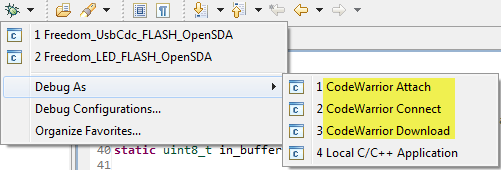
Downloading means to me that the debugger will program my application into the device, then loads the symbolics (debug information, source file information, …) and then I debug my application. Looking at the ‘Debug As’ options, there is as well Attach and Connect:

Debug as Attach, Connect and Download

Debug as Attach, Connect and Download

Continue reading

Tutorial: USB CDC with the KL25Z Freedom Board

Question: What to do on a rainy Sunday?
Answer: Having fun with USB and the KL25Z Freedom board! :-).

In “A shell for the Freedom board” I used the UART-to-USB OpenSDA capability of the KL25Z Freedom board: The KL25Z processor uses the OpenSDA K20 microprocessor as Serial-to-USB converter. But this only works because of the P&E OpenSDA USB CDC (Communication Device Class) implementation. If I create my board without OpenSDA, I need a different approach: I want to do USB CDC with the KL25Z :twisted:.

USB CDC Device on COM22

USB CDC Device on COM22

Continue reading

Processor Expert, gcc C++ and Kinetis-L with MQXLite

The Kinetis-L is a 32bit microprocessor family, based on ARM Cortex M0+. It comes with ARM gcc in CodeWarrior. Although the Kinetis-L does not have much RAM, it is very possible to use gcc with C++, especially as a programmer I keep the limited RAM amount in mind. So I thought I try C++ and Processor Expert for my Kinetis-L KL25Z Freedom board.

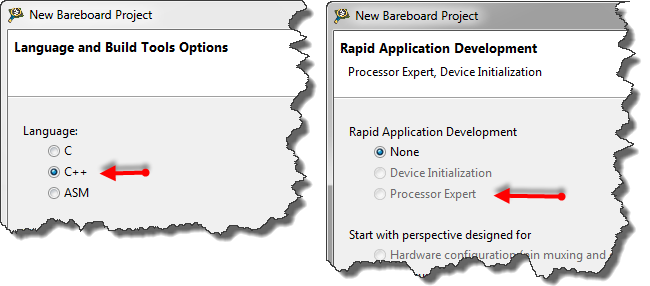
If I select C++ as language in the New Bareboard Project Wizard of CodeWarrior, then I cannot select Processor Expert or Device Initialization:

C++ in the New Project Wizard

C++ in the New Project Wizard

That makes somewhat sense, as Processor Expert creates normal C code and C files, but no C++. Still, what if I need C++? This is doable, but with anything advanced, I need to know exactly what I want and what I do. Here is the ‘How to use C++ with Processor Expert’.

Continue reading

Tutorial: Touching the Freedom KL25Z Board

I have covered several aspects of the Freescale KL25Z Freedom board with a tutorial: LED, Accelerometer and RTOS. One peripheral on the board is missing so far: the touch slider area:

Freedom KL25Z Board Touch Slider Area

Freedom KL25Z Board Touch Slider Area

Continue reading

S-Record, Intel Hex and Binary Files

My earlier posts were around the Kinetis gcc compiler which comes with CodeWarrior for MCU10.3. MCU10.3 comes as well with the Freescale Kinetis compiler as in MCU10.2. In “S-Record Generation with gcc for ARM/Kinetis” I explored how to generate S19 or other output files with gcc. However, you only can produce one file format at a time. What if I need multiple formats or a different format. What if I need to do the same with non-gcc build tools? S-Records are usually easy as supported in the linker. Other formats need a bit more plumbing. So this post is how I can create and manipulate the different output formats, so I can use it with a bootloader.

Continue reading

Code Size Information with gcc for ARM/Kinetis

Working with the Freescale S08 and S12 build tools, there is something I really appreciated: that the linker reports on the console the code size of the application:

S08 Linker reporting the code size

S08 Linker in Eclipse reporting the code size

This is especially handy as it allows you to see the impact on code size immediately e.g. if I change a compiler option or do a source code change. Simple and easy. Yes, I could get that kind of information from the linker map file too. But this means I need to open that file, scroll down/etc: many steps just to find out the code size.

Continue reading